
SPF, DKIM, and DMARC are the three DNS-based checks that stop attackers from spoofing your domain in email. SPF confirms which servers may send on your behalf, DKIM cryptographically signs each message to prove it wasn’t altered, and DMARC ties both together by enforcing alignment with the visible From address and telling receivers what to do with failures. If you haven’t touched this yet, the move is simple: confirm SPF and DKIM pass for every sending source, then publish a DMARC record at p=none with an rua address so reports start flowing before you enforce anything.
TL;DR:
- Implement DMARC alongside SPF and DKIM to prevent spoofing, starting with a monitoring policy at
p=noneand gradually increasing enforcement.- Ensure SPF records are merged into a single TXT record and limit DNS lookups to avoid silent failures, especially when using multiple includes.
- Prioritize fixing DKIM alignment issues first when troubleshooting DMARC failures, as DKIM signatures survive message forwarding more reliably than SPF.
- Regularly review DMARC aggregate reports to identify unauthorized sources and fix misconfigurations, aiming for a full enforcement within three to six months.
- Maintain ongoing record hygiene by rotating DKIM keys weekly or monthly and removing unused senders to prevent security vulnerabilities and deliverability issues.
Table of Contents
- What Are SPF, DKIM, and DMARC?
- How Do SPF, DKIM, and DMARC Work Together?
- Where Do SPF, DKIM, and DMARC Records Live in DNS?
- How Do You Check SPF, DKIM, and DMARC Right Now?
- What’s the Rollout Checklist From Zero to Enforcement?
- What Goes Wrong, and How Do You Fix It?
- What Does Ongoing Maintenance Actually Look Like?
- Why Most Teams Stall at Monitoring Mode
- Sources
- FAQ
What Are SPF, DKIM, and DMARC?
Each protocol protects a different piece of the SMTP handshake, and none of them does the others’ job.
- SPF (Sender Policy Framework) publishes a list of servers authorized to send mail for your domain. It checks the envelope sender, also called the MAIL FROM address, not the address a recipient actually sees.
- DKIM (DomainKeys Identified Mail) attaches a cryptographic signature to outgoing mail. The receiving server pulls a public key from DNS and verifies the message wasn’t tampered with in transit, and confirms which domain actually signed it.
- DMARC (Domain-based Message Authentication, Reporting, and Conformance) sits on top of both. It requires that either SPF or DKIM aligns with the domain in the visible From header, then applies a policy (
none,quarantine, orreject) to anything that fails, according to Microsoft’s authentication documentation.
A lot of teams stop at SPF and DKIM and assume the job is done. It isn’t. Without DMARC, nothing stops a spoofed message from clearing SPF or DKIM on some other domain while still landing in an inbox under your brand name, according to PowerDMARC’s guidance.
How Do SPF, DKIM, and DMARC Work Together?
A receiving server checks SPF and DKIM independently first, then applies DMARC alignment on top. DMARC passes if either mechanism aligns with the From domain. It doesn’t require both, which surprises a lot of administrators who assume it’s an “and” condition.
- SPF alignment fails most often because of email forwarding, since the forwarding server isn’t on your authorized sender list.
- DKIM alignment tends to survive forwarding intact, because the signature travels with the message body and headers rather than depending on the connecting IP address.
- Third-party senders (marketing platforms, help desks, CRM tools) are the single biggest source of legitimate DMARC failures, since they often send as your domain without proper alignment configured.
- ARC (Authenticated Received Chain) can preserve original authentication results when an intermediary modifies a message, giving downstream receivers something to fall back on.
Pro Tip: When troubleshooting a DMARC failure, check DKIM alignment before SPF. Since DKIM signatures survive forwarding and most SPF failures trace back to a forwarding hop, DKIM is usually the more reliable path to a pass for mail that’s been relayed.
Where Do SPF, DKIM, and DMARC Records Live in DNS?
All three protocols publish as TXT records, but at different locations in your zone. Here’s what a minimal, functional set looks like:
| Protocol | DNS location | Example record |
|---|---|---|
| SPF | Domain apex (example.com) |
v=spf1 include:_spf.example.com ~all |
| DKIM | selector._domainkey.example.com |
v=DKIM1; k=rsa; p=your_public_key_here |
| DMARC | _dmarc.example.com |
v=DMARC1; p=none; rua=mailto:reports@example.com |
The SPF record’s trailing qualifier matters: ~all (soft fail) flags unauthorized senders without hard-rejecting them, while -all (hard fail) tells receivers to reject outright. Most operators start with ~all and tighten later. The DKIM selector is a name you choose (many providers auto-generate one), and the public key value (p=) comes from whichever platform signs your mail. Some providers hand you a CNAME instead of a raw TXT record for DKIM, which is fine as long as it resolves correctly.
How Do You Check SPF, DKIM, and DMARC Right Now?
You don’t need to guess whether your records are live. Three checks confirm it in under five minutes.
- Query DNS directly with
dig. Rundig TXT example.comfor SPF,dig TXT selector._domainkey.example.comfor DKIM (swap in your actual selector), anddig TXT _dmarc.example.comfor DMARC. - Send a test message and open the headers. In Gmail, open the message and select “Show original” to see the raw source, including the authentication block.
- Read the
Authentication-Resultsheader. Look forspf=pass,dkim=pass, anddmarc=pass. Any of these showingfail,neutral, orpermerrorpoints to a misconfiguration worth chasing down immediately.
Once records are live, DMARC’s aggregate reports (rua) become your ongoing verification layer. They arrive as XML files from receiving mailbox providers, and report-processing tools can turn that raw data into a readable summary showing exactly which sending sources are passing and which aren’t, according to Dmarc.
What’s the Rollout Checklist From Zero to Enforcement?
Moving from no authentication to a fully enforced p=reject policy follows a predictable sequence. Skipping steps is how legitimate mail ends up in spam folders.
- Inventory every sending source. List your email provider, marketing platform, CRM, help desk, and any transactional service that sends as your domain. Miss one here and it shows up as a mystery failure in your reports later.
- Publish SPF and turn on DKIM signing for each sender identified in step one. Confirm both resolve correctly with
digbefore moving forward. - Publish DMARC at
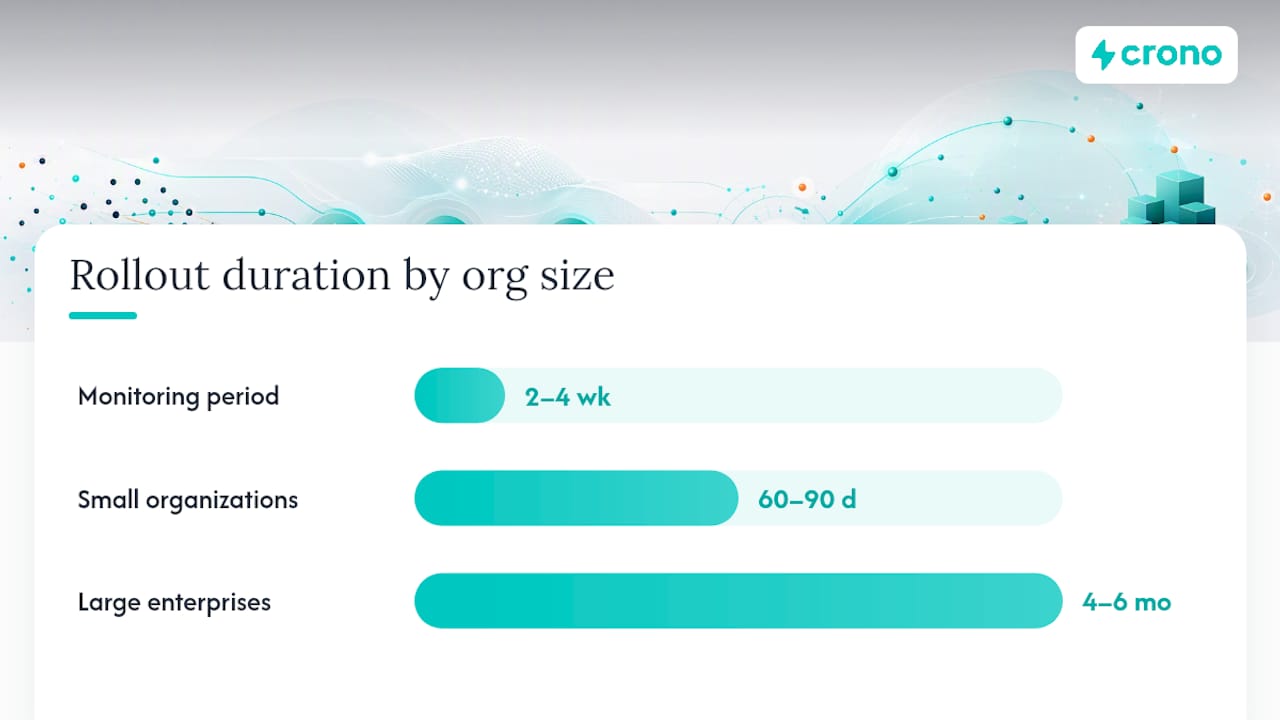
p=nonewith anruaaddress. This is monitoring mode: nothing gets blocked, but you start collecting visibility into every domain sending as you. - Let reports accumulate for two to four weeks. Classify each sending source in the reports as either legitimate-and-aligned, legitimate-but-misconfigured, or unauthorized.
- Fix alignment issues for legitimate senders, typically by enabling custom DKIM signing or a dedicated return path through the sending platform.
- Ramp policy gradually. Move to
p=quarantinewith a lowpctvalue, watch for damage, then increase towardp=rejectonce reports come back clean.
Small organizations with a handful of senders can often complete this cycle in 60 to 90 days; larger enterprises with dozens of platforms and business units frequently need four to six months, according to one operator walkthrough.
Pro Tip: *Don’t skip the pct tag when ramping to quarantine.
What Goes Wrong, and How Do You Fix It?
Most authentication failures trace back to a small set of repeat offenders.
- Multiple SPF records on one domain cause a permerror. DNS only allows one SPF TXT record per domain; merge every include statement into a single record.
- Exceeding the 10-DNS-lookup limit silently breaks SPF. Each
includemechanism counts against that ceiling, so audit and trim nested includes regularly, per Linuxize’s breakdown. - Forwarding breaks SPF almost every time. Lean on DKIM, SRS, or ARC to preserve authentication through the hop.
- DKIM selector mismatches or missing signing show up as
dkim=noneordkim=failin headers, often because a platform update quietly changed the selector without updating DNS. - Stale, unrotated DKIM keys are a security liability even if they still technically pass, since a compromised long-lived key stays valid until you rotate it.
When triaging a stack of DMARC reports, prioritize by volume multiplied by failure rate.
What Does Ongoing Maintenance Actually Look Like?
Authentication isn’t a set-and-forget project. Treat it like patch management: skip the cadence and drift creeps back in.
- Weekly: review DMARC aggregate summaries for new or unrecognized sending IPs, and confirm DNS TTLs and DKIM selectors are still resolving as expected.
- Monthly: rotate DKIM keys, re-run your SPF lookup count to catch creeping includes, and remove selectors or includes tied to platforms you no longer use.
- Ongoing: document your compliance posture and keep dedicated addresses for abuse and reporting mail. Crono’s breakdown of CAN-SPAM compliance requirements is a useful reference for keeping that documentation current alongside your authentication records.
Why Most Teams Stall at Monitoring Mode
Teams get stuck at p=none because nobody sets a deadline; monitoring feels safe indefinitely. A dated ramp schedule, not more waiting, is what actually gets you to enforcement. Fix alignment before you reach for p=reject. Rejecting mail you haven’t diagnosed just trades spoofing risk for lost legitimate mail.
Sources
Verify details directly against RFC 9989 for DMARC, Microsoft’s authentication overview, and PowerDMARC’s provider requirements page.
Deliverability problems caused by broken authentication don’t just cost you inbox placement, they cost you the outbound sales motion built on top of it. If your team runs multichannel outreach through email, pairing clean SPF, DKIM, and DMARC records with a platform like Crono keeps your sending reputation and your pipeline execution working from the same foundation instead of fighting each other.
- How email authentication works in Microsoft 365 – Microsoft Defender for Office 365 | Microsoft Learn
- Google and Yahoo email authentication requirements | PowerDMARC
- Email authentication: SPF, DKIM, DMARC | Linuxize
FAQ
What Is SPF, DKIM, and DMARC?
SPF, DKIM, and DMARC are three DNS-based email authentication standards. SPF authorizes sending servers, DKIM cryptographically signs messages, and DMARC enforces alignment between the two and the visible From address while defining a policy for failures.
How Do I Check SPF, DKIM, and DMARC?
Query your DNS records with dig for each protocol’s TXT record, then send a test email and open it in Gmail using “Show original” to read the Authentication-Results header for spf=, dkim=, and dmarc= status.
How Do I Set Up SPF, DKIM, and DMARC?
Publish an SPF TXT record listing authorized senders, enable DKIM signing through your email provider and publish the resulting selector record, then publish a DMARC record at _dmarc.yourdomain.com starting with p=none and an rua reporting address.
Does DMARC Need Both SPF and DKIM?
No. DMARC passes if either SPF or DKIM aligns with the visible From domain; it doesn’t require both to succeed simultaneously, though having both configured gives you redundancy when one fails, such as during forwarding.
