
CRM automation uses triggers, rules, and integrations to handle routine sales and customer tasks automatically, so reps spend less time on data entry and more time selling. The immediate payoff is faster follow-up, fewer dropped leads, and more consistent pipeline movement. The rest of this guide walks through how it works, where it fits your CRM, and how to build it without breaking compliance or your team’s trust in the system.
TL;DR:
- Automation is most valuable when handling high-volume, repeatable, or time-sensitive tasks like lead routing and follow-up reminders, not single manual proposals.
- Most small teams should prioritize operational automation, focusing on lead enrichment, SLA-based routing, and follow-up sequences that directly boost response time and conversion.
- Building automations step-by-step, with thorough testing, owner accountability, and compliance controls, reduces risks of misfires and legal violations.
- Proper setup requires ongoing monitoring of response times, conversion rates, and error rates, along with strict adherence to CAN-SPAM rules and deliverability hygiene.
- Using orchestration tools like Crono simplifies integration of enrichment, outreach, and AI, helping teams avoid the pitfalls of over-automating before verifying core workflows.
Table of Contents
- What CRM automation actually does and when to use it
- The four CRM types and where automation earns its keep
- High-impact workflows worth building first
- A step-by-step playbook for rolling out automation safely
- Compliance and deliverability rules your automations can’t skip
- Templates and a fast-start playbook for getting automation live
- What most teams get wrong about automation
- Where Crono fits if you want automation without the DIY curve
- Sources
- FAQ
What CRM automation actually does and when to use it
CRM automation runs on three building blocks: triggers, actions, and rules. A trigger is an event, a new form submission, a deal stage change, a set number of days without contact. An action is what happens next: a task gets created, an email goes out, a record gets updated. Rules decide which action fires under which conditions, often pulling in enriched data (company size, job title, intent signals) to make the decision smarter than a blanket if-then statement.
In practice, this looks like:
- A new lead fills out a form and is automatically enriched with firm-o-graphic data, then assigned to the right rep.
- A deal that sits untouched for 14 days triggers a task reminder or a re-engagement email.
- A demo booking automatically creates a calendar event, sends a confirmation, and queues a reminder sequence.
- A contract nearing renewal triggers an internal alert 60 days out so the account team can start the conversation.
Automation earns its place when a task is repeatable, high-volume, or time-sensitive enough that a human is likely to delay or forget it. Sending a single custom proposal doesn’t need automation. Routing 200 inbound leads a month to the right rep within minutes does. The general rule: automate the handoff and the reminder, keep the judgment calls and the relationship-building manual.
On return, the math is straightforward even without hard figures: every hour a rep doesn’t spend on manual data entry or chasing internal handoffs is an hour spent on calls, demos, or negotiation. The compounding effect shows up in response time and in how many leads actually get a second or third touch instead of falling through the cracks.
The four CRM types and where automation earns its keep
CRM systems are generally grouped into four categories, and automation plays a different role in each one.
- Operational CRM handles the day-to-day mechanics of sales, marketing, and service, the layer most people mean when they say “CRM automation.” Automation here covers lead capture, task assignment, sequence enrollment, and record updates. This is where SMB sales teams should focus first, since it directly touches follow-up speed and rep workload.
- Analytical CRM is built around mining customer data for patterns, forecasting, and segmentation. Automation shows up as scheduled reporting, automatic scoring recalculations, and alerts when a metric crosses a threshold, like a sudden drop in a segment’s engagement rate.
- Collaborative CRM focuses on sharing customer information across departments, sales, marketing, support, so everyone works from the same record. Automation here means syncing activity logs across teams, triggering a support ticket to notify sales of an at-risk account, or pushing a closed-won deal into onboarding without manual re-entry.
- Strategic CRM takes a longer view, aligning customer data with broader business planning and retention strategy. Automation supports this with recurring account health scoring, renewal forecasting, and periodic executive-level reporting that would otherwise require someone to compile numbers by hand every quarter.
Most small and mid-size teams start with operational automation because it has the clearest, fastest payoff: leads get touched sooner, tasks stop getting missed, and reps stop losing time to copy-paste work. Analytical and strategic automation tend to matter more as the business scales and forecasting accuracy becomes a board-level concern. Collaborative automation becomes urgent the moment sales and customer success start working the same accounts and stepping on each other.
When evaluating a CRM or automation layer, match the feature set to the type of problem you’re actually solving. A tool with excellent reporting dashboards, but weak routing logic will not fix a slow-response problem. A tool that routes leads brilliantly but can’t sync activity to your support platform will not fix a handoff problem.
High-impact workflows worth building first
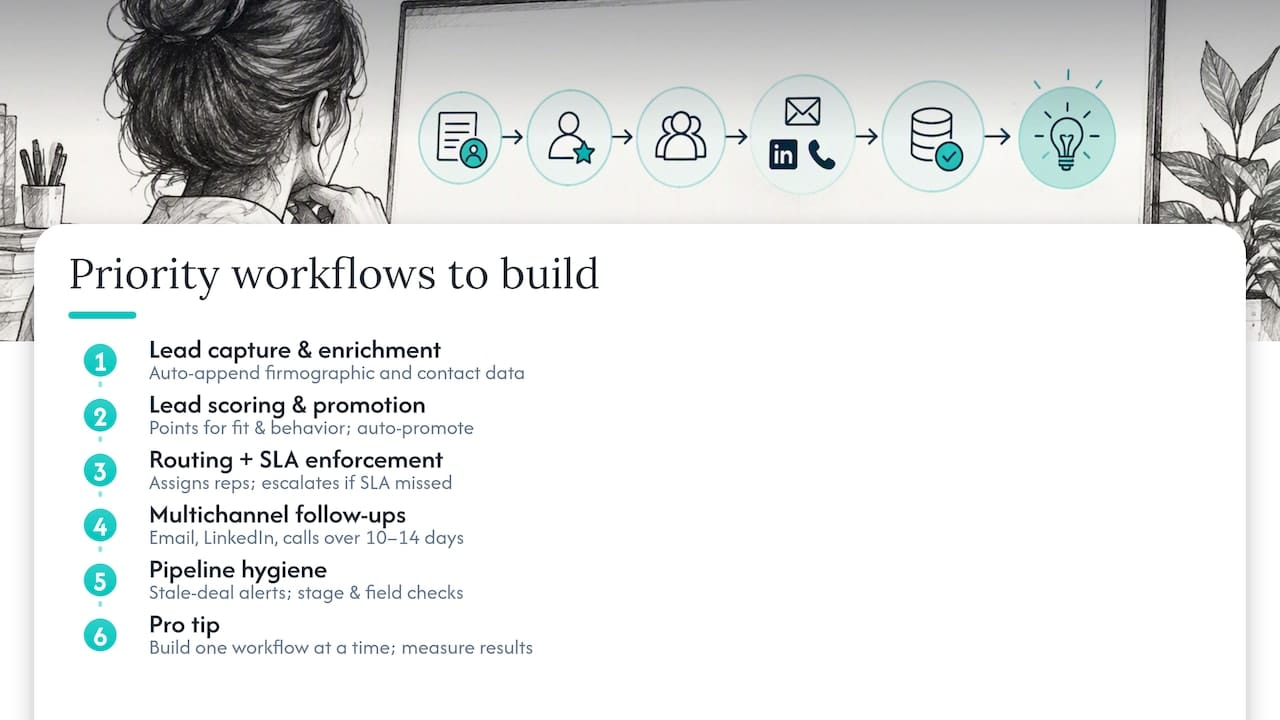
Not every automation deserves equal attention. A handful of workflows account for most of the practical benefit SMB sales teams see, and they tend to follow the buyer’s journey in order.
Lead capture and enrichment comes first. When a lead fills out a form, books a demo, or gets added from a list, an automation should immediately append firm-o-graphic and contact data (company size, industry, title, sometimes intent signals) so the record is usable the moment a rep opens it. Waiting for someone to manually research every new lead is where speed dies.
Lead scoring and promotion follows enrichment. Rules assign points based on fit (does this account match your ideal customer profile) and behavior (did they open three emails, visit the pricing page, attend a webinar). Once a lead crosses a threshold, it’s automatically promoted from marketing-qualified to sales-qualified and handed to a rep, rather than sitting in a queue someone has to review manually.
Routing with SLA enforcement decides who gets the lead and how fast. Round-robin assignment, territory rules, or account-based routing all work, but the part that actually improves conversion is pairing routing with a service-level agreement: if a rep hasn’t made contact within a set window, the lead escalates or reassigns automatically.
Multichannel follow-up sequences keep leads warm without manual chasing. A typical sequence mixes email, LinkedIn touches, and calls over 10 to 14 days, with timing spaced to avoid looking automated: same-day acknowledgment, a value-add email on day two, a LinkedIn connection on day four, a call attempt on day six, and so on. Sequences should stop automatically the moment a lead replies or books a meeting.
Pipeline hygiene is the automation most teams skip and later regret. Stale-deal alerts (no activity in 21 days), automatic stage-duration flags, and required-field checks before a deal can move stages all keep the pipeline honest, which matters enormously once forecasting depends on it.
Pro Tip: Build one workflow at a time and measure it before adding the next. Stacking five automations at once makes it impossible to tell which one is actually working.
A step-by-step playbook for rolling out automation safely
Automation projects fail less often from bad tools and more often from skipping the groundwork. This sequence keeps risk low while still moving fast.
- Audit your data and process first. Check for duplicate records, inconsistent field usage, and unclear ownership rules. Automating a messy process just breaks things faster and at scale.
- Map each workflow to a measurable outcome. Don’t automate for its own sake, tie every workflow to a metric: faster first response, higher sequence reply rate, fewer stalled deals.
- Design single-purpose automations. One trigger, one clear action, one owner. Automations that try to do five things at once are the hardest to debug when something goes wrong.
- Pilot before you scale. Run the workflow on a small segment, log every action it takes, and watch for edge cases: what happens if the same lead submits the form twice, or a field is blank.
- Monitor, adjust, and only then expand. Once the pilot behaves predictably, roll it out to the full team, and keep a rollback plan ready in case volume or edge cases behave differently than expected.
A few things to keep in mind throughout the build:
- Give every automation a named owner who reviews performance monthly.
- Log every automated action somewhere reviewable, not just the outcome, but the trigger that caused it.
- Build automations to be idempotent: running twice on the same record should never duplicate a task, email, or note.
- Keep a change log so anyone can see what was modified, when, and why.
Track a small set of KPIs from day one: response time to new leads, conversion lift at each pipeline stage, and error rate (how often an automation fires incorrectly or requires manual correction). Governance matters as much as the workflow logic itself. A dev or sandbox environment for testing changes before they touch live data, combined with a documented rollback procedure, prevents a single misfiring automation from cascading into hundreds of bad emails or misassigned leads.
Compliance and deliverability rules your automations can’t skip
Automated email is still subject to the same rules as any commercial message, and running it through a CRM doesn’t create an exemption. The CAN-SPAM Act applies to commercial email, including business-to-business messages, and it requires a clear, working opt-out method that recipients can use without extra steps.
Under the FTC’s compliance guide, opt-out requests must be honored within 10 business days, and the opt-out mechanism itself has to remain capable of processing requests for at least 30 days after a message is sent. This means your suppression list can’t be a manual, once-a-month cleanup task. It needs to sync automatically across every tool sending on your behalf, and any active sequence must stop the moment someone opts out, not the next time a human checks the list.
Responsibility doesn’t disappear when a third party sends the message. The FTC guidance is explicit that both the business on whose behalf an email is sent and the party doing the sending can be held liable for violations, which means vendor oversight is a real operational control, not paperwork. Separately, federal rules define a “primary purpose” test for mixed-content messages: if a subject line would lead a recipient to see the email as promotional, it counts as commercial under CAN-SPAM regardless of what else the message contains.
One opt-out request handled late doesn’t just cost you a subscriber, it creates legal exposure under a law that applies to every business email you automate.
Deliverability hygiene deserves the same discipline:
- Keep SPF, DKIM, and DMARC records correctly configured and verified for every sending domain.
- Rate-limit sends to avoid tripping spam filters, especially during a pilot or a list migration.
- Monitor sender health (bounce rates, spam complaints) on a recurring schedule, not just when something breaks.
- Review vendor-managed sends the same way you review your own, since liability follows the sponsor as well as the sender.
Building these controls into the automation itself, not as a separate manual checklist, is what keeps a growing outreach program compliant as volume increases.
Templates and a fast-start playbook for getting automation live
A workable outbound automation template follows five steps: build the list, enrich the records, enroll in a sequence, score engagement, and route qualified leads to a rep. Each step should have a clear timing rule (enrichment happens within minutes of list import, sequences run over 10 to 14 days) and a guardrail (sequences stop on reply or opt-out, no exceptions).
Follow-up email templates work best when they stay short, reference something specific to the recipient, and always carry a working opt-out, both for compliance and because it filters out uninterested prospects faster. Crono’s follow-up templates and cold email structure for B2B software companies are built around this same logic: brief, specific, easy to opt out of.
For a RevOps fast start, prioritize in this order:
- Lead capture and enrichment, since every later automation depends on clean data.
- SLA-based routing, since response time has the fastest visible impact on conversion.
- Follow-up sequences, since they recover leads that would otherwise go cold.
- Pipeline hygiene, since it protects forecast accuracy once volume grows.
Orchestrating CRM, enrichment, and AI agents in one place removes the manual handoffs between tools that usually cause data to go stale or leads to sit unassigned. Crono’s guide to starting with one workflow walks through this exact sequencing for teams building their first automation program.
What most teams get wrong about automation
The most common failure isn’t under-automating, it’s over-automating too fast. Teams see one workflow succeed and immediately stack five more before anyone has verified the first one is doing what they think it’s doing. The result is a system nobody fully understands, where a misfiring rule can send the wrong email to hundreds of contacts before anyone notices.
The fix isn’t complicated, but it requires discipline: one owner per automation, a sandbox to test changes before they go live, a change log so changes are traceable, and a rollback plan written before the automation launches, not after it breaks.
Before deploying anything new, run through a short checklist: Does this automation map to a metric we’re actually tracking? Does it have a single owner? Can it run twice on the same record without duplicating an action? Is there a documented way to turn it off in under five minutes? If any answer is no, it’s not ready.
— Alex
Where Crono fits if you want automation without the DIY curve
Crono works as a sales execution layer that sits alongside your CRM rather than replacing it, connecting enrichment, multichannel outreach, workflow automation, and AI agents into a single place your team actually works from. Instead of stitching together separate tools for data enrichment, sequencing, and routing, the orchestration happens in one execution layer, which cuts down the manual handoffs that usually slow automation programs down.
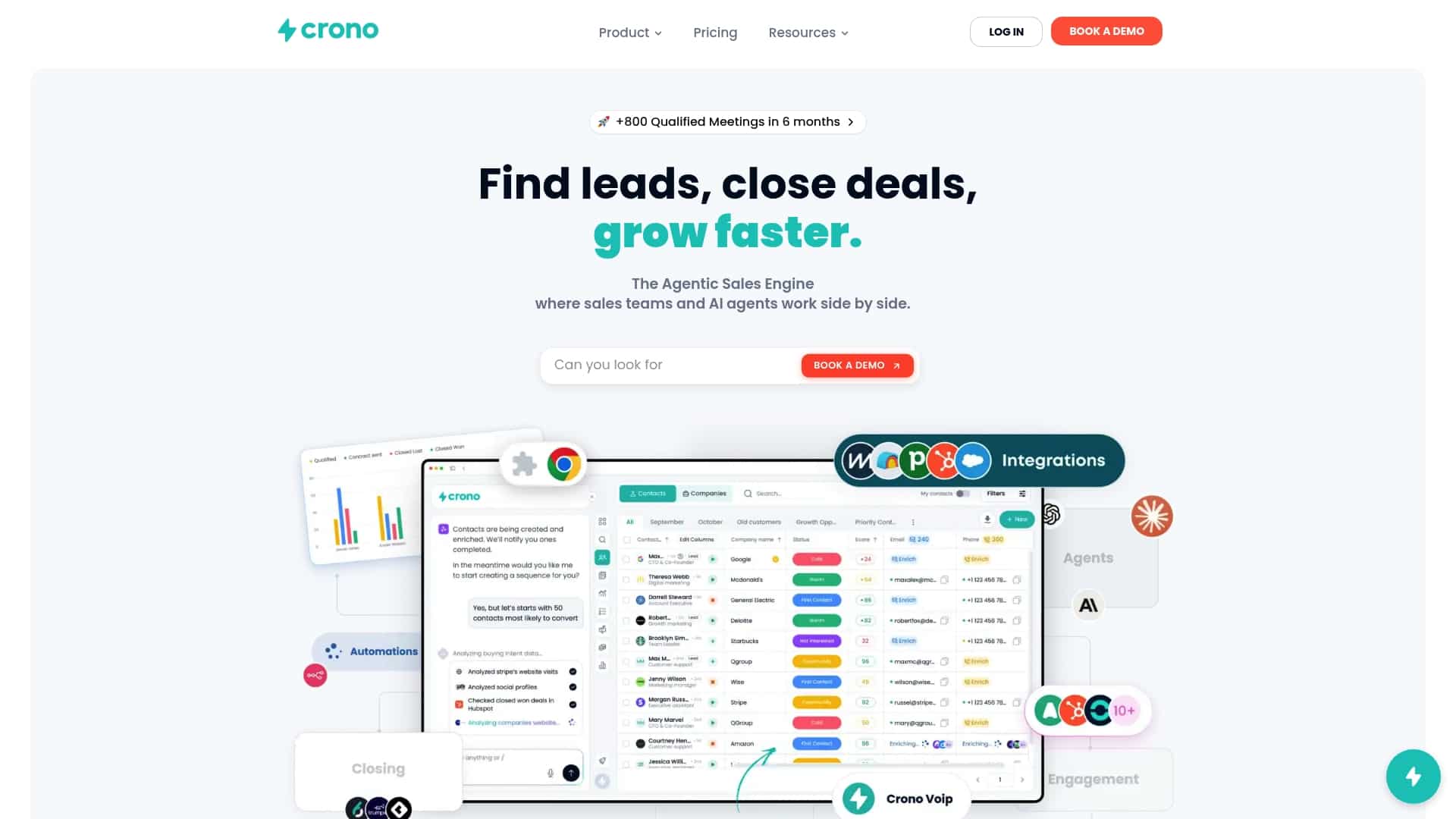
For teams building their first workflows, Crono provides ready-to-use templates, including RevOps fast-start workflows and follow-up sequences, so you’re adapting a proven structure instead of building from a blank page. Plans run from the Pro tier at 79 € per month per seat, with Ultra at 119 € per month per seat and an Enterprise option with pricing available on request, all detailed on the pricing page. Teams that want AI-driven prospecting and enrichment on top of core automation can add an Agentic Sales Engine plan starting at 99 € per month for 10,000 credits, listed on the Agentic Sales Engine page.
If your current setup is leaving leads unassigned or follow-up inconsistent, the fastest next step is to check the plans against your team’s size and request a demo to see the orchestration in action.
FAQ
What is CRM automation?
CRM automation uses triggers, rules, and integrations to handle routine sales and customer tasks without manual input, such as assigning leads, sending follow-up emails, or updating records. Its main purpose is to speed up response time and free reps from repetitive administrative work.
What are the four types of CRM?
The four main types are operational, analytical, collaborative, and strategic CRM. Operational CRM handles daily sales and service tasks, analytical CRM focuses on data and forecasting, collaborative CRM shares information across departments, and strategic CRM supports long-term customer relationship planning.
Will CRM be replaced by AI?
AI is being built into CRM systems as agents and assistants that handle enrichment, scoring, and personalized messaging rather than replacing the CRM itself. The CRM still serves as the system of record, while AI increasingly automates the execution work layered on top of it.
What are the top CRM automation tools?
The right tool depends on team size, existing tech stack, and whether you need standalone CRM automation or a broader execution layer that includes enrichment and multichannel outreach. Platforms like Crono position themselves specifically around orchestrating CRM, AI agents, and outreach together rather than functioning as a traditional standalone CRM.
