
AI follow-up emails work best when AI handles the context and the drafting, and your workflow rules handle timing, frequency and stopping. Used that way, you can automate follow-ups after meetings and in outbound sequences without sending the same nudge five times to someone who already answered. Used as a “send more” button, AI mostly produces more noise. This guide shows how to choose the right type of tool, set the rules that matter, measure the result and roll it out in a B2B sales team.
TL;DR
- “AI follow-up email” covers three different jobs: a one-off draft, a triggered sequence, and an agent that reads context and acts. Pick the job before you pick the tool.
- AI helps most when it improves relevance. In one 2025 benchmark of 16.5 million cold emails, first-message reply rates rose from 2.60% to 4.19% with AI-generated questions, but total reply rates only moved from 6.5% to 7.66%.
- Define triggers, audience rules, timing, frequency limits and exit conditions first. The AI writer comes last.
- Keep a human approval step on high-value and sensitive sends until tone and accuracy are proven.
- Measure qualified replies, meetings and pipeline, not drafts generated or opens.
Table of Contents
- Three jobs hiding behind one phrase
- Where AI follow-up earns its keep
- Design the workflow before you choose the writer
- What a good AI follow-up looks like
- Use more than email
- Our perspective: AI should execute a plan, not invent one
- Measure what pays
- A rollout plan for sales teams
- Where Crono fits
- FAQ
- Sources
Three jobs hiding behind one phrase
Most confusion about AI follow-up starts here. Tools that look similar do very different work, and HubSpot’s guide to automating follow-ups frames automation as a workflow of trigger, message and personalization rather than a single feature. In practice you will meet three categories:
| Job | What it does | Best for | Main risk |
|---|---|---|---|
| Draft generator | Writes one email from context you paste in | Ad hoc replies, rewriting a rough note | Depends entirely on what you feed it |
| Triggered sequence | Sends a set of emails after a date or action | Webinar recaps, demo no-shows, stalled deals | Repeats itself and keeps sending after the buyer engages |
| Agent | Reads thread and CRM context, drafts or sends, and stops on a defined event | Post-meeting recaps, signal-based outbound | Acting without enough guardrails |
A generator is a writing aid. A sequence is scheduling. An agent is closer to a junior rep that needs rules. If you want help with a handful of emails a week, a generator is enough. If you want follow-up to happen reliably across a team, you need the other two, plus the data that feeds them.
Where AI follow-up earns its keep
After a meeting: accuracy beats volume
The strongest use case is the recap after a discovery call or demo. The goal is a faithful summary of what was discussed, decided and agreed as next steps. Microsoft documents this pattern in Outlook: its Sales agent meeting follow-up feature analyzes meeting discussions together with CRM data, meeting notes and customer interaction logs, then drafts an email covering discussion points, decisions and action items.
The lesson applies to any tool. A model that sees only the last email will miss commitments, stakeholders, objections and deal stage. A model connected to notes and history writes something a buyer can act on. When you evaluate a product, ask what context it can actually read.
If you want starting points for the wording, our guide to the sales call follow-up email covers structure and templates, and our follow-up email templates that get replies work well as the base your AI drafts from.
In outbound: relevance before cadence
For cold and warm outbound, the question is whether AI makes the second, third and fourth touch worth reading. This is where the data is less flattering than the marketing. The Belkins benchmark reports a first-message reply rate of 4.19% for campaigns using AI-generated questions against 2.60% without. Across the whole sequence, total reply rate went from 6.5% to 7.66%. The same report finds that engagement falls as follow-ups pile up, with sequences of five or more follow-ups doing worst.
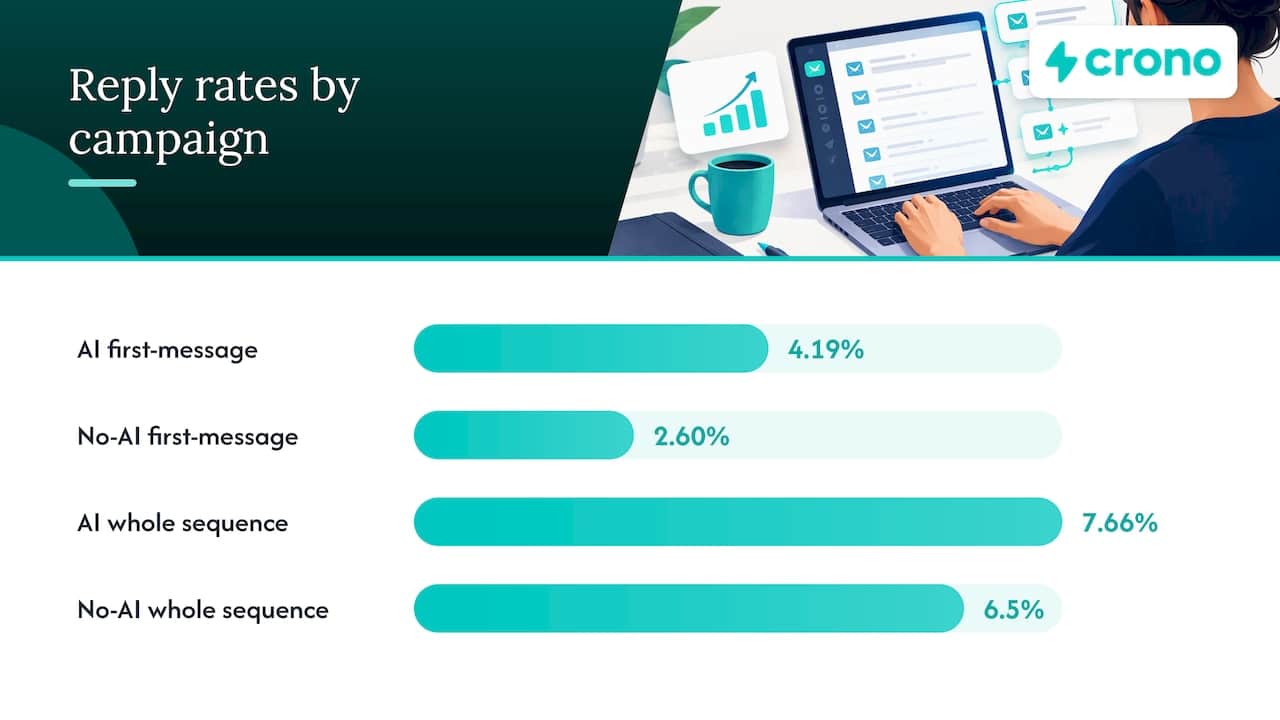
Read that as a corrective, not a verdict against AI. The lift is real at the first touch and smaller across the sequence. So the job of your follow-ups is to add something new, not to repeat the opener with different words. If you are weighing whether personalization is worth the effort, this piece on why personalized content matters for engagement makes the same relevance-first argument from the content side.
Design the workflow before you choose the writer
The expert move, and the one most teams skip, is to write the rules on a page first. HubSpot and Mailchimp both treat follow-up as conditional design. Here is the checklist we use.
- Trigger. What starts the follow-up: a meeting ending, a proposal viewed, a signal such as a job change or funding news, a no-show, silence after an opener?
- Audience rule. Who is eligible? Exclude current customers, open opportunities, people in active conversations and anyone who opted out.
- Context fields. Which data does the AI read: meeting notes, CRM stage, last reply, firmographics, role?
- Timing. How long after the trigger, and in which time zone?
- Frequency cap. How many touches, and how many across all sequences for one contact?
- Exit conditions. What stops it?
- Approval. Which sends need a human before they leave?
Timing: start from the trigger
Mailchimp’s guidance on automated follow-ups matches timing to the event: 1 to 2 hours for cart abandonment, 1 to 2 days after a support interaction, and the next day for a webinar recap. It suggests roughly 2 to 5 follow-up emails as a guideline. That advice comes from general email programs, so treat it as a starting point for sales, not a cold-outreach rule. For a B2B meeting recap, same day or next morning is a sensible default; for a stalled proposal, space touches further apart and change the angle each time.
Stop conditions are where automation fails
The most overlooked risk is a sequence that keeps going when it should not. A production workflow should stop or reroute when a prospect:
- replies, including with an out-of-office or a referral;
- books a meeting;
- opts out or bounces;
- becomes an open opportunity;
- has an unresolved support or commercial issue.
If you build on Outlook, note that custom flows may need Power Automate, as described in this Microsoft Q&A thread. Microsoft’s meeting follow-up feature is designed mainly to draft context-rich post-meeting emails, not to replace sales judgment. Check what your stack can and cannot do before promising leadership “fully automated.”
What a good AI follow-up looks like
Whatever tool produces the draft, hold it to the same standard.
- It adds something new. A new point of relevance, a resource, a question tied to the buyer’s situation. “Just checking in” adds nothing.
- It is specific. It references the actual call, the actual stakeholder, the actual next step.
- It is short. One idea, one ask.
- It is accurate. Every claim about your product, price or timeline can be traced to a source your team controls.
- It reads like your rep. Tone is reviewed, not assumed.
Our AI sales email templates page walks through six templates to personalize, review and send safely, and our piece on AI email personalization explains why stitching separate tools together tends to break the context the model needs.
A worked example
Say a rep finishes a 30-minute discovery call with a RevOps manager. Three things came up: the team wants CRM updates to stop being manual, the CFO must approve spend, and the buyer asked for an integration list.
A weak AI follow-up thanks them for their time and offers to “circle back.” A strong one does this:
- Opens with the one problem the buyer stated, in their words.
- Lists the integration list as an attachment or link, since it was promised.
- Offers a short summary the buyer can forward to the CFO.
- Proposes one concrete next step with two time options.
The AI drafts it from the call notes and CRM record. The rep reads it for 30 seconds, fixes anything off and sends. That review is the part to keep until your error rate is demonstrably low.
Use more than email
When engagement drops, adding another email is the weakest response. The Belkins report notes that changing timing, channel, audience or relevance helps, and that integrating calls and LinkedIn messages can outperform simply adding more email touches. So a follow-up plan might be: email on day 1 after the call, a LinkedIn touch on day 3 that references something new, a call attempt on day 6, and a final short email with a useful resource. For the channel logic, see our multichannel outreach playbook and the two-part series on the power of timing in multichannel strategies.
Our perspective: AI should execute a plan, not invent one
We build Crono as a sales execution layer, so we see the same pattern in team after team. The failure is rarely the writing. It is that the writer is disconnected from everything that tells it who to contact, when, and when to stop.
Our view comes down to four points:
- Signals decide who, AI decides what to say. A follow-up to someone who has shown a buying signal and fits your ICP beats a perfectly worded email to a random list.
- Workflow rules own timing and suppression. A model should not decide on its own whether a fifth touch is a good idea. Your rules should.
- Humans approve what matters. Sensitive accounts and high-value deals get a review. Routine recaps can move to lighter review once quality is proven.
- The CRM stays the source of truth. We connect to your CRM and sales tools rather than replacing them, so replies, meetings and stage changes feed back into what the AI does next.
The benchmark data supports this hybrid shape. Autonomous volume without prioritization runs straight into declining engagement after repeated touches. If you want to see how we think about deploying agents with these guardrails, read our guide to deploying AI sales agents in B2B sales and our agentic sales execution examples.
— Alex
Measure what pays
Opens are a weak signal, and image blocking and privacy features make them less reliable. Track this instead:
| Metric | Why it matters |
|---|---|
| Qualified reply rate | Separates interest from out-of-office and “remove me” replies |
| Meetings booked per 100 contacts | Ties follow-up to pipeline |
| Opportunities created | Shows whether meetings are the right ones |
| Time from trigger to first follow-up | Reveals gaps in speed |
| Unsubscribe and bounce rate | An early warning for over-sending |
| Manual edit rate on AI drafts | Tells you when you can loosen approval |
Run your AI-assisted flow against a control group for a few weeks. Since the benchmark shows a bigger lift at the first touch than across the whole sequence, compare at both levels. If the first touch improves but the sequence does not, your later steps are the problem, not the model.
Keep your CRM clean too, because follow-up quality depends on stage, owner and next-step fields being right. Our pipeline hygiene audit covers the four fields to check weekly.
A rollout plan for sales teams
Start small and pick one workflow. Our guide to starting with one workflow in RevOps automation makes the same case.
- Week 1: choose the use case. Post-demo recap is usually the safest first pick.
- Week 1: write the rules. Trigger, audience, fields, timing, cap, exit conditions, approver.
- Week 2: pilot with two or three reps. Every draft is reviewed. Log each edit and why.
- Weeks 3 to 4: tune prompts and templates. Fix recurring errors such as wrong tone, missing action items or invented details.
- Month 2: expand to a second sequence, such as no-shows or stalled proposals, with a frequency cap across both.
- Ongoing: review monthly. Check qualified replies, meetings and complaints, and prune sequences that add touches without adding value.
Mistakes to avoid
- Sending the same email with a new subject line as “follow-up 3.”
- Letting the AI promise discounts, dates or features nobody approved.
- Running several sequences against one contact with no global cap.
- Ignoring replies that arrive through another channel.
- Judging success by emails sent.
Where Crono fits
If you want follow-up that runs on signals, CRM data and multichannel steps in one place, Crono connects your existing tools and lets people and AI agents work in the same workflows. Seat plans on our pricing page start at €79 per month per seat for Pro and €119 per month per seat for Ultra, with Enterprise available on request. If you would rather start with agent capacity, the Agentic Sales Engine is offered at 10,000 credits for €99 per month, 30,000 credits for €199 per month and 100,000 credits for €499 per month. Credits cover AI and enrichment tasks, so size them to the volume of workflows you plan to run.
FAQ
Can you automate follow-up emails in Outlook?
Yes, within limits. Microsoft’s Sales agent can draft post-meeting follow-ups from meeting discussions, CRM data and notes. Custom automated flows may require Power Automate access. Either way, keep a human review step for customer-facing messages at first.
How many follow-up emails should you send?
General email guidance suggests about 2 to 5, but that comes from broad automated programs, not cold outreach. In the Belkins benchmark, sequences with five or more follow-ups had the lowest engagement. Fewer, more relevant touches across more than one channel usually beat a long email-only chain.
Does AI actually improve reply rates?
It can, mainly at the first touch. One 2025 benchmark found first-message reply rates of 4.19% with AI-generated questions versus 2.60% without, while total reply rate rose from 6.5% to 7.66%. Results depend on relevance and targeting, so test against a control group.
Should AI send follow-ups without approval?
Not at the start. Have AI extract commitments, decisions and next steps, and require approval for customer-facing sends until tone, factual accuracy and escalation rules are proven. Then loosen review for routine recaps while keeping it for high-value accounts.
Sources
- Cold outreach benchmarks 2025, Belkins and partners
- How to Automate Your Follow-up Emails, HubSpot
- Meeting follow-up FAQ, Microsoft Learn
- Automated email follow-ups, Mailchimp
- Power Automate and Copilot for Outlook, Microsoft Q&A
