
Best Sales Automation Tools for Mid-Market Companies
If you manage a B2B sales team of 10 to 50 reps, you’ve probably been sold the dream at least a dozen times: “This tool will fix your pipeline.” You bought it, onboarded it, and three months later your SDRs are still bouncing between eight browser tabs, your CRM data is a mess, and you’re still missing quota.
The problem isn’t that sales automation doesn’t work. It’s that most tools were built for either tiny startups or enterprise giants — leaving mid-market teams duct-taping together stacks that cost a fortune and still don’t talk to each other.
This guide is an honest, no-fluff comparison of the best sales automation tools for mid-market B2B companies in 2025. We’ll cover what each tool actually does well, where it falls short, and which combination of capabilities you genuinely need to move the needle on pipeline.
Why Mid-Market Sales Teams Need a Different Approach
Mid-market companies sit in a frustrating gap. You’re too big to run outbound manually, but too agile (and budget-conscious) to deploy the massive enterprise platforms designed for companies with dedicated RevOps teams of 20 people and six-figure software budgets.
The stakes are real. According to Salesforce’s State of Sales report, sales reps spend only 28% of their week actually selling, the rest is eaten up by administrative tasks, tool-switching, and data entry. For a team of 20 SDRs, that’s the equivalent of 14 full-time reps who aren’t selling.
Meanwhile, Gartner projects that by 2026, 65% of B2B sales organizations will transition from intuition-based to data-driven decision-making, but only if they’ve built the infrastructure to support it. Mid-market companies that don’t consolidate their stack now will find themselves outpaced by competitors who have.
The core tension for sales leaders in this segment isn’t which tools to use, it’s how to get them to work together without creating more complexity than they solve.
The Mid-Market Stack Problem in Numbers: The average B2B sales rep uses 8–10 different tools daily. Every context switch costs approximately 23 minutes of focused productivity (per UC Irvine research). For a team of 15 SDRs, that’s a staggering loss of selling time before a single email goes out.
The Core Categories of Sales Automation
Before comparing specific tools, it helps to be clear about what you’re actually trying to automate. Sales automation in 2025 breaks down into five functional categories, and the best mid-market stacks cover all five, ideally without five separate vendors.
1. Prospecting and Lead Finding
Identifying the right contacts, finding verified contact data, and enriching records with firmographic and technographic signals. This is where most teams lose enormous amounts of time manually searching LinkedIn or importing CSVs with 40% bounce rates.
2. Outreach Sequencing
Orchestrating multichannel touchpoints, emails, LinkedIn messages, phone calls, and follow-ups, in a logical cadence without requiring reps to remember what they sent two weeks ago. According to HubSpot, it takes an average of 8 touchpoints to get an initial meeting with a prospect, yet most reps give up after two.
3. AI-Assisted Personalization
Using AI to draft messages, adapt tone, detect buying signals, and surface the right leads at the right moment. McKinsey found that companies using AI in sales see a 10–15% revenue uplift and a 40–60% reduction in sales costs, but only when AI is embedded in workflow, not bolted on.
4. CRM Sync and Data Hygiene
Ensuring that outreach activity flows automatically into your CRM (HubSpot, Salesforce, Pipedrive) without manual logging. Poor CRM data is one of the most underrated killers of mid-market pipeline visibility.
5. Reporting and ROI Visibility
Understanding which sequences, channels, and rep behaviors actually drive meetings booked and pipeline created, not just vanity metrics like emails sent.
The Best Sales Automation Tools Compared
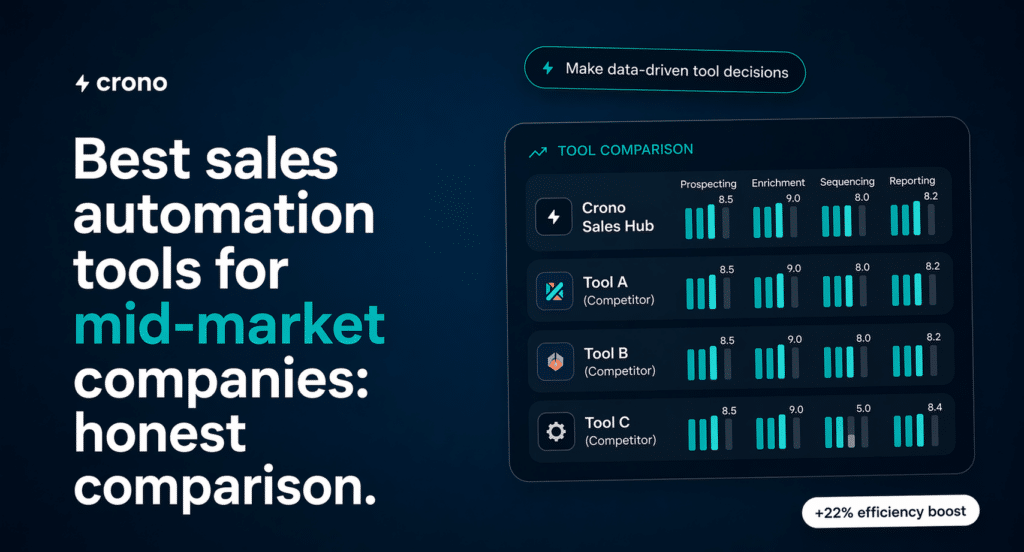
Below is an honest breakdown of the tools mid-market sales teams most commonly evaluate. This is not a sponsored ranking, each tool has genuine strengths and real limitations depending on your use case.
Outreach.io
Outreach is one of the most mature sales engagement platforms on the market. It offers robust sequencing, call recording, deal management, and deep Salesforce integration. The reporting is genuinely excellent for teams that have invested in operationalizing their data.
Best for: Larger sales organizations (50+ reps) with dedicated RevOps and Salesforce as their source of truth.
Limitations for mid-market: Pricing starts high and scales aggressively per seat. Implementation complexity is significant, most teams need a few months to configure it properly. It can feel like using a freight train when you need a sports car.
Salesloft
Salesloft competes directly with Outreach and has increasingly moved toward revenue intelligence and deal management. Its cadence functionality is solid, and the platform’s UI is cleaner than many competitors.
Best for: Teams already invested in HubSpot or Salesforce who want a polished engagement layer on top.
Limitations for mid-market: Similar to Outreach, pricing and implementation overhead can be prohibitive. After its merger with Drift, the product roadmap has created some uncertainty for buyers evaluating long-term fit.
Apollo.io
Apollo has become a popular choice for mid-market teams precisely because it combines a large contact database with sequencing and basic enrichment. For teams that don’t have a separate data provider, this all-in-one appeal is compelling.
Best for: Teams that need affordable access to a prospect database and basic outreach automation in one tool.
Limitations for mid-market: Data quality is inconsistent, email bounce rates can be painful at scale. The sequencing engine lacks the sophistication of dedicated tools. AI features are improving but still relatively surface-level as of early 2025.
Lemlist
Lemlist made its name with personalized image and video email campaigns. It’s particularly popular with smaller sales teams and individual contributors. The multichannel functionality (email + LinkedIn) is well-executed for the price point.
Best for: Smaller outbound teams or individual SDRs who want high personalization without heavy technical setup.
Limitations for mid-market: Reporting and team-level analytics are limited. It lacks the CRM sync depth and data enrichment capabilities that growing mid-market teams need as they scale from 5 to 25 reps.
Clay
Clay is less a traditional sales automation tool and more a data enrichment and workflow automation powerhouse. It allows RevOps teams to build complex data pipelines, pulling from 75+ data providers and enriching records with AI-generated research. For teams that know what they’re doing technically, it’s remarkable.
Best for: RevOps-led organizations that want maximum control over their data layer and are comfortable building custom workflows.
Limitations for mid-market: Clay has a steep learning curve. It’s a builder’s tool, not a seller’s tool. SDRs can’t log in and start prospecting independently — someone technical needs to maintain the workflows.
Crono
Crono positions itself as an AI Sales Orchestration Platform, meaning it’s designed to handle the full workflow from lead finding to outreach to CRM sync in a single interface. What distinguishes it for mid-market teams is the combination of a 10-provider waterfall approach to data enrichment (achieving 84% accuracy on contact data), native multichannel sequencing across email, LinkedIn, and phone, and an AI co-pilot that helps reps write messages and detect buying signals without leaving the platform. For teams feeling the pain of tool fragmentation, it’s built around the premise that sales reps and AI agents should work together in one place, not in parallel across a dozen disconnected apps.
Hubspot Sales Hub
For teams already on HubSpot CRM, the Sales Hub adds sequencing, deal pipelines, call recording, and reporting. The advantage is obvious: everything lives in one system, which dramatically reduces data quality issues caused by integration gaps.
Best for: Teams fully committed to the HubSpot ecosystem who want to minimize vendor sprawl.
Limitations for mid-market: HubSpot’s sequencing capabilities are functional but not best-in-class for high-volume outbound. Advanced prospecting and enrichment still require additional tools.
Folk
Folk is a CRM for startups that prioritizes simplicity and relationship-driven workflows over the rigid structures of legacy software. It offers a highly visual, flexible interface that feels more like a modern productivity tool than a traditional database, making it particularly effective for teams that need to centralize contacts from LinkedIn and Gmail quickly. Its strength lies in its “all-in-one” approach to contact enrichment and messaging, which significantly reduces the manual data entry typically associated with early-stage prospecting.
Best for: Lean teams and founders who need a collaborative, lightweight tool to manage investors, PR, and sales without the steep learning curve of enterprise platforms.
Limitations for scaling: As a company’s needs become more complex, folk’s streamlined nature can become a trade-off. While it handles basic outreach well, teams requiring advanced revenue forecasting or deep multi-layered analytics might find the reporting features a bit lean.
| Tool | Sequencing | Data Enrichment | AI Features | CRM Sync | Best Fit |
|---|---|---|---|---|---|
| Outreach.io | ★★★★★ | ★★★ | ★★★★ | ★★★★★ | Large enterprise |
| Salesloft | ★★★★ | ★★★ | ★★★★ | ★★★★ | Mid-to-large |
| Apollo.io | ★★★ | ★★★ | ★★★ | ★★★ | SMB to mid-market |
| Lemlist | ★★★★ | ★★ | ★★★ | ★★★ | SMB / individuals |
| Clay | ★★ | ★★★★★ | ★★★★★ | ★★★ | RevOps-led teams |
| Crono | ★★★★★ | ★★★★★ | ★★★★★ | ★★★★★ | Mid-market B2B |
| HubSpot Sales Hub | ★★★ | ★★ | ★★★ | ★★★★★ | HubSpot-native teams |
A Framework for Choosing the Right Stack
Rather than chasing the “best” tool in isolation, the smartest sales leaders use a structured evaluation process. Here’s a practical five-step framework built for mid-market decision-making:
Step 1: Audit Your Current Stack and Identify the Real Bottleneck
Before evaluating any new tool, map every step of your current outbound workflow — from lead sourcing to first reply. Where do reps spend the most manual time? Where does data get lost or duplicated? Nine times out of ten, the bottleneck is either data quality or the gap between prospecting and sequencing. Your tool selection should solve that specific problem, not add another layer of complexity.
Step 2: Define Your “Must-Have” vs. “Nice-to-Have” Criteria
Create a simple two-column list. Must-haves are non-negotiable for your workflow (e.g., native Salesforce sync, LinkedIn outreach, GDPR compliance). Nice-to-haves are features you’d use if they came included but wouldn’t purchase a separate tool for. Most mid-market teams overweight nice-to-haves during vendor demos and then underuse them for the first year.
Step 3: Evaluate Total Cost of Ownership, Not Just License Cost
A tool at $80/seat/month that requires a $40K implementation and three months of onboarding is not cheaper than a tool at $120/seat that’s live in a week. Factor in: implementation time, training, integration maintenance, and the cost of rep productivity lost during ramp. Forrester research consistently finds that TCO is 2–4x the license cost for complex sales platforms in mid-market deployments.
Step 4: Run a Controlled Pilot with Real Reps on Real Accounts
Never evaluate sales tools based on demos alone. Run a 30-day pilot with 3–4 of your actual SDRs, targeting a real segment. Measure meetings booked, reply rate, and — critically — how much time reps spent managing the tool versus actually selling. If the tool requires more than 30 minutes of daily administration per rep, it’s adding friction, not removing it.
Step 5: Assess the Integration Ecosystem Before You Commit
The most expensive mistake mid-market RevOps leaders make is buying a great point solution that doesn’t integrate cleanly with their CRM or communication tools. Verify that native integrations exist for your CRM, email provider, and calling tools before signing. API-based integrations maintained by third-party automation platforms (like Zapier or Make) sound fine in theory but break in practice more often than vendors admit.
Quick Evaluation Scorecard:
Rate each tool you’re considering from 1–5 on:
(1) Solves your core bottleneck
(2) Ease of rep adoption
(3) CRM integration quality
(4) Data enrichment accuracy
(5) Reporting visibility
Any tool scoring below 3 on criteria 1 or 2 is likely the wrong fit, regardless of brand recognition.
What to Watch Out For (Honest Warnings)
The sales automation vendor landscape is full of inflated promises. Here are the most common traps mid-market teams fall into and how to avoid them.
The “AI-Powered” Label Is Everywhere and Means Almost Nothing
Every tool released in 2024 or 2025 claims to be AI-powered. The meaningful question is: what specifically does the AI do, and does it reduce rep workload in a measurable way? Genuine AI capability means things like: generating personalized email drafts based on a prospect’s LinkedIn activity, scoring leads based on behavioral signals in real time, or automatically adjusting sequence timing based on engagement patterns. If a vendor says “AI-powered” but can’t show you the workflow, treat it as a red flag.
Database Size Is Not the Same as Data Quality
Several popular tools advertise access to hundreds of millions of contacts. What they don’t advertise is the email bounce rate. According to Validity’s annual Email Deliverability Report, poor list quality is the number one driver of inbox placement failure. A database of 300 million contacts with 35% bounce rates is actively harmful to your domain reputation. Always ask for bounce rate data during the evaluation process.
Sequence Automation Without Personalization Kills Reply Rates
The industry average cold email reply rate sits below 3% (per HubSpot benchmarks). Teams that use automation to send generic, high-volume sequences don’t beat that average — they usually fall below it. The tools that move the needle are the ones that make personalization faster, not the ones that make volume easier. Look for tools where AI helps reps write better messages at scale, rather than tools that simply fire off templated sequences automatically.
Beware of “Integration” Claims That Are Actually Just Zapier Connectors
A native integration means data flows bidirectionally, in real time, without manual intervention. A Zapier connector means someone has to maintain a workflow that will break the next time either platform updates its API. When evaluating integrations, ask explicitly: “Is this a native, direct API integration or a third-party automation connector?” The answer matters enormously for CRM data quality over time.
SDR Adoption Is the Metric That Kills Most Tools
Your reps are the ultimate judges. A tool that 60% of your SDRs use consistently will outperform a theoretically superior tool that 30% of reps use reluctantly every time. During your pilot, track adoption rate as closely as you track meetings booked. If reps are building workarounds or reverting to their old habits within four weeks, the tool won’t stick — no matter what the vendor’s customer success team tells you.
FAQ
What is the best sales automation tool for a mid-market company with 15–30 SDRs?
The right answer depends on your existing stack, but the most important criteria are: native CRM integration, reliable contact data enrichment, multichannel sequencing (email, LinkedIn, phone), and an AI layer that helps reps personalize without slowing them down. Platforms built specifically for this segment — like Crono — tend to outperform enterprise tools that have been scaled down or SMB tools that have been scaled up, because the core workflows are designed around mid-market team structures from the ground up.
How much should a mid-market company budget for sales automation tools?
A reasonable benchmark is $150–300 per rep per month for a consolidated stack that covers sequencing, enrichment, and CRM sync. Be cautious about stacks that look cheaper at the license level but require expensive integrations, custom implementations, or ongoing RevOps maintenance to function. The hidden cost of a fragmented stack almost always exceeds the premium of a more integrated solution.
Can sales automation tools replace SDRs?
Not meaningfully, and any vendor claiming otherwise is overselling. What automation does well is eliminate the administrative burden that consumes 60–70% of an SDR’s day — data entry, sequence management, follow-up scheduling — so reps can focus on the conversations that require human judgment. The SDRs who adapt to AI-assisted workflows will become significantly more productive; they aren’t being replaced, they’re being augmented.
How long does it typically take to see ROI from a new sales automation platform?
For well-implemented platforms with high rep adoption, most mid-market teams see measurable improvement in reply rates and meetings booked within 60–90 days. Full ROI, accounting for onboarding time and ramp, typically materializes in the 3–6 month range. If you’re not seeing improvement in reply rate or pipeline contribution after 90 days, the issue is usually either data quality, sequence strategy, or rep adoption — not the tool itself.
Is it better to use an all-in-one platform or a best-of-breed stack?
For mid-market teams with dedicated RevOps resources and mature existing infrastructure, a best-of-breed stack can outperform an all-in-one. For the majority of mid-market teams — where RevOps is one or two people wearing multiple hats — an integrated platform reduces maintenance overhead, improves data consistency, and accelerates SDR ramp time significantly. The trend in 2025 is toward consolidation: Gartner reports that 78% of buyers now prefer fewer vendors that offer broader capabilities over specialized point solutions.
Ready to See What a Consolidated AI Sales Stack Looks Like in Practice?
If you’re evaluating options for your mid-market sales team and want to see how an AI Sales Orchestration Platform handles prospecting, multichannel sequencing, and CRM sync in a single workflow, without the enterprise price tag or the SMB limitations Crono is worth a closer look.
300+ B2B sales teams are already using it to cut tool sprawl, improve data quality, and get new SDRs productive faster. Book a demo at crono.one and see the full workflow live with your actual use case.
Not sure where to start?
Start with the Playbook.
Download our free Sales Playbook 2026 and learn how top B2B teams structure their outbound process.
 BANT, SPICED & MEDDPICC frameworks
- 30+ ready-to-use sales templates
- 2026 outbound & pipeline benchmarks
Don't sell the product. Sell the change the product makes possible.
Build the process before the pipeline.
