
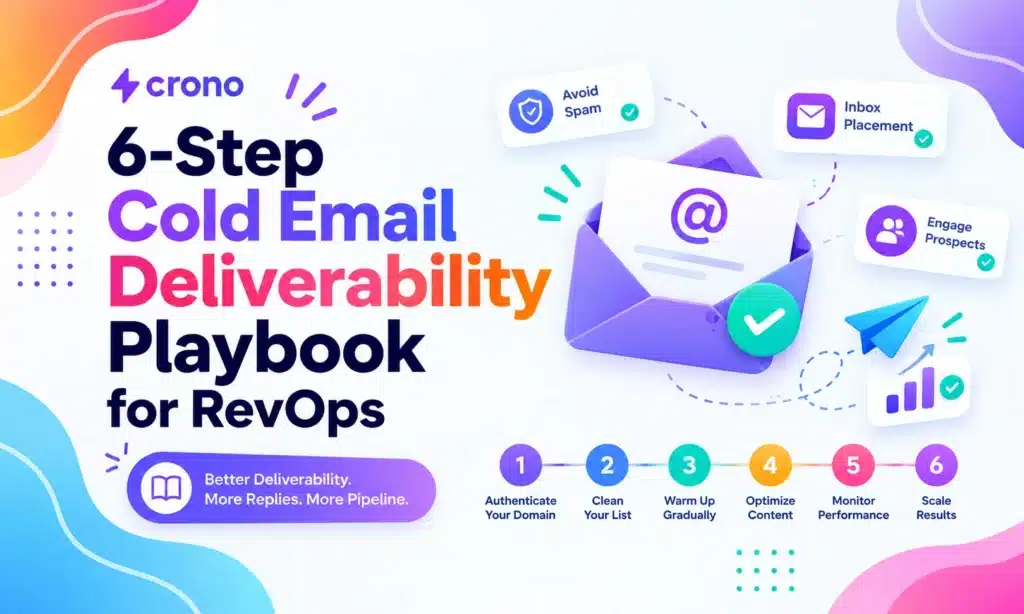
Cold email deliverability is won by technical setup and list hygiene first, not clever subject lines. Authenticate your domains with SPF, DKIM, and DMARC, warm up every new inbox, verify your lists before you send, and cap volume per inbox. Expect weeks of warm-up and ongoing monitoring: fixes here are measurable, not magic. If you do one thing today, verify your authentication records, validate your list, and run a placement test before your next campaign goes out.
TL;DR:
- Verify your SPF, DKIM, and DMARC records, and start collecting reports before sending large campaigns to ensure proper domain authentication.
- Maintain a clean list by running two-step validation and removing invalid, risky, or role-based addresses to keep bounce rates under 2 percent.
- Warm up new inboxes gradually over four to six weeks and use redundancy across multiple inboxes and domains to protect your sending reputation.
- Keep daily email volume steady at 30 to 50 per inbox after warm-up and avoid volume spikes or erratic sending patterns that harm deliverability.
- Monitor inbox placement with seed tests and Postmaster tools, and respond promptly to bounce or complaint signals to recover from reputation issues quickly.
Table of Contents
- Quick deliverability checklist you can action today
- Technical foundation: SPF, DKIM, DMARC, DNS, and sending architecture
- List quality and validation: bounce management, suppression, and data decay
- Warm-up, redundancy, and inbox rotation strategy
- Sending behavior: volume limits, ramping cadence, and provider-specific best practices
- Message and sequence design that improves inbox placement and response
- Testing, monitoring, and metrics: inbox placement tests, Postmaster tools, and thresholds
- Common symptoms and step-by-step remediation checklist
- Crono practitioner playbook: how to operationalize deliverability in a sales stack
- Author perspective: infrastructure-first cold outreach for revenue teams
- How Crono helps manage deliverability at scale
- Authoritative references and primary sources
- Sources
- FAQ
Quick deliverability checklist you can action today
Most deliverability problems trace back to five gaps, and you can close all five in under 48 hours. Work through them in order, since each step protects the ones that follow.
- Verify SPF, DKIM, and DMARC are published and aligned, and start collecting DMARC reports so you can see who is sending on your domain’s behalf, as recommended in Gmail’s sender guidelines.
- Run a two-step list validation through an enrichment source and a dedicated email verifier, then strip out invalid, risky, and role-based addresses before the next send.
- Confirm warm-up status on every inbox younger than 90 days, and pause any inbox that skipped its ramp schedule.
- Cap sends per inbox at a conservative daily number rather than pushing volume through a handful of addresses.
- Simplify your message: plain text, one call to action, no attachments, and a visible unsubscribe or reply-to-opt-out line.
- Set up Postmaster Tools for Gmail-heavy lists and start watching spam complaint and bounce rates daily for the first two weeks of any new campaign.
None of these steps require a new tool if you already run a sales engagement platform. They require someone on your team to own them on a recurring basis, which is where most cold email programs quietly fail: the checklist gets run once at setup and never again. Treat it as a weekly habit tied to whoever owns your outbound calendar, not a one-time launch task.
Technical foundation: SPF, DKIM, DMARC, DNS, and sending architecture
Authentication is the foundation everything else sits on, and it is also the piece most sales teams get wrong first. SPF tells receiving servers which mail servers are allowed to send on behalf of your domain. DKIM attaches a cryptographic signature that proves a message wasn’t altered in transit. DMARC ties the two together and tells receivers what to do when a message fails alignment, meaning the domain in the From header must match the domain authenticated by SPF or DKIM.
- Publish SPF as a single TXT record per domain; multiple SPF records will break authentication entirely.
- Set DKIM with a unique selector per sending tool so you can revoke one integration without breaking others.
- Start DMARC at
p=noneto collect reports without affecting delivery, then move top=quarantineonce alignment is consistently clean, and finallyp=reject. - Check reverse DNS (PTR records) match your sending IP to your domain, since mismatches are a common flag on dedicated IPs.
- Confirm MX records and TLS support are current; outdated MX entries or missing TLS can cause silent delivery failures.
A realistic progression plan runs over 60 to 90 days: two to three weeks at p=none while you review DMARC aggregate reports for unauthorized senders, then two to four weeks at p=quarantine to confirm nothing legitimate gets caught, then a move to p=reject once your reports show clean alignment across every sending source. The FTC’s CAN-SPAM guidance also notes that a disciplined DMARC progression helps protect domains from spoofing, which matters for compliance as much as for inbox placement. A detailed walkthrough of this exact 60 to 90 day path is available if you want step-by-step DMARC guidance.
Shared IPs pool reputation across every sender using them, so one bad actor can hurt your placement even if your own sending is clean. Dedicated IPs put the reputation entirely in your hands, which is safer once you have volume to sustain it, but risky for low-volume senders who can’t generate enough consistent activity to build trust.
Most teams should send cold outreach from a subdomain, such as outreach.yourcompany.com, rather than the root domain that handles transactional or marketing email. A subdomain isolates cold sending risk from your primary domain’s reputation, so a rough patch in outbound doesn’t threaten receipts, password resets, or newsletters.
Pro Tip: Set up a separate DMARC record for your outreach subdomain so you can monitor and adjust its policy independently from your root domain.
List quality and validation: bounce management, suppression, and data decay
A clean list matters more than almost anything else you control, because bounces and spam complaints are the two signals that most directly damage sender reputation. The fix is a waterfall validation process, not a single tool.
- Start with an enrichment source to build or refresh contact records, then run every address through a primary email validator before it touches a live sequence.
- Add a fallback validator for addresses the primary tool marks as risky or unknown rather than discarding them outright.
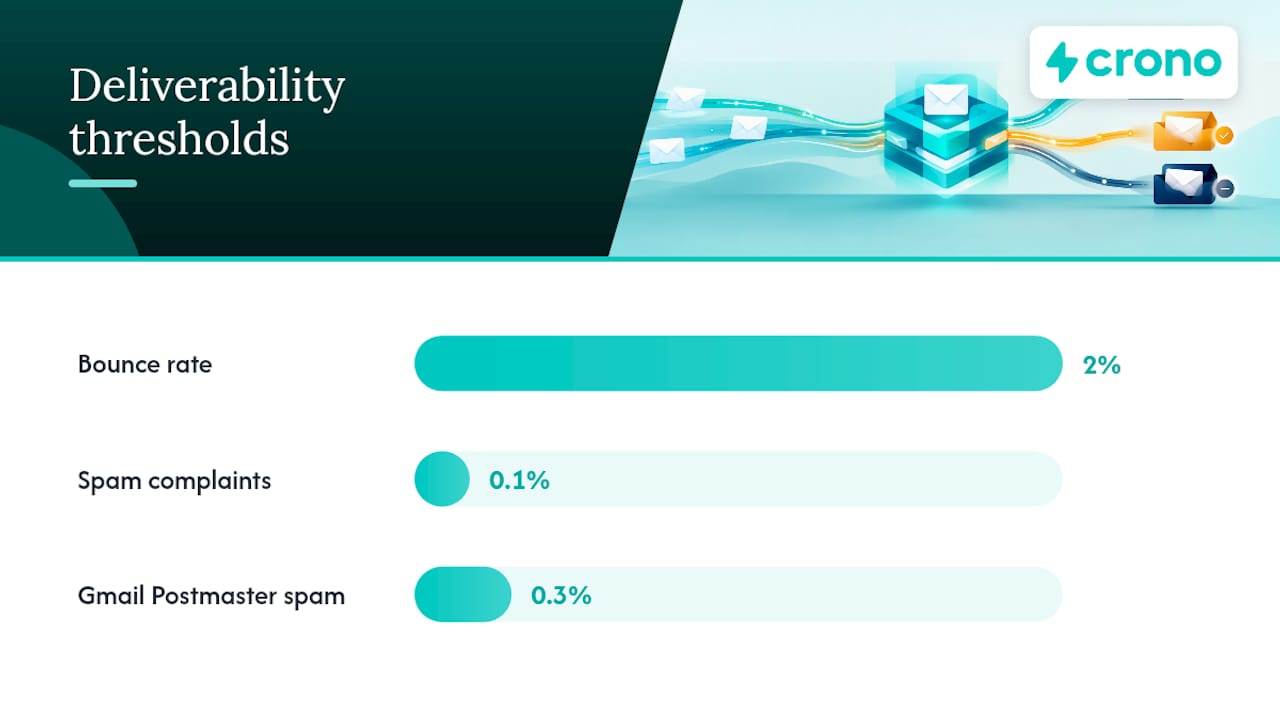
- Keep bounce rates under 2% as a working target, and treat anything above 2% to 5% as a signal to pause the campaign and re-verify the list, a range consistent with industry practitioner benchmarks for cold outreach.
- Exclude role-based addresses like
info@orsales@, since they carry higher complaint rates and rarely convert. - Avoid purchased lists entirely; they carry outdated addresses, spam traps, and contacts who never opted into anything from you.
- Reverify contacts sitting in a sequence or nurture list for more than 90 days, since email addresses decay faster than most teams expect.
- Maintain a suppression list across every tool in your stack and honor opt-out requests within the window the FTC’s CAN-SPAM Act requires, which is 10 business days.
Spam traps deserve specific attention because they don’t behave like normal bounces. A pristine trap is an address that never belonged to a real person and was seeded specifically to catch senders with bad list hygiene, while a recycled trap is an old, abandoned address a provider reactivated to catch stale lists. Both punish you the same way: a single trap hit can tank sender reputation faster than a batch of ordinary bounces. The only real defense is validation before every send and prompt removal of anything that bounces, plus building your list from enrichment and opt-in sources rather than static exports you bought once and never refreshed. Teams looking for more list-building tactics can find complementary guidance on growing an email list the right way.
Warm-up, redundancy, and inbox rotation strategy
New inboxes and new domains need to earn trust before receivers will treat their mail as legitimate, and skipping this step is the single most common reason cold campaigns land in spam from day one. Warm-up simulates normal human email behavior at low volume so mailbox providers build a positive history before you ask them to trust bulk outbound traffic.
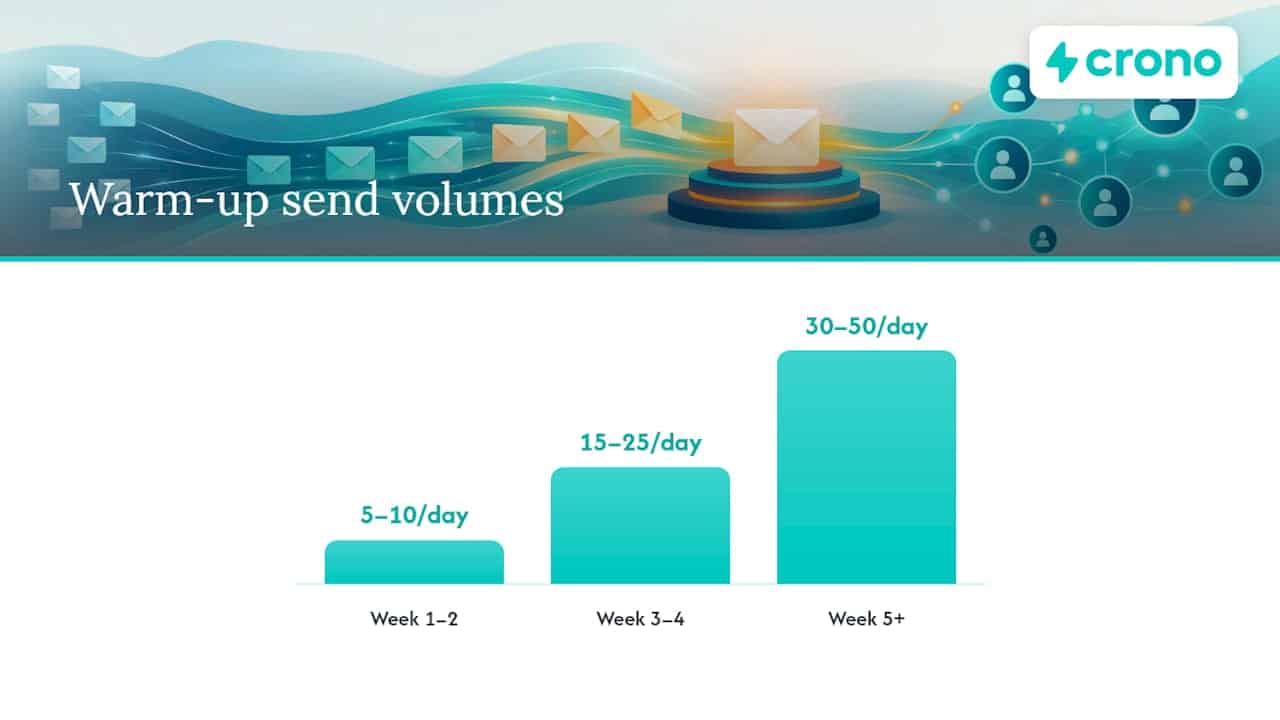
- Week 1 to 2: Send 5 to 10 emails per day per inbox, mostly to colleagues or engaged contacts who will open, reply, and occasionally move the message out of spam.
- Week 3 to 4: Increase to 15 to 25 emails per day, introducing a mix of real prospecting sends alongside warm-up traffic.
- Week 5 and beyond: Scale toward your steady-state volume, typically 30 to 50 per day per inbox, only after bounce and complaint rates stay clean for two consecutive weeks.
Primary domains, meaning the one your company uses for everyday business email, behave differently than cold outreach domains because they already carry years of transactional trust. That’s exactly why cold sending should live on a dedicated subdomain: a reputation hit on outreach traffic shouldn’t threaten the domain your invoices and support replies depend on.
Redundancy means spreading sending across multiple inboxes, domains, and where budget allows, multiple providers, so no single point of failure can take down an entire campaign. If one inbox gets flagged, the others keep running while you diagnose and fix the problem. Rotating sends across inboxes also keeps volume per address low, which is itself a reputation-protecting move.
When a domain does get burned, meaning it’s consistently landing in spam or getting blocked, the fix is rarely quick. Pause outbound sending entirely, let the domain sit for several weeks with light, engagement-only traffic, and rebuild trust gradually rather than resuming full volume immediately. Practitioners generally expect a secondary domain to take months of careful warm-up before its reputation matches a domain that’s been sending cleanly for a year or more.
Pro Tip: Never launch a new domain straight into full-volume outbound. Give it at least four weeks of graduated warm-up traffic before it touches a real prospecting sequence.
Sending behavior: volume limits, ramping cadence, and provider-specific best practices
Volume is one of the clearest signals mailbox providers use to separate legitimate senders from spammers, and the fix is almost always to add capacity rather than push harder through what you already have.
- Keep steady-state sending around 30 to 50 emails per day per inbox once warm-up is complete; spiking volume, even briefly, resets trust faster than it built it.
- Scale a campaign by adding more warmed inboxes and domains, not by raising the ceiling on the ones you already have.
- Watch for SMTP error codes like 4.7.28 from Gmail, which typically signal a temporary rate or reputation issue rather than a permanent block, per Gmail’s sender guidance.
- Follow provider-specific enrollment steps for high-volume sending programs, since Microsoft and other mailbox providers publish separate requirements for high-volume senders that differ from standard sending rules.
- Keep a consistent daily cadence rather than sending in bursts; mailbox providers read erratic volume patterns as a spam signal even when total weekly volume is unchanged.
Outlook and Gmail read signals slightly differently, which is why monitoring both matters if your prospect list spans providers. Gmail leans heavily on Postmaster Tools data and complaint rate, while Outlook’s high-volume sender requirements focus more on authentication compliance and consistent sending patterns over time. Neither provider publishes an exact volume cap, since the real signal is reputation built through consistent behavior rather than a hard number you can hit and stop worrying about.
Message and sequence design that improves inbox placement and response
Content still matters, but its job is to avoid tripping filters and to earn replies, not to work around a broken foundation. A well-written email sent from an unauthenticated, unwarmed domain will still land in spam.
- Keep first-touch emails between 50 and 125 words; the strongest performers tend to stay under 80 words.
- Skip HTML-heavy templates, images, and attachments, which spam filters weigh more heavily than plain text.
- Use one link at most, and only when the message genuinely needs it.
- Build sequences of 3 to 5 follow-ups, widening the gap between each one and shifting the angle rather than repeating the same ask.
- Personalize beyond a first name: reference something specific to the recipient’s role, company, or recent activity to lift reply rates and reduce complaint risk.
Replies and opens both matter as engagement signals, but replies carry more weight because many mail clients suppress open tracking for messages that land in spam, making opens an unreliable early indicator. A jump in complaint rate almost always traces back to either a mismatched offer or a sequence that ignores earlier non-responses and keeps pushing the same message. Teams that want a deliverability-friendly starting point can adapt a cold email template built for B2B software rather than starting from a blank page.
Pro Tip: Write your first follow-up as if the prospect never saw the original, since most didn’t. A new angle outperforms a reminder every time.
Testing, monitoring, and metrics: inbox placement tests, Postmaster tools, and thresholds
You can’t manage what you don’t measure, and deliverability without monitoring is just guessing with better vocabulary. Two systems matter most: inbox placement testing before you scale a campaign, and provider dashboards once it’s live.
- Run a placement test by sending to a panel of seeded addresses across major providers and checking whether messages land in the inbox, promotions, or spam, giving you a snapshot before real prospects are exposed.
- Set up Gmail Postmaster Tools for any domain sending meaningful volume to Gmail addresses, and Microsoft SNDS for Outlook-heavy lists.
- Watch bounce rate and keep it under 2%, treat spam complaints above 0.1% as an active warning sign, and monitor Postmaster’s spam rate metric, which Gmail recommends keeping below 0.3% to avoid throttling or classification as spam.
- Check DMARC aggregate reports weekly to catch unauthorized senders or alignment failures before they escalate.
- Build in a monitoring cadence, daily for the first two weeks of any new domain or campaign, weekly once metrics stabilize.
Gmail’s spam rate threshold of 0.3% reported through Postmaster Tools is one of the few hard numbers mailbox providers publish, and crossing it consistently is a fast route to inbox restrictions on that domain, according to Gmail’s own guidance.
Provider dashboards don’t agree perfectly with each other, since Gmail, Outlook, and Yahoo each weigh signals slightly differently, which is exactly why a placement test across providers before a big send matters more than trusting a single dashboard.
Common symptoms and step-by-step remediation checklist
Deliverability problems tend to announce themselves through a small set of symptoms, and matching the symptom to the right first check saves days of guessing.
- Sudden drop in replies or out-of-office responses usually points to a placement problem rather than a targeting problem, since OOO auto-replies are one of the more reliable early signals that mail is reaching the inbox at all.
- Rising bounce rate means stop sending immediately and re-run list validation before another message goes out.
- Spam complaints climbing above 0.1% means pause the sequence, review the message for anything that reads as generic or pushy, and check that unsubscribe requests are actually being honored.
- Consistent landing in spam across multiple test inboxes means shift volume to a warmed secondary domain while you diagnose the primary, rather than continuing to burn the affected one.
- No improvement after two weeks of reduced volume is the point to bring in deliverability expertise, since persistent problems at that stage usually involve a blocklist listing or a deeper authentication misconfiguration.
Recovery timelines vary, but a domain that catches a problem early and responds with reduced volume and a validated list often stabilizes within two to four weeks. A domain that’s been flagged for longer, or landed on a blocklist, can take considerably longer and may never fully recover the reputation it had before. Success looks like bounce and complaint rates back under threshold for two consecutive weeks, not a single good day.
Crono practitioner playbook: how to operationalize deliverability in a sales stack
Running this checklist manually across a growing list of domains and inboxes gets unwieldy fast, which is the practical reason to build it into your existing sales workflow rather than a separate side process.
- Enrichment and verification can sit in the same workflow that builds your prospect list, so bad addresses get filtered before they ever reach a sequence.
- Multichannel routing lets you shift a contact to LinkedIn or a call when email engagement drops, protecting your sending reputation instead of pushing harder on a channel that’s already showing warning signs.
- Automated reply routing surfaces out-of-office and bounce signals to the right person immediately, instead of sitting unnoticed in an inbox.
- Workflow rules can pause a sequence automatically when bounce or complaint thresholds are crossed, rather than relying on someone to check a dashboard daily.
The goal isn’t to add another tool to babysit. It’s to fold deliverability checks into the same system your team already uses to run outreach, enrich contacts, and manage pipeline, so the discipline survives past the first week of a new campaign.
Author perspective: infrastructure-first cold outreach for revenue teams
Most teams treat deliverability as a copy problem because copy is the part they can control without touching DNS records. That instinct is backwards. A great subject line sent from an unauthenticated domain still lands in spam, and the fix that actually moves the needle almost always sits in infrastructure and list quality, not the fourth rewrite of your opening line.
Deliverability belongs in RevOps, not in the hands of whoever writes the sequences. Someone needs to own authentication status, bounce thresholds, and warm-up schedules the same way someone owns pipeline hygiene. Run the checklist from this guide against one active sequence this week. You’ll likely find at least one gap, and closing it will do more for your reply rate than another round of subject line testing.
How Crono helps manage deliverability at scale
The playbook in this guide works with any tools you’re already running. Crono was built to make it easier to run consistently, especially once you’re managing multiple domains, inboxes, and sequences at once rather than a single campaign.
- Enrichment and list validation happen inside the same workflow that builds your prospect lists, reducing the gap between finding a contact and confirming the address is real.
- Multichannel orchestration across email, LinkedIn, and calls means a flagged inbox doesn’t have to stall an entire sequence.
- Workflow automation can pause sends automatically when bounce or complaint signals cross the thresholds covered above.
None of this requires abandoning the manual checklist, and plenty of teams run the entire playbook without a platform behind it. For teams that want it built into their daily workflow rather than tracked across spreadsheets and separate tools, Crono’s pricing plans start with Pro and Ultra tiers, and the Agentic Sales Engine adds credit-based automation for enrichment and outreach at scale. If you’re evaluating a unified platform for your sales stack, consider how workflows connect before your next campaign launches.
Authoritative references and primary sources
For technical specs and legal requirements, go directly to the source rather than a secondhand summary.
- Gmail sender guidelines for authentication and Postmaster thresholds.
- FTC CAN-SPAM compliance guide for legal requirements on commercial email.
- Spamhaus DNSBL whitepaper for how blocklists affect shared and dedicated IPs.
Sources
- CAN-SPAM Act Compliance Guide for Businesses — FTC
- Email sender guidelines – Gmail Help
- Strengthening the email ecosystem — Microsoft Tech Community
FAQ
What does cold email deliverability mean?
Cold email deliverability is the rate at which your cold outreach messages reach a recipient’s inbox rather than spam or getting blocked entirely. It depends on domain authentication, sender reputation, list quality, and sending behavior, not on message content alone.
What is the 30/30/50 rule for cold emails?
Definitions vary across practitioners, and no single authoritative source defines a universal 30/30/50 rule for cold email. If your team uses a version of it internally, treat it as a working guideline rather than an industry standard, and prioritize the authentication, warm-up, and volume benchmarks covered in this guide instead.
How do I check my cold email deliverability?
Run an inbox placement test that sends to seeded addresses across major providers and shows whether your mail lands in the inbox, promotions, or spam. Pair that with ongoing monitoring through Gmail Postmaster Tools, tracking bounce rate, spam complaints, and Postmaster’s spam rate metric against the thresholds described above.
Does cold emailing still work?
Cold email still works when the infrastructure behind it is solid: authenticated domains, warmed inboxes, clean lists, and disciplined volume. Programs that skip those fundamentals and rely purely on message copy tend to see declining reply rates and rising spam placement over time.
