
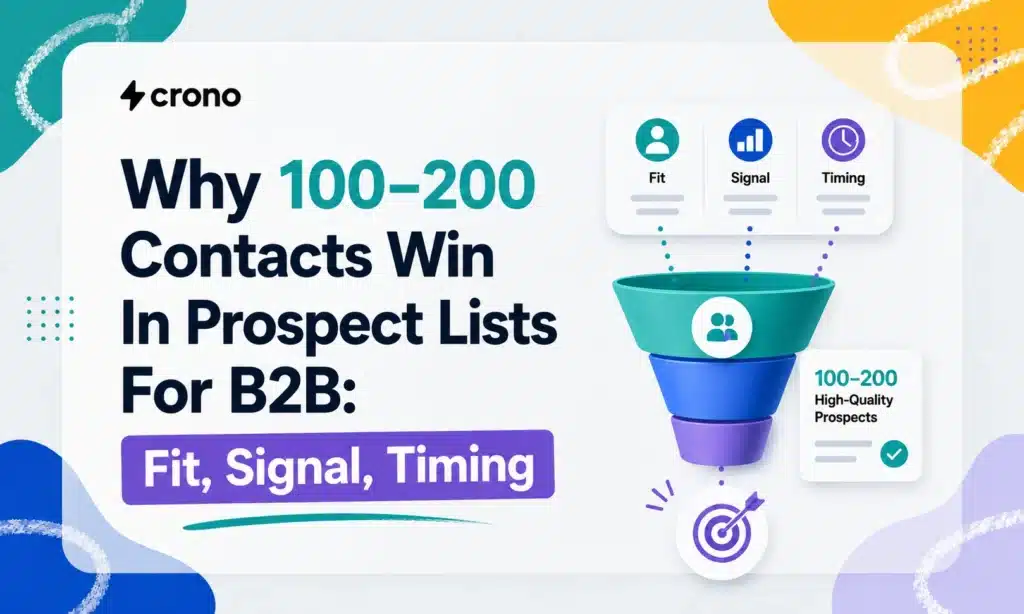
Prospect list building comes down to six steps: define your ideal customer profile, source contacts against it, enrich and verify the data, prioritize by fit and readiness, load everything into your CRM, then measure and iterate. A tight list of 100 to 200 verified contacts outperforms a bloated file of thousands you’ve never checked. Platforms like Crono exist specifically to run this workflow without forcing your team to stitch together five disconnected tools.
Step-By-Step Workflow: Define Your ICP and Qualification Gates
Most prospecting problems start before anyone opens LinkedIn. They start with an ideal customer profile built on guesses instead of evidence.
Pull your last 20 to 30 closed-won deals and look for what actually repeats: company size, industry, tech stack, funding stage, and the title of whoever signed. This is your firmographic and technographic baseline, and it’s far more reliable than a persona invented in a conference room. Cross-reference those wins against your losses. If both groups share a trait, drop it from your ICP. It isn’t predictive.
Here’s where most teams overcorrect. They build an ICP with ten or twelve criteria, thinking specificity equals precision. It doesn’t. Every added filter shrinks your addressable market, and beyond three or four predictive criteria, you’re mostly excluding good-fit accounts for reasons that never actually drove your past wins. Keep the list short:
- Company size (employee count or revenue band tied to your best-performing segment)
- Industry or vertical (only if it showed up consistently in win data)
- Tech stack or tooling (a signal that predicts fit, not just interest)
- Buying trigger (a recent event that correlates with urgency)
That fourth criterion is where the Fit, Signal, and Timing heuristic starts to matter. Fit tells you whether an account matches your ICP at all. Signal tells you whether something changed recently that makes them receptive. Timing tells you whether now, specifically, is the moment to reach out. You’ll use all three again later to score and route prospects, but the gate starts here, at list construction, not after the list exists.
Action to take today: export your last quarter of closed-won records, tag the four fields above, and run a simple pivot table. Patterns usually surface within an hour. If they don’t, your win data may be too thin to define an ICP yet, and it’s worth studying B2B prospecting in the AI era for how other teams solved that same gap.
Where Do You Find Prospects Who Match Your ICP?
Once your ICP is set, sourcing is mostly about picking the right channel for the signal you’re chasing. Different channels surface different kinds of evidence, and mixing them raises your confidence in any single match.
- LinkedIn Sales Navigator: filter by title, company size, and recent job changes; a role change inside 90 days is often a stronger buying signal than title alone.
- Job boards: a company hiring three sales ops roles in one quarter is quietly telling you it’s scaling its go-to-market function.
- Company news and press releases: funding announcements, new offices, and leadership hires are trigger events with a shelf life of weeks, not months.
- Tech stack directories: tools like BuiltWith reveal what a company already runs, which tells you what integrates with or replaces your product.
- Public filings: SEC filings and state business registries confirm size, ownership, and sometimes budget authority that press coverage glosses over.
A Boolean X-ray search on LinkedIn (site:linkedin.com/in “VP of Sales” “Series B”) finds people search filters miss. Google Alerts on funding keywords catches triggers before your competitors do. Combining two channels, say a hiring signal plus a tech stack match, gives you a materially more confident target than either signal alone.
Buying a list is occasionally justified, but only for a small, audited sample you verify yourself before scaling spend. Never load a purchased file straight into your sequences.
Pro Tip: *Run any purchased sample through your verification tool before judging it.
What Fields Belong in a Prospect List Template?
A workable prospect list needs a minimum set of columns to be outreach ready, plus a second tier of enrichment fields that make prioritization and personalization possible.
At minimum, you need company name, contact name, title, a verified email, and a LinkedIn profile URL. Skip any of these and your sequence either bounces or reaches the wrong person.
- Company name and domain
- Contact name and title
- Verified email address
- LinkedIn profile URL
- Direct dial (when available)
Beyond that baseline, enrichment fields turn a contact record into a targeting asset: tech stack, most recent funding round, headcount growth, and a trigger event. That last field, a one-line note on why this contact matters right now, is what actually moves reply rates. A contact tagged “just hired a VP of Sales” gets a different opening line than one with no context at all, and that context is what makes personalization lift measurable instead of theoretical.
| Field | Minimum or Enriched | Purpose |
|---|---|---|
| Company name | Minimum | Identifies the account |
| Verified email | Minimum | Enables deliverable outreach |
| LinkedIn URL | Minimum | Confirms identity, supports multichannel touch |
| Direct dial | Enriched | Supports call cadences |
| Trigger event | Enriched | Drives personalization and timing |
When importing, assign a unique ID per row, stamp a “last verified” timestamp, and record the source column. Without that metadata, you’ll have no way to tell a fresh contact from one that’s been sitting untouched for six months.
How Do You Enrich and Verify Prospect Data?
Enrichment and verification solve two different problems, and conflating them is a common reason lists underperform. Enrichment fills in missing fields, like a phone number or a funding date. Verification confirms the data you already have is accurate and deliverable right now.
The waterfall approach runs a contact through multiple enrichment sources in sequence, pulling from whichever source returns the most complete, most recent match. Multi-source enrichment consistently yields more usable contacts than relying on a single provider, because no individual data source has full coverage on its own.
- Run enrichment first to fill missing fields (title, direct dial, tech stack).
- Verify every email before the first send, no exceptions.
- Reverify contacts sitting in a list for more than 60 to 90 days, since job changes and email churn compound over time.
- Flag and remove role-based addresses (info@, sales@), suspicious domains, and any address that fails a mailbox ping.
Statistic Callout: A focused, verified list of 100 to 200 high-fit contacts tends to outperform a much larger unverified file, because deliverability and relevance compound: fewer bounces protect sender reputation, which protects the reach of every future send.
How Do You Prioritize Prospects With Fit, Signal, and Timing?
Not every contact on a qualified list deserves the same effort. The Fit, Signal, and Timing heuristic gives you a repeatable way to decide who gets a hand-crafted sequence and who gets a lighter-touch campaign.
- Fit measures how closely an account matches your firmographic and technographic ICP criteria.
- Signal captures whether a trigger event, like a funding round or a leadership change, makes the account receptive right now. Trigger events consistently outperform cold firmographic targeting alone.
- Timing estimates whether the account is inside an active buying window, based on hiring pace, budget cycles, or renewal dates.
Score each dimension 1 to 3 and add them. A 7 to 9 lands in Tier 1: multichannel, personalized, SDR-owned. A 4 to 6 goes into Tier 2: templated sequence with light customization. Anything below 4 sits in a nurture cadence until a new signal fires. This routing logic keeps your best reps focused on the accounts most likely to close, instead of spreading effort evenly across a list where most contacts were never going to convert this quarter.
How Should You Load and Route Prospects Into Your CRM?
Your CRM, not a spreadsheet, should be the canonical source of prospect data. Centralizing records in the CRM prevents duplicate outreach, keeps routing logic consistent, and preserves the verification metadata you’ll need later for reporting.
- Use email address and LinkedIn URL as your dedupe keys; title alone creates false duplicates across job changes.
- Map enrichment fields (trigger event, tech stack) into custom CRM properties so sequence logic can reference them.
- Assign Tier 1 contacts to SDR-owned, multichannel sequences with a 24-hour first-touch SLA.
- Assign Tier 2 and Tier 3 contacts to templated, automation-driven sequences with longer cadences.
- Add an automation gate that blocks any contact without a “verified” flag from entering a sequence.
Pro Tip: Build the verification gate as a hard stop, not a warning. Reps will click past a warning under deadline pressure; a hard block won’t let them.
Platforms built for outbound sales automation can handle this routing without a manual handoff between your enrichment tool, your CRM, and your sequencer, which is usually where lists quietly go stale.
Which KPIs Show Whether Your List Is Working?
Bounce rate, deliverability, reply rate, meeting rate, and conversion to opportunity are the five metrics that tell you whether a list is worth scaling or needs to be cut.
- Set a test window of at least two weeks and a minimum sample of 100 contacts before drawing conclusions.
- Run A/B tests on one variable at a time: subject line, send time, or trigger-event messaging.
- A bounce rate above 3 to 5% signals a verification failure, not a messaging problem.
Statistic Callout: Teams that treat their prospect lists as living assets rather than one-time exports, verifying and refreshing on a schedule, report steadier reply and meeting rates over time. Prune segments below your baseline reply rate; scale segments that beat it.
What Compliance and Deliverability Rules Apply to Outreach?
The CAN-SPAM Act requires every commercial email to identify the sender honestly, include a working unsubscribe link, and avoid deceptive subject lines. These aren’t optional best practices; they’re legal requirements for anyone sending outreach at volume.
- Authenticate your sending domain with SPF, DKIM, and DMARC before ramping send volume.
- Remove hard bounces immediately rather than letting them accumulate across campaigns.
- Limit daily send velocity per mailbox to protect domain reputation.
- Keep a record of data source and, where required, consent basis for each contact.
- Escalate to legal or privacy counsel when sourcing data from jurisdictions with stricter consent rules than your own.
How Does Crono Support This Workflow in Practice?
A trigger event, say a Series A raise, sets the whole workflow in motion. Crono can flag the account against your ICP criteria, pull enrichment from multiple sources, run verification automatically, and route the resulting contact into a priority sequence, all without a rep manually touching five separate tools.
- Signal detection surfaces accounts the moment a qualifying trigger fires.
- Enrichment and verification run in the same flow, cutting the lag between sourcing and outreach readiness.
- CRM routing assigns tiered contacts to the right sequence automatically, based on the Fit, Signal, and Timing score.
- Multichannel execution (email, LinkedIn, calls) fires from the same record, so reps aren’t rebuilding context across tools.
Teams exploring how AI changes prospect discovery generally find the biggest gains come from cutting the handoff time between signal and first touch, not from sourcing more names.
What Should You Do This Week?
Run this checklist before your next outbound push: verify every email, set dedupe keys on email and LinkedIn URL, assign Fit, Signal, and Timing scores, launch one small A/B test, and watch bounce rate daily for the first two weeks.
The mistakes I see most often are skipping verification to hit a volume target, inflating the ICP until it fits everyone, and ignoring early deliverability warnings until sender reputation is already damaged. Fix those three things this week and your reply rates will move before your list size does.
Ready to Run This Workflow Without the Manual Handoffs?
Building a prospect list by hand across five disconnected tools is slow, and every manual handoff is a place where verification gets skipped or a duplicate slips through. Crono is the alternative to stitching together separate enrichment, verification, and sequencing tools: it runs the entire six-step workflow, from signal detection to CRM routing to multichannel execution, inside one connected flow, so your team spends time on outreach instead of data cleanup.
If you want to see how the Fit, Signal, and Timing scoring works against your own CRM data, request a walkthrough of Crono’s platform or read the full breakdown of B2B sales techniques built for prospecting at scale to see the workflow applied to a real pipeline. Either is a faster starting point than building your next list from a blank spreadsheet.
Sources
- CAN-SPAM Act: A compliance guide for business | FTC
- Research: Customer referrals are contagious | Harvard Business Review
- Lead generation strategies: 17 tactics that work in 2026 | SalesEcho
