

Sales tool consolidation means reducing the number of overlapping tools your revenue team pays for, trains on and maintains, and moving their work into fewer systems that share data and workflows. Done well, it lowers cost, cleans up data and gives reps back selling time. Done badly, it just swaps a messy stack for a messy migration. This guide shows how to audit what you have, decide what to keep, combine or retire, manage the risks, and prove the result.
TL;DR
- Consolidation is about fewer, better-connected systems, not a lower tool count for its own sake. Adoption, workflow design and ownership decide whether it pays off.
- Start with an audit of utilization, overlap, integration, outcome linkage and switching cost, then sort every tool into keep, optimize, consolidate, replace or retire.
- Protect data first: map dependencies, export what you need, and archive or purge the rest before anything is switched off.
- Migrate in phases, one workflow at a time, and measure with a baseline you set before the first cancellation.
- Keep your CRM as the system of record and consolidate execution (prospecting, enrichment, outreach, orchestration) around it.
Table of Contents
- What sales tool consolidation actually covers
- Why teams consolidate, and what the numbers say
- Signs your stack needs consolidating
- Step 1: Audit what you actually run
- Step 2: Decide keep, optimize, consolidate, replace or retire
- Step 3: Assess the risks before you cancel anything
- Step 4: Migrate in phases and keep essential workflows running
- Step 5: Measure whether consolidation worked
- A worked example: eight tools down to four
- Consolidate execution around the CRM, not instead of it
- Our perspective
- Where Crono fits
- Common mistakes to avoid
- FAQ
- Sources
What sales tool consolidation actually covers
A sales stack is rarely one decision. It is the sum of tools bought by different people at different times to fix different problems. Forrester’s view of the space shows how wide it is: sales enablement technology covers content and readiness tools that help sellers with “what to know and what to show”, while sales operations technology spans conversation intelligence, revenue intelligence, sales engagement, CPQ, revenue operations, SFA/CRM, sales performance management and intelligent virtual assistants.
In practice, most teams consolidate in these layers:
- Data and enrichment: contact databases, email and phone finders, intent and signal feeds.
- Prospecting and list building: tools that decide who to target and build the lists.
- Engagement: email sequencers, LinkedIn automation, dialers.
- Intelligence: call recording, conversation analysis, forecasting and pipeline analytics.
- Workflow and orchestration: the glue, whether native or built with middleware and spreadsheets.
- System of record: the CRM, which is almost never what you retire.
The last point matters. Consolidation does not mean ripping out your CRM. It means deciding how many separate systems sit around it and how well they talk to it.
Why teams consolidate, and what the numbers say
The pressure is real and well documented. A Salesforce survey of 7,775 leaders in 38 countries, cited by the Revenue Enablement Institute, found respondents using an average of 10 tools to close deals, with 94% of sales-operations professionals planning to consolidate their stack within 12 months. Closer to home, Zapier’s survey of more than 450 U.S.-based RevOps professionals found that 70% had five or more apps in their RevOps stack and one-fifth had 10 or more.
Those are not abstract figures. Each extra tool adds a login, a training burden, a renewal date, an integration to maintain and another place where a contact record can drift out of sync. The usual benefits of consolidating are:
- Lower and more predictable spend. Fewer overlapping licenses, fewer middleware subscriptions, fewer surprise renewals.
- Cleaner data. One enrichment path and one activity log mean fewer duplicates and conflicting fields.
- Faster ramp and higher adoption. New reps learn three systems instead of eight.
- Clearer reporting. When activity, signals and pipeline live closer together, attribution gets simpler.
- Easier executive sponsorship. Forrester notes that enablement leaders want fewer solutions, or one vendor, because simpler needs are easier for executives to understand, sponsor and fund.
The trade-offs to accept up front
Consolidation has costs, and pretending otherwise is how projects stall. You may lose a best-in-class feature in one niche. You will spend rep time on migration. You concentrate vendor risk. And Gartner’s guidance is blunt that reducing the tool count is not enough: adoption, workflow design, governance and operational ownership determine whether consolidation produces value. A smaller stack that nobody uses is still a failed stack.
Signs your stack needs consolidating
You do not need a survey to know. Look for these symptoms:
- Reps ask “which tool do I use for this?” more than once a week.
- Two or more tools enrich the same contacts, and nobody can say which result is correct.
- Sequences run in one tool while replies and meetings get logged by hand in another.
- RevOps spends more time fixing integrations than building reports.
- Renewals arrive and nobody can name the owner or the outcome the tool supports.
- Pipeline numbers differ depending on which dashboard you open.
If three or more are true, an audit will almost certainly pay for itself.
Step 1: Audit what you actually run
Start with an inventory, but do not stop there. An inventory only describes; an audit makes a judgment on each tool. One practical audit method evaluates every tool on utilization, overlap, integration, outcome linkage and switching cost, and recommends calculating total cost of ownership rather than just license price, including administration time, middleware and agency fees.
Build a simple sheet with one row per tool and these columns:
| Column | What to record |
|---|---|
| Owner | The named person accountable for the tool |
| Users | Licensed seats versus people who logged in during the last 30 days |
| Function | What job it does (data, engagement, intelligence, workflow) |
| Overlap | Which other tools do part of the same job |
| Integrations | What it connects to, and whether natively or through middleware |
| Outcome | The metric it supports (meetings booked, reply rate, forecast accuracy) |
| Total cost | Licenses, admin hours, middleware, services |
| Renewal and notice | Date and cancellation window |
| Exit cost | Data export options, contract lock-in, retraining effort |
Two habits make the audit honest. First, pull usage from the tool’s admin panel, not from what the owner says. Second, record total cost, not the headline license. A $40-per-seat tool that needs eight hours of monthly admin and a middleware subscription is not a $40 tool.
Step 2: Decide keep, optimize, consolidate, replace or retire
A workable framework sorts each tool into one of five outcomes, after checking dependencies, exports, contractual lock-ins, reports and automations:
- Keep: high usage, unique function, clean integration. Leave it alone.
- Optimize: useful but underused or badly configured. Fix adoption before judging the tool.
- Consolidate: its function is duplicated elsewhere. Merge the work into the stronger system.
- Replace: the job matters but the tool is weak or poorly connected.
- Retire: low usage, low uniqueness, no tied outcome.
A quick usage-versus-uniqueness grid helps. Tools with low usage and low uniqueness are the first cuts. Tools with high usage but low uniqueness are merge candidates: keep the function, drop the standalone vendor.
Criteria that separate good consolidation targets
When you evaluate a platform that would absorb several tools, test it against concrete criteria, not a feature checklist:
- Does it keep your CRM as the system of record? A consolidation that forces a CRM migration is a different, riskier project.
- Are the integrations native and deep? Two-way sync of fields, activities and statuses, not a one-way push.
- Can it handle the full outbound motion? Signals, enrichment, list building, multichannel outreach and pipeline visibility.
- Does it work for both people and AI agents? Automation should run inside the same workflows reps use, with human review where it matters.
- Is pricing predictable? Per-seat plus clearly metered credits beats opaque usage billing.
- Can you export your data? Exit cost is part of the decision, even for the tool you choose.
Step 3: Assess the risks before you cancel anything
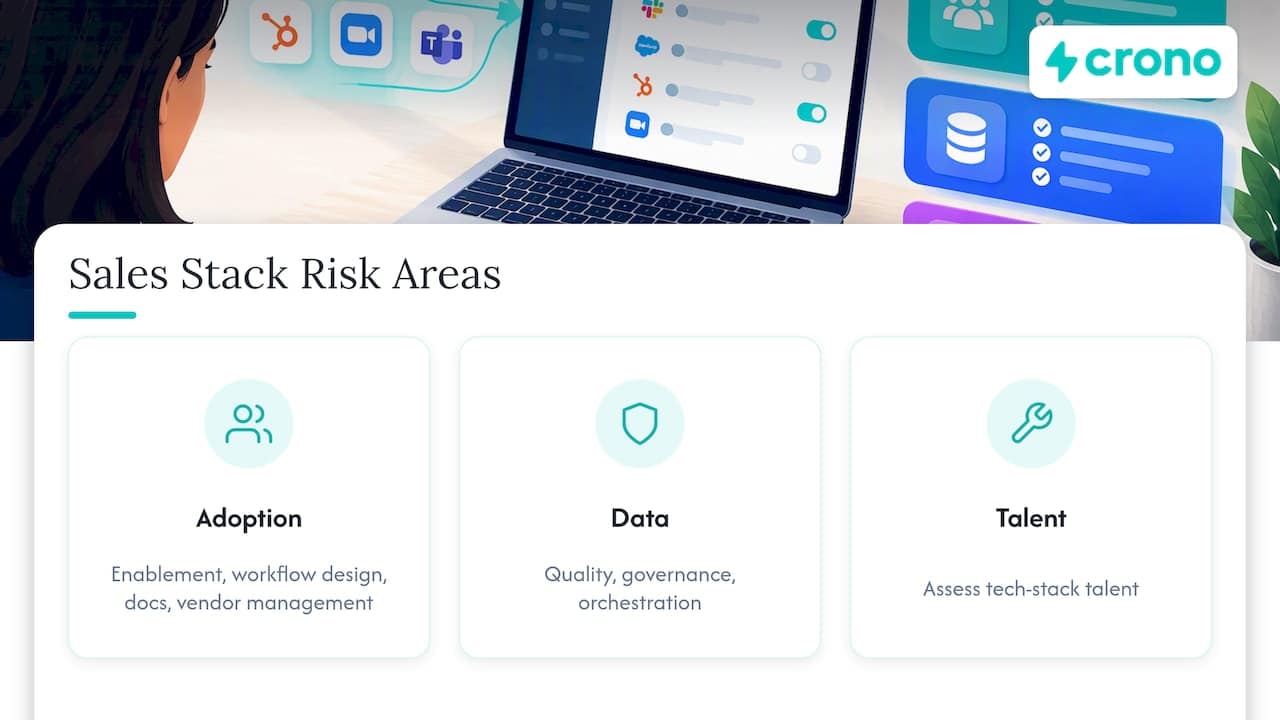
Gartner’s sales-technology guidance divides an effective stack into three areas: adoption, data management and tech-stack talent. Adoption depends on user-centric enablement, workflow design and documentation, and vendor management, while data management requires quality, governance and orchestration. That maps neatly onto the risks you need to check.
Data risk
Map every field and object each tool writes to your CRM. Identify which tool is the source of truth for each one. Export historical activity, sequences, notes and enrichment data before the contract ends, since many vendors delete data soon after termination. Decide what to archive and what to purge. Stale, duplicated or unconsented contact data is a liability, so a migration is a good moment to clean it, as long as you keep what drives insight.
Workflow risk
List the automations that depend on each tool: routing rules, alerts, scoring, sync jobs, Slack notifications, reports. These break silently. Document each one, then rebuild and test it in the new system before the old one is switched off.
Cost risk
Compare total cost of ownership before and after, including migration hours, a possible overlap period when you pay for both systems, and credit or usage costs in the new platform. Watch for contractual lock-ins: an annual contract with an auto-renewal clause can set your timeline for you, so calendar every notice date.
Adoption risk
This is the one that sinks projects. Name a business owner for the consolidated system, not just an IT admin. Involve two or three reps in the design. Write short how-to documentation for the five things a rep does daily. Retire the old tool on a published date, so people do not run two systems indefinitely.
Vendor risk
Putting more work in one system increases your dependence on it. Ask about uptime history, data export, API access, support response times and what happens to your data if you leave.
Step 4: Migrate in phases and keep essential workflows running
A phased approach keeps pipeline moving while you change the machinery. A sequence that works for most mid-market teams:
- Freeze new purchases. Require a written overlap check before any new tool is bought.
- Pick the first workflow. Start with the one that has the clearest overlap and lowest revenue risk, often enrichment or list building.
- Run a pilot. One pod or segment uses the consolidated workflow for two to four weeks, while the old tool stays available.
- Compare against baseline. Check reply rates, meeting rates, data accuracy and rep time against numbers captured before the pilot.
- Roll out and retire. Move the remaining team, set the sunset date, export and archive the old data, then cancel at the contract window.
- Repeat for the next layer. Engagement next, then reporting and orchestration.
If you are building the workflow layer itself, our sales workflow automation templates give RevOps teams four ready starting points, and our guide to B2B sales orchestration explains how signals, tasks and channels fit together in one flow.
Step 5: Measure whether consolidation worked
Set the baseline before the first cancellation. Without it you will end up arguing about whether things improved. Track a short list:
| Metric | Why it matters | Direction you want |
|---|---|---|
| Total tool spend per rep | Shows license and admin savings | Down |
| Number of systems a rep touches daily | Proxy for friction | Down |
| Weekly active usage of the remaining tools | Shows real adoption | Up |
| Time from new signal to first touch | Shows execution speed | Down |
| Reply and meeting-booked rates | Shows outreach quality held up | Stable or up |
| Data accuracy (bounce rate, duplicate rate) | Shows data quality | Better |
| Forecast accuracy and pipeline hygiene | Shows reporting trust | Better |
Review at 30, 60 and 90 days. Gartner’s advice is to scale up what works and scale down what does not, which applies to the consolidated stack as much as to the old one. Pipeline hygiene is a good early indicator, and a weekly check on a few core fields will catch drift quickly: see our pipeline hygiene audit for the four fields we look at.
A worked example: eight tools down to four
Take a hypothetical 15-person outbound team. It runs a contact database, a separate email finder, a LinkedIn automation tool, an email sequencer, a dialer, a conversation-intelligence tool, a spreadsheet for lead scoring and a middleware subscription holding it all together, plus the CRM. The numbers below are illustrative, not a customer result.
- Audit finding: the database, email finder and spreadsheet scoring all do part of the same job. The sequencer and LinkedIn tool run separate cadences against the same prospects, so people get contacted twice in the same week.
- Decisions: keep the CRM and the conversation-intelligence tool. Consolidate enrichment, scoring, sequencing and LinkedIn outreach into one execution layer. Retire the middleware once native sync replaces it. Optimize the dialer by connecting it to the same activity log.
- Result on paper: from eight tools around the CRM to four, one enrichment path, one cadence per prospect, and one place to see what happened.
The point is not the count. It is that every remaining tool has a clear job, an owner and an outcome.
Consolidate execution around the CRM, not instead of it
Most teams should not try to collapse everything into a single suite. Suites tend to be strong at one thing and merely adequate at the rest, and a forced CRM swap multiplies risk. A more reliable pattern is to keep the CRM as the record, and add one execution layer that connects signals, enrichment, outreach and pipeline views, working with the tools you keep. Our outbound sales tech stack guide for mid-market teams walks through which layers earn their place, and our comparison of sales automation tools covers the trade-offs by tool type.
Our perspective
We built Crono around a simple observation: most revenue teams do not have a shortage of tools, they have a shortage of execution. Signals sit in one place, contact data in another, sequences in a third, and the person who has to act on all of it is switching tabs. Consolidation projects that only count licenses miss that.
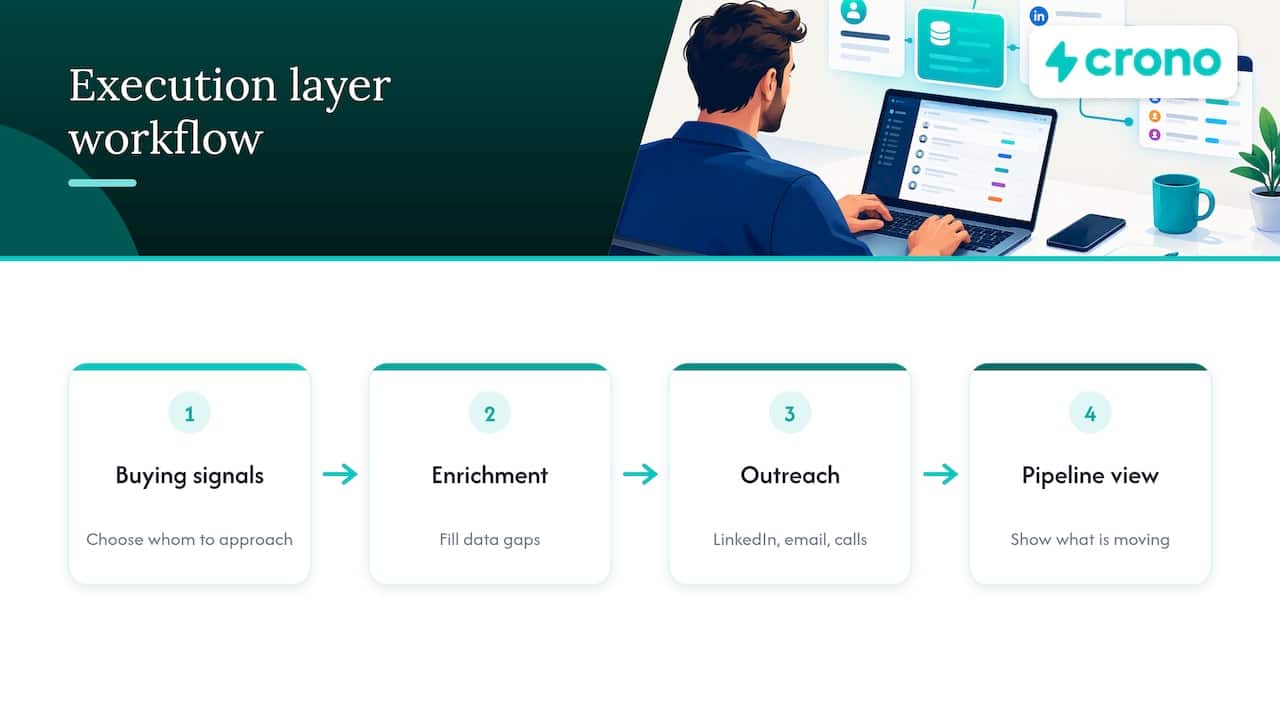
So we do not ask teams to replace their CRM or rip out every tool. We connect them into a single execution layer where reps and AI agents work inside the same workflows: buying signals decide who to approach, enrichment fills the gaps, multichannel outreach runs across LinkedIn, email and calls, and pipeline visibility shows what is moving. Teams consolidate the overlapping point solutions around that layer and keep the systems that already do their job well.
Our advice is the same whichever platform you choose. Audit first. Name owners. Migrate one workflow at a time. Measure against a baseline. And judge any vendor by how deeply it integrates with what you keep, because that decides whether the stack becomes simpler or just differently fragmented.
— Alex
Where Crono fits
If your audit shows overlapping enrichment, prospecting and outreach tools, Crono is built to take that layer over while staying connected to your CRM. Plans are priced per seat: Pro starts at 79 € per month per seat and Ultra at 119 € per month per seat, with an Enterprise tier for larger teams. AI and enrichment work runs on credits, and the Agentic Sales Engine is available at 99 € per month for 10,000 credits, 199 € per month for 30,000 credits and 499 € per month for 100,000 credits. Credit packs can also be bought one-off. That makes the cost of the consolidated layer easy to set against the line items you are retiring.
Common mistakes to avoid
- Cutting by price instead of by outcome. The cheapest tool to cancel is not always the least valuable.
- Skipping the owner. Every remaining tool needs one accountable person.
- Consolidating before cleaning data. Migrating duplicates just moves the mess.
- Running old and new indefinitely. Publish the sunset date and hold to it.
- Ignoring coaching and enablement. Reps need to know why the change helps them, and our sales enablement guide covers how to make that stick.
- Treating it as a one-time project. Add an overlap check to every future purchase and review the stack twice a year.
FAQ
What does sales tool consolidation mean?
It means reducing the number of overlapping software tools a sales organization uses, and moving their functions into fewer, better-integrated systems. The aim is lower cost, cleaner data and less friction for reps. It usually leaves the CRM in place and targets the tools around it.
How many sales tools is too many?
There is no universal number. Surveys show teams commonly run five to ten or more, but the better test is whether each tool has a distinct job, an owner, a measurable outcome and real usage. If two tools do the same job or nobody can explain what a tool contributes, you have too many.
Should we consolidate into one platform or keep best-of-breed tools?
Most teams do best with a middle path: keep the CRM as the system of record, consolidate the overlapping execution tools into one connected layer, and retain specialist tools that are clearly unique and well integrated. A single suite can simplify buying, but it can also force compromises on features you rely on.
How long does a sales stack consolidation take?
The audit usually takes a few weeks. Each workflow migration then takes a pilot period of a few weeks plus a rollout, and contract notice dates often set the final timeline. Plan for a quarter or two for a full project, working one workflow at a time.
Sources
- Forrester: What does the current sales enablement tech consolidation mean?
- Gartner: Sales Technology, develop a plan to support revenue growth
- Revenue Enablement Institute: Tackling the sales technology proliferation problem
- Zapier: The state of RevOps automation report
- Checkpoint GTM: GTM tech stack audit
