
Size your SDR team from the pipeline you need to hit quota, not from a headcount guess or an SDR-to-AE ratio. Work backward: revenue target → required pipeline → opportunities → meetings → meetings per productive SDR. Adjust for ramp, attrition, territory limits, and AE capacity, then run the worked example below to turn that math into real hire dates.
TL;DR:
- SDR team size should be based on pipeline requirements derived from revenue targets, not on fixed ratios like two SDRs per AE.
- The calculation depends on factors like pipeline coverage ratio, win rate, average deal size, and meetings booked per SDR, adjusted for ramp and attrition.
- Accurate capacity planning requires analyzing your own CRM data, especially in terms of booked meetings, conversion rates, and data quality issues.
- Territory saturation and account availability must be assessed regularly to prevent over-hiring and ensure meaningful engagement.
- Using real-time capacity data for lead routing and planning reduces errors, with platforms like Crono helping automate and optimize this process.
Table of Contents
- What is SDR capacity planning, and why beat ratios with pipeline math?
- How do you calculate SDR headcount from your pipeline target?
- How do you measure what one SDR can actually produce?
- How do ramp time and attrition change your hiring number?
- When does your territory run out of room to grow?
- Why AE capacity is the constraint that breaks good SDR plans
- How do you build a hiring calendar that lands capacity on time?
- Should you build SDR capacity in-house or borrow it?
- What should you review every month, and where do plans break?
- How do you route leads to reps who actually have room for them?
- What most capacity plans get wrong before they even launch
- How Crono operationalizes capacity-aware SDR planning
- Sources
What is SDR capacity planning, and why beat ratios with pipeline math?
SDR capacity planning is the process of calculating how many sales development reps you need, and when, based on the pipeline required to hit a revenue target. It’s distinct from three things people conflate constantly: capacity (how many meetings a rep can produce), productivity (how many they actually produce), and headcount (bodies in seats regardless of output).
Quota gets set at the top by finance or the CRO. Capacity planning is the operational layer underneath it that answers “how many reps, ramped to what level, do we need to hit that number?”
Most sales leaders still plan from a rule of thumb: two SDRs per AE, or one SDR per $1 million in ARR. Those ratios aren’t useless. They’re a sanity check you run after the math, not the input you plan from. A SDR-to-AE ratio that looks healthy on paper can still leave you short if your average deal size dropped or your sales cycle stretched. The ratio doesn’t know that. Only the pipeline math does.
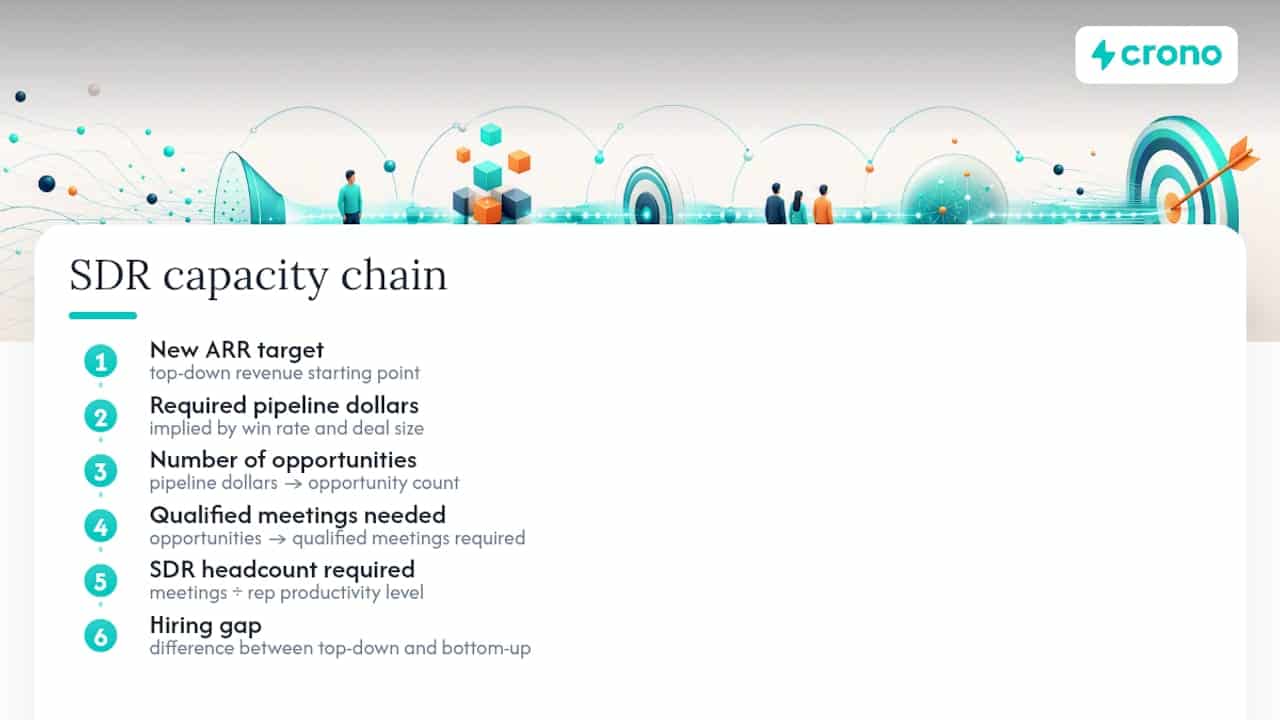
Here’s the funnel you’re actually sizing against: your new ARR target implies a required pipeline dollar amount (based on your win rate and average deal size), which implies a number of opportunities, which implies a number of qualified meetings, which implies a number of SDRs at a given productivity level. Every step compounds. This is why sales capacity planning has to run in two directions at once: top-down from revenue, and bottom-up from what your current SDRs actually produce. When those two numbers disagree, and they usually do, the gap is your real hiring signal.
How do you calculate SDR headcount from your pipeline target?
The formula sales development resource allocation actually runs on has six steps, and each one feeds the next.
- Start with your new ARR target. Say $8 million for the year.
- Apply your pipeline coverage ratio. Most B2B teams run 3x to 4x coverage, meaning you need $24 million to $32 million in pipeline to land $8 million in closed revenue.
- Divide by average deal size to get required opportunities. At a $40,000 average deal, $28 million in pipeline means 700 opportunities.
- Divide by your meeting-to-opportunity conversion rate. If a substantial portion of qualified meetings become opportunities, you need 1,750 meetings.
- Divide meetings by meetings booked per fully productive SDR per month, annualized, to get required productive SDR equivalents. This is the step most plans skip, and it’s the one that determines everything downstream.
- Adjust for ramp, attrition, and availability to convert “productive equivalents” into actual headcount, since a newly hired SDR is nowhere near a fully ramped one for months.
That fifth step is where benchmarks matter most. A reasonable planning assumption is 15 to 20 booked, AE-accepted meetings per fully productive SDR per month for a mid-market outbound motion, though enterprise motions with longer research cycles often land closer to 8 to 12. The math changes fast depending on which number you plug in, so pull your own historical data before trusting an industry average.
Here’s how the scenario plays out for that $8 million ARR target, run three ways:
Build all three scenarios before you commit to a number, and carry a 15 to 25% hiring buffer on top of whichever one you pick to absorb ramp delays and the attrition you didn’t plan for, a practice recommended in outbound capacity planning calculators built for exactly this exercise. The buffer isn’t padding. It’s the difference between a plan that survives Q2 and one that quietly falls apart in April when two reps leave at once.
How do you measure what one SDR can actually produce?
Before you trust any productivity assumption in that formula, pull it from your own CRM and engagement platform, not from a benchmark deck. The number you’re after is booked, AE-accepted meetings per rep per month, and it only means something when you can see the conversion steps that produced it.
Track these inputs for every rep on your team:
- Connect rate (dials or emails that result in a live conversation or reply)
- Time-to-first-contact on new leads, since speed decays fast after the first hour
- Sequence completion rate, which flags reps who are getting interrupted by inbound firefighting
- Meetings booked per 100 dials or per 100 outbound touches
- AE-acceptance rate on booked meetings, the metric that actually matters more than raw booking count
Statistic to watch: SMB motions with high volume and short cycles often support 20+ meetings per productive SDR per month, while enterprise motions with account-based targeting and multitouch research frequently settle closer to 8 to 10. Plugging an SMB benchmark into an enterprise model is one of the fastest ways to under-hire.
One caveat that trips up more capacity models than anything else: dirty contact data can waste a significant portion of outreach effort, which means a rep’s raw activity numbers can look strong while actual productive output is quietly depressed. If activity is high but meetings are low, check data quality and messaging before you conclude the rep, or the model, is broken. Activity without conversion is usually a process problem, not a headcount problem.
How do ramp time and attrition change your hiring number?
A newly hired SDR doesn’t produce at full capacity from day one. Modeling hires as fractional, cohort-weighted productive equivalents rather than whole headcount is what separates a plan that holds up from one that quietly overstates capacity for months, a distinction laid out clearly in Saleshive’s headcount framework.
- Map your ramp curve month by month. A typical curve looks like 25% productivity in month one, 50% in month two, 75% in month three, and 100% from month four onward. Your own onboarding data will differ, but the shape rarely does.
- Apply that curve to each hiring cohort separately. A rep hired in March is at 50% productivity in April, not 100%, and your model needs to reflect that explicitly rather than assuming everyone hits full output the month they start.
- Subtract attrition and temporary unavailability. Budget for 20 to 30% capacity loss across the team to cover ramp gaps, turnover, and unplanned leave, rather than assuming every seat produces every month.
- Sum the cohort-weighted equivalents across the year. A team of eight nominal SDRs, staggered across three hiring waves with realistic ramp curves, might only produce the equivalent of 5.5 to 6 fully productive SDRs in aggregate.
- Back into the headcount number that closes the gap. If your formula says you need 7 productive equivalents and your cohort math says you’ll produce 6, you’re short one seat, not zero.
Skipping this step is the single most common reason capacity plans look fine in the spreadsheet and fall apart in Q3.
When does your territory run out of room to grow?
Headcount math means nothing if the accounts aren’t there to work. Before you approve a hiring number, audit whether your addressable territory can actually support it.
- Score every account in the addressable universe by fit and intent signal, then check how many “high fit” accounts exist per rep, not just total account count.
- Watch for saturation: reps calling the same accounts every quarter with diminishing response rates is a sign the territory is exhausted, not that the rep is underperforming.
- Set explicit rules against account overlap. Two reps quietly working the same account wastes capacity and confuses the buyer.
- If saturation shows up in the data, rebalancing territory boundaries or narrowing the ideal customer profile usually fixes more than hiring another rep does.
- Revisit territory assignments every time you add headcount. A territory built for six reps doesn’t automatically flex to eight.
An SDR with a full calendar of low-fit accounts will hit activity targets and still miss meeting quality, which shows up downstream as low AE acceptance rather than an obvious capacity problem.
Why AE capacity is the constraint that breaks good SDR plans
SDR output only matters if AEs have room to work what gets booked. Calculate AE capacity the same way: how many net-new opportunities can each AE actually run through their pipeline in a given month without diluting attention on existing deals.
- Set a maximum booked-meeting volume per AE per week based on their current pipeline load, not an arbitrary quota.
- Define clear acceptance criteria upfront (budget, authority, need, timeline signals) so AEs and SDRs agree on what counts as a qualified meeting before disputes happen.
- Set a rejection SLA, typically 24 to 48 hours, so rejected meetings route back into nurture fast instead of sitting in limbo.
- Track AE-acceptance rate by SDR monthly. A rep with high booking volume but low acceptance is a coaching issue, not a capacity win.
- Use AE capacity as your sanity check at the end of the process, never as the starting constraint. Planning to AE capacity first caps your ambition before you’ve even tested the market.
If AEs are consistently overbooked, adding SDRs makes the bottleneck worse, not better.
How do you build a hiring calendar that lands capacity on time?
Work backward from the month you need the capacity, not forward from today.
- Calculate your hire cutoff date: needed month minus recruiting time, minus notice period, minus ramp time. If you need full productivity in October and ramp takes three months, notice periods run four weeks, and recruiting takes six weeks, your cutoff to make an offer is roughly early June.
- Size hiring cohorts to protect onboarding quality. Hiring four reps at once overloads training and buddy systems; two cohorts of two, staggered six weeks apart, usually ramps faster in aggregate.
- Add a manager once span of control gets tight. A ratio of one manager per 6 to 8 SDRs is the common benchmark, and beyond that, coaching quality drops fast, which drags down ramp speed for every rep underneath.
Pro Tip: Build your hiring calendar off the conservative scenario in your three-scenario model, then treat the likely and aggressive scenarios as triggers to accelerate the next cohort, not as the baseline you staff against.
Should you build SDR capacity in-house or borrow it?
Building in-house wins on quality and long-term cost, but it’s slow. Recruiting, onboarding, and ramp routinely take four to six months before a hire hits full productivity.
- Use a partner or contract SDR team when you have an urgent, time-boxed gap, like a funding-driven pipeline push before a hire can ramp.
- Partners make sense for testing a new segment or region before committing to permanent headcount there.
- They also absorb short-term spikes, like a product launch, without disrupting your core team’s territory assignments.
- Whatever the source, evaluate partner output with the exact same pipeline math you use internally: meetings booked, AE-acceptance rate, and cost per productive equivalent, not just cost per hour.
Speed comes at a quality-control cost. Treat outsourced capacity as a bridge to a permanent hire, not a permanent substitute for one.
What should you review every month, and where do plans break?
Run this checklist monthly, not quarterly. SDR performance metrics tracking drifts fast, and a plan that’s three months stale is already wrong.
- Compare modeled pipeline against actual pipeline generated, by rep and by cohort.
- Check ramp progress for every hire against the curve you built, flagging anyone more than one stage behind schedule.
- Track connect rate by assignment-volume quintile to spot the exact load level where conversion starts dropping.
- Review response-time trends; a creeping time-to-first-contact usually predicts a capacity problem before the meeting numbers show it.
The mistakes that sink most plans repeat across companies: planning from headcount instead of pipeline, trusting activity data without checking data quality first, ignoring territory saturation, and assuming nominal selling time (eight hours) instead of actual selling time after meetings, admin, and training eat into the day.
| Common mistake | Fix |
|---|---|
| Planning from headcount, not pipeline | Rebuild the model from revenue → pipeline → meetings |
| Trusting raw activity metrics | Audit data quality before setting productivity benchmarks |
| Ignoring territory saturation | Score accounts and rebalance before adding headcount |
| Assuming full 8-hour selling time | Measure actual selling time after meetings and admin |
Three moves to make this week: pull your last three months of AE-accepted meetings per rep, run the three-scenario formula against your current-quarter revenue target, and flag any rep whose ramp curve has stalled for more than one review cycle.
How do you route leads to reps who actually have room for them?
Capacity planning doesn’t stop once headcount is set. It has to govern daily routing, or your best-ramped reps get buried while others sit idle.
- Score each rep’s live capacity using open task queue depth, active sequence count, rolling response time, and connect-rate trend.
- Layer in policy constraints: daily volume caps, priority quotas for top-tier accounts, and a development pool for reps still ramping.
- Route new leads against that score in real time rather than by static round-robin assignment.
- Have managers watch connect-rate-by-quantile weekly to catch overload before it shows up in missed quota.
Pro Tip: A capacity score model shifts managers from watching queues to coaching reps whose conversion is dropping under load, which is a far better use of a manager’s time than manual list assignment.
What most capacity plans get wrong before they even launch
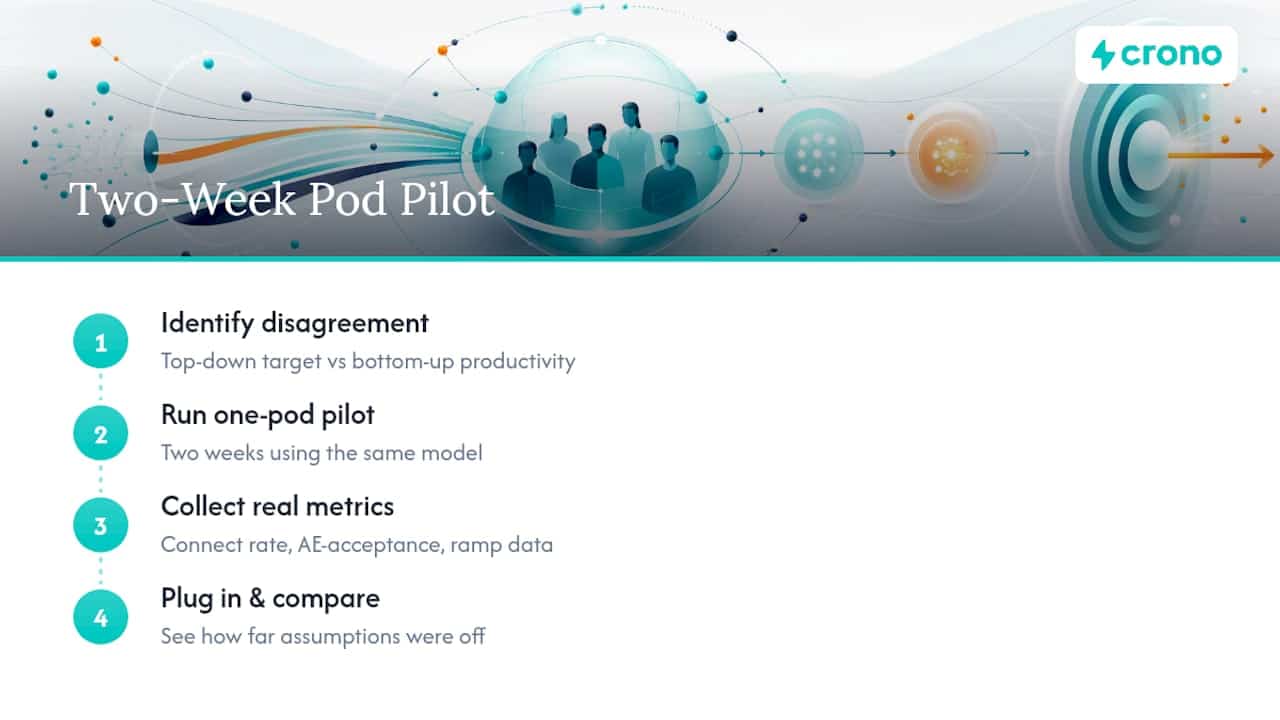
The plans that fail aren’t usually wrong about the math. They’re wrong about which number to trust when the top-down revenue target and the bottom-up productivity data disagree, and most teams default to the optimistic one because it requires fewer hires.
Run the model on one pod or one segment for two weeks before rolling it out company-wide. Pull real connect rates, real AE-acceptance rates, and real ramp data for that pod, plug them into the formula above, and see how far your assumptions were off. It usually is, in one direction or the other, and finding out on one pod costs you two weeks instead of a missed quarter.
How Crono operationalizes capacity-aware SDR planning
Running the math in a spreadsheet gets you the headcount number. Keeping the plan accurate month over month, with real signals instead of stale CRM exports, is a different problem, and it’s the one Crono is built to solve. As a sales execution layer, Crono connects CRM, enrichment, and outreach tools into one place, so the connect rate, response time, and sequence data feeding your capacity model reflect what’s actually happening, not what was true last quarter.
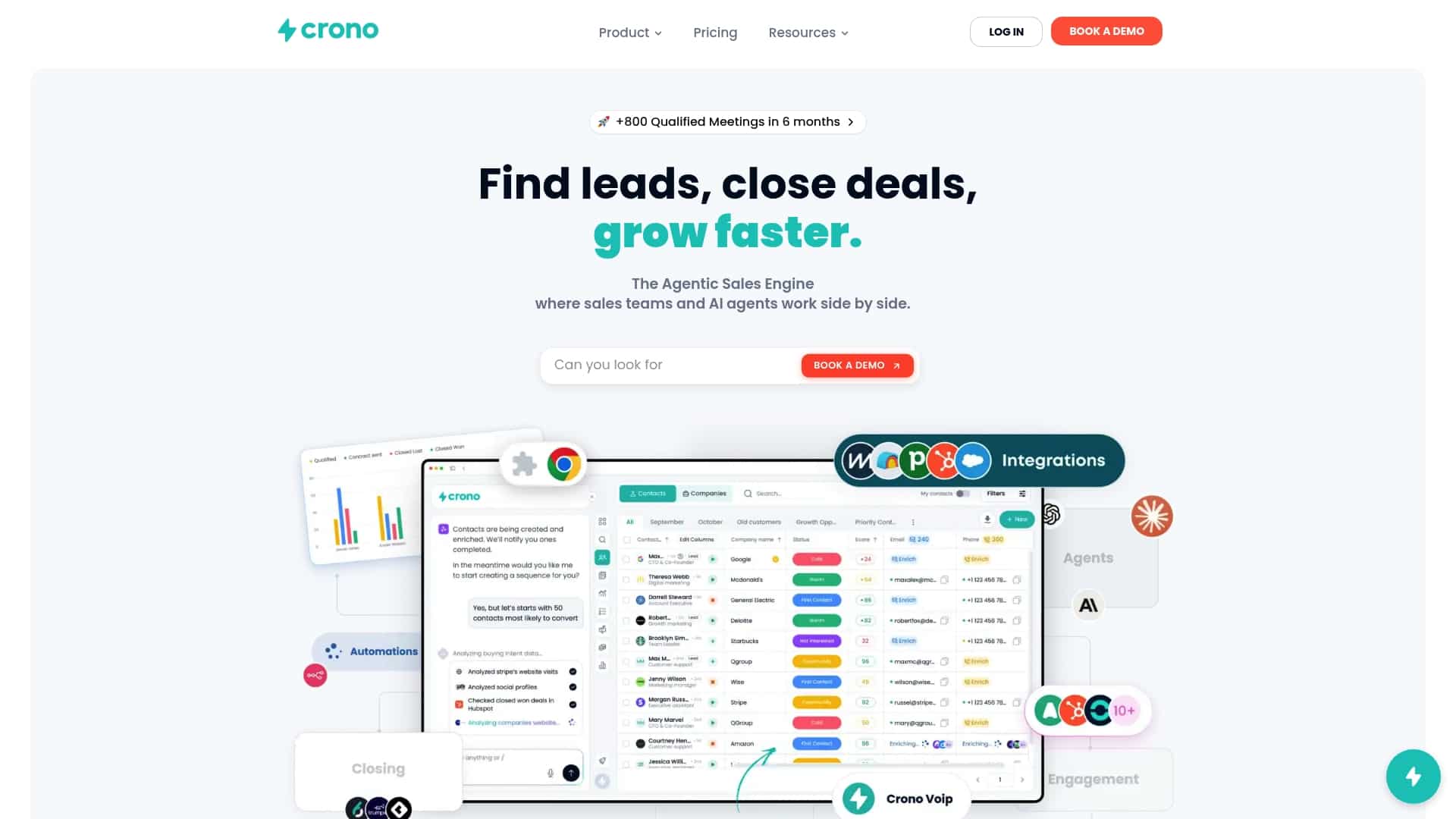
Instead of manually pulling activity metrics from four different tabs, some platforms surface real-time buying signals and route accounts to reps based on live capacity, not a static list assignment. That means the territory-saturation checks and workload-balancing rules covered above become dashboards your managers can act on weekly instead of guesses made once a quarter. If you’re rebuilding your capacity model this quarter, start by seeing how Crono’s platform handles routing and enrichment, or work through the prospecting masterclass to pressure-test your assumptions before you commit to a hiring number.
Sources
- Sales capacity planning B2B RevOps guide
- Sales Capacity Planning for B2B Outbound: How Many SDRs Do You Need?
- How many SDRs do you need? Capacity planning benchmarks 2026
- How dirty lead data wastes SDR time
