

Automated sales is the use of software and AI to execute repetitive selling tasks (capturing leads, scoring them, sequencing outreach, updating records) without a rep touching every step manually. The immediate payoff is time: Salesforce’s research on the evolution of sales automation points to how much of a rep’s week gets consumed by non-selling work, and automation exists specifically to claw that back.
Two things happen almost immediately once a team automates the right tasks:
- Reps sell more, log less. Activity capture, data entry, and manual follow-up scheduling shift to the system, freeing hours for calls and conversations that actually move deals.
- Pipeline moves faster and more consistently. Leads get scored and routed within minutes instead of sitting in a queue, and follow-up sequences fire on schedule regardless of how busy the rep is that day.
McKinsey’s analysis of sales automation’s revenue and cost impact finds that organizations investing properly in data quality and governance see both revenue growth and lower sales operating costs, not just faster busywork.
That combination, more selling time plus more predictable pipeline, is why automated sales has moved from a “nice to have” to a baseline expectation for any B2B revenue team competing seriously in 2026.
Key Takeaways
Automated sales works best when a unified execution layer, not disconnected point tools, handles data capture, scoring, and outreach so reps spend their time selling, not logging.
| Point | Details |
|---|---|
| Start with a narrow pilot | Pick one high-friction task, like follow-up sequencing, and measure it for six to eight weeks before expanding. |
| Fix data before automating | Audit CRM records for duplicates and missing fields; automation amplifies whatever data quality already exists. |
| Track stage-level conversion | Watch conversion by pipeline stage, not just overall activity, to see where automation is actually working. |
| Keep humans on high-risk decisions | Require approval gates for agentic AI actions touching strategic accounts or unfamiliar prospects. |
| Consider a unified execution layer | Platforms like Crono connect CRM, enrichment, and multichannel outreach into one system instead of five disconnected tools. |
Table of Contents
- What Automated Sales Actually Looks Like Day to Day
- How an Automated Sales System Actually Processes a Lead
- Which Sales Tasks Should You Automate First
- The Business Case: What Automated Sales Actually Delivers
- How to Build and Roll Out an Automated Sales System
- The Tool Categories Behind Every Automated Sales Stack
- Measuring What Matters: KPIs and a Simple ROI Model
- Where Automated Sales Projects Go Wrong
- Agentic AI in Sales: What It Adds and How to Use It Safely
- What Sales Leaders Consistently Get Wrong About Automation
- A Production-Ready Path to Automated Sales
- Frequently Asked Questions
- Sources
What Automated Sales Actually Looks Like Day to Day
Strip away the marketing language and automated sales is software that executes sales work automatically based on data, triggers, and rules, increasingly enhanced by AI that makes judgment calls a human used to have to make. A lead fills out a form, the system enriches that contact’s data, checks it against your ideal customer profile, assigns a score, and either drops it into a nurture sequence or alerts a rep, all before anyone on your team has read the submission.
IBM’s explainer on sales automation frames it as technology that eliminates repetitive tasks across lead generation, prospecting, onboarding, and retention. That framing matters because automated sales isn’t one tool doing one job. It’s a layer of connected capabilities working across the entire revenue cycle.
The core components you’ll find in almost every automated sales stack:
- Data capture and enrichment: pulling firmographic, technographic, and intent data to build a complete contact and account profile automatically.
- Triggers and workflows: rules (or AI models) that decide what happens next based on behavior, such as a website visit, an email reply, or a contract renewal date approaching.
- An execution layer: the part that actually acts on CRM data, sending the email, updating the deal stage, booking the meeting, rather than just flagging that something should happen.
Sales automation, marketing automation, and your CRM aren’t the same thing, and confusing them causes real handoff problems. Marketing automation nurtures unqualified leads with broad content and scoring. Your CRM is the system of record, the database everything else reads from and writes to. Sales automation is the layer that acts, sequencing outreach, scoring fit, updating fields, and moving records through the pipeline based on what’s happening in real time. Teams that treat these as interchangeable end up with duplicate outreach, stale records, and reps who don’t trust the data.
How an Automated Sales System Actually Processes a Lead
Picture the flow this way: raw data sources feed into an enrichment layer, which feeds a trigger engine, which hands decisions to an orchestration and execution layer, which writes everything back to your CRM. Each stage depends on the one before it, and a weak link anywhere (bad enrichment, poorly tuned triggers) degrades everything downstream.
Here’s the lifecycle of a single lead moving through that system:
- Capture. A form fill, an inbound call, a LinkedIn message, or an intent signal from a buying-signal tool enters the system as a raw record.
- Enrich. The platform appends firmographic data, company size, technology stack, and often intent signals showing the account is actively researching solutions like yours.
- Score. Rules or an AI model weigh fit and engagement to rank the lead, so reps and sequences prioritize the accounts most likely to convert.
- Route. The system assigns the lead to the right rep or team based on territory, industry vertical, or account tier, with no manual reassignment needed.
- Sequence. An outreach cadence begins automatically, mixing email, LinkedIn touches, and call tasks timed according to what tends to convert for that segment.
- Close (or disqualify). As the prospect engages, the system logs activity, updates deal stage, and either escalates to a human for the close or loops the lead back into nurture.
A concrete version of this: a mid-market software company captures a demo request, enriches it with employee count and tech stack data, scores it above threshold because the company matches the ideal customer profile, routes it to the enterprise team, and triggers a three-touch sequence over five business days. If the prospect opens two emails and clicks a pricing link, that’s a trigger to escalate to a phone call task for the assigned rep instead of waiting for the sequence to finish.
None of this works without integration touchpoints that actually hold up: bi-directional CRM sync so nothing gets logged twice, calendar and email integration so booking a meeting doesn’t require five extra clicks, and increasingly, conversation intelligence that captures what was actually said on a call and feeds that back into scoring and coaching.
Which Sales Tasks Should You Automate First
Not every task deserves the same priority. The teams that get automation right start with high-frequency, low-complexity work and only move to judgment-heavy automation once the basics are solid and trusted.
Quick wins worth tackling in month one:
- Meeting scheduling. Eliminating the email back-and-forth to find a time slot is one of the fastest, most visible wins for rep morale.
- Activity capture. Automatically logging calls, emails, and meeting notes into the CRM removes an entire category of manual data entry reps resent.
- Follow-up sequences. Timed, templated outreach after a demo or a stalled deal keeps prospects warm without relying on a rep’s memory.
Higher-complexity automation to layer in once the fundamentals work:
- Predictive lead routing based on historical conversion patterns rather than static rules.
- Agentic outreach, where an AI agent researches a prospect and drafts a genuinely personalized first touch rather than filling a template.
- Renewal and expansion triggers that flag accounts showing usage decline or upsell signals before a human would notice.
Small teams should start with scheduling and follow-up automation, where the return is immediate and the risk of a bad automated decision is low. Enterprise teams with more complex territory and approval structures often get more value starting with routing and scoring, since manual routing at scale is where the most hours get lost.
The Business Case: What Automated Sales Actually Delivers
Automation only matters if it moves numbers leadership cares about. The Cincom overview of sales automation use cases lists productivity and consistency as the headline benefits, but the deeper value shows up in a handful of specific outcomes:
- More selling time per rep. Removing manual logging and scheduling gives reps back hours each week that convert directly into more calls and conversations.
- Faster pipeline velocity. Automated routing and sequencing cut the lag between a lead entering the system and a rep making first contact, often the single biggest lever on conversion.
- Higher conversion rates at each stage. Consistent, timely follow-up beats sporadic manual outreach almost every time it’s measured.
- Better forecast accuracy. When activity and stage updates happen automatically instead of at a rep’s convenience, pipeline data reflects reality instead of a rep’s optimism.
- Lower cost per opportunity. Automating the repetitive middle of the funnel means a smaller SDR team can generate the same qualified pipeline.
McKinsey’s research on capturing value from sales automation makes a point that’s easy to skip past: the revenue and cost benefits only materialize when organizations pair automation with real investment in data quality and governance. Automation layered on top of messy, duplicate-riddled CRM data just executes bad decisions faster.
Think about an industry-typical scenario: a 12-person SDR team spending a notable amount of time daily on manual prospecting and data entry. Automating enrichment and activity logging alone can reclaim a meaningful chunk of that time for actual selling, without adding headcount. That’s the kind of outcome that gets a budget approved for a second phase of automation.
How to Build and Roll Out an Automated Sales System
Treat this as a staged project, not a software purchase. The rollout checklist that works:
- Discovery. Map your current sales process end to end and identify where reps spend time on tasks that don’t require judgment.
- Data readiness. Audit your CRM for duplicate records, missing fields, and inconsistent stage definitions before automating anything on top of it.
- Tool selection. Choose platforms based on integration depth and API maturity, not feature lists alone.
- Integration. Connect your CRM, email, calendar, and enrichment sources so data flows both directions without manual reconciliation.
- Sequencing. Build your first automated workflows around the quick-win tasks identified earlier, not the most ambitious ones.
- Training. Walk reps through what’s changing in their daily workflow and why, specifically what they no longer have to do manually.
- Measurement. Set baseline metrics before launch so you can prove impact, not just activity.
For a pilot, six to eight weeks is enough to prove or disprove value. Success looks like a measurable lift in one of your core metrics, faster first-touch time, higher sequence reply rates, more logged activity without added rep effort, not a wholesale transformation of the sales org. After the pilot, review results against your baseline, fix what broke, and only then expand to additional teams or use cases.
Change management deserves real attention here. Reps’ roles shift when automation takes over logging and scheduling, some will worry it signals headcount cuts. Address that directly: automation removes the tasks reps already dislike, not the selling work that determines their compensation. Build a governance owner (usually RevOps) responsible for who can create or edit automated workflows, and set a recurring training cadence rather than a single onboarding session.
Pro Tip: Scope your first automation to a single, well-defined task with a clear before-and-after metric, like reply rate on a specific outreach sequence, rather than automating an entire process at once. A narrow pilot that clearly works builds the internal trust you’ll need to expand automation into higher-stakes areas later.
The Tool Categories Behind Every Automated Sales Stack
Buyers get overwhelmed less by feature lists than by not understanding what category of tool solves what problem. Automated sales stacks typically draw from five categories:
- CRM. The system of record holding account, contact, and deal data that every other tool reads from and writes to.
- Sales engagement platforms. Manage sequencing, multichannel outreach across LinkedIn, email, and calls, and reply detection.
- Data and enrichment tools. Append firmographic, technographic, and intent signals so scoring and personalization have something real to work with.
- Conversation intelligence. Captures and analyzes call and meeting content, feeding insights back into coaching and deal risk scoring.
- Orchestration and agentic layers. Sit across the other categories, coordinating what happens next and increasingly executing multi-step actions through AI agents rather than static rules.
Small and mid-market teams generally do best consolidating into fewer, tightly integrated platforms since they don’t have dedicated RevOps headcount to manage a sprawling stack. Comparisons built specifically for mid-market needs tend to weight integration simplicity heavily for exactly this reason. Enterprise teams often justify a more specialized, best-of-breed stack because they have the operational capacity to manage more integration points, but they pay for that flexibility in implementation time.
Whichever category you’re evaluating, prioritize open APIs, true bi-directional sync (not just one-way data pushes), and clear security controls around who can access and export customer data. A platform that looks powerful in a demo but only pushes data one direction into your CRM will create reconciliation headaches within a quarter.
Measuring What Matters: KPIs and a Simple ROI Model
Automation without measurement is just a different way of doing the same guesswork. Track these KPIs from day one:
- Percentage of time spent selling versus administrative work, ideally measured before and after each automation rollout.
- Conversion rate by pipeline stage, so you catch which stage automation actually improved instead of assuming.
- Average deal cycle length, since faster follow-up should shorten time to close.
- Lead-to-opportunity rate, a direct signal of whether scoring and routing are working.
- Churn risk signals tracked automatically, catching at-risk accounts before renewal conversations start.
| KPI | Formula | Data Needed |
|---|---|---|
| Selling time percentage | (Hours on selling activities ÷ total working hours) | Activity logs, calendar data |
| Stage conversion rate | (Deals advancing to next stage ÷ total deals in stage) | CRM stage history |
| Average deal cycle | Sum of days from creation to close ÷ number of closed deals | CRM created and closed dates |
| Lead-to-opportunity rate | (Opportunities created ÷ total leads) | CRM lead and opportunity records |
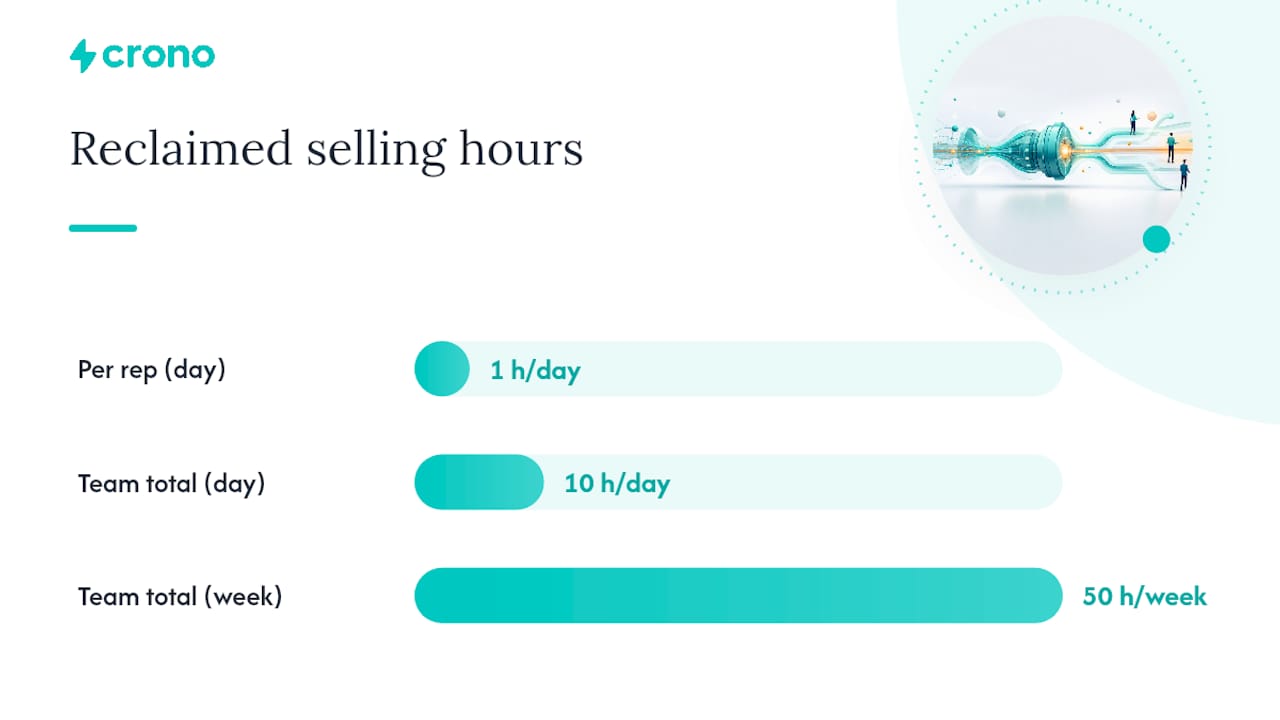
A simple ROI model you can adapt: assume a 10-person sales team where automation reclaims one hour per rep per day previously spent on manual logging and scheduling. That’s 10 hours a day, roughly 50 hours a week, redirected toward selling. If even a fraction of that time converts at your team’s existing close rate, the math on reclaimed hours alone often justifies the tool cost before you factor in faster pipeline velocity or improved forecast accuracy. McKinsey’s analysis of automation’s cost and revenue impact reinforces that the biggest gains come from combining time savings with genuine pipeline quality improvements, not from time savings alone.
Read your results honestly. If selling time went up but conversion rates didn’t move, the bottleneck likely isn’t rep bandwidth, it’s messaging or targeting, and no amount of additional automation fixes that.
Where Automated Sales Projects Go Wrong
The failures are predictable enough that most of them are avoidable if you know what to watch for.
- Automation that kills personalization. Sequences that feel obviously templated hurt reply rates and brand perception, especially at the top of funnel where trust hasn’t been built yet.
- Poor data quality feeding the system. Automation amplifies whatever data you put into it, garbage in at scale is worse than garbage in one record at a time.
- Over-automating decisions that need human judgment. Complex, high-value deals with multiple stakeholders still need a rep reading the room, not a workflow deciding the next move.
Governance prevents most of this from becoming a crisis. Build these controls before scaling past a pilot:
- Clear data ownership, so it’s obvious who’s accountable when a record is wrong or a workflow misfires.
- Access controls limiting who can create, edit, or pause automated workflows.
- Audit logs showing what the system did and why, essential when a prospect complains about an outreach cadence gone wrong.
- Human-in-the-loop approval for any high-risk action, like an AI agent sending a message on a strategic account, before it goes out.
On the privacy side, be deliberate about what data your enrichment and outreach tools store and for how long, and make sure your outreach cadences respect opt-out and consent rules for the channels you’re using. This isn’t a compliance checkbox, it’s the difference between a prospect who trusts your brand and one who reports your emails as spam.
Agentic AI in Sales: What It Adds and How to Use It Safely
Agentic AI is the biggest shift in automated sales since the category existed, and it’s worth understanding precisely what changes. Older sales automation followed static rules: if X happens, do Y. Agentic AI can research a prospect, draft genuinely personalized messaging based on that research, and execute a multi-step sequence, adjusting its approach based on how the prospect responds, without a human writing each step in advance.
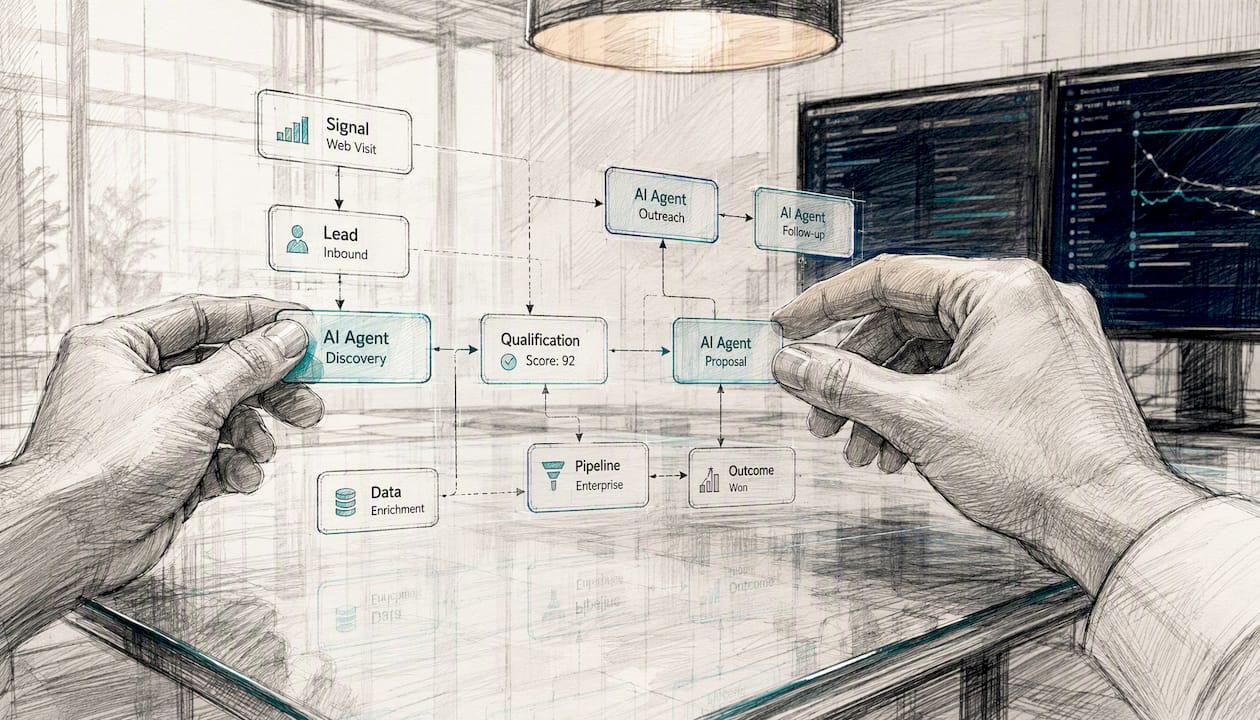
Research on how sales automation architecture works describes this shift as moving from simple triggers toward AI-assisted execution that can make judgment calls previously reserved for humans. That’s a meaningful jump in capability, and it comes with a meaningful jump in risk if deployed carelessly.
Here’s how to introduce agentic automation without losing control of your outreach:
- Start with guardrails, not full autonomy. Give the agent a narrow scope, such as researching and drafting a first-touch email, rather than full end-to-end sequence control on day one.
- Use canned templates as a backstop. Even AI-personalized messages should draw from approved messaging frameworks so tone and compliance stay consistent.
- Build in a review loop. Route agent-drafted outreach through human approval for the first several weeks until you trust the output quality.
- Expand scope gradually. Once an agent’s output consistently matches what a good rep would produce, extend its autonomy to the next step in the sequence.
Monitoring signals matter as much as the guardrails themselves. Watch confidence thresholds the agent uses to flag uncertain decisions, keep approval gates in place for anything touching a strategic account, maintain audit trails showing exactly what the agent did and why, and have a rollback procedure ready if an agent starts producing outreach that doesn’t match your standards.
Pro Tip: Run agentic AI on your lowest-risk segment first, cold outbound to small accounts, rather than your highest-value pipeline. If something goes wrong, the damage is contained, and you’ll learn what to fix before the agent touches accounts that matter most.
The framing worth repeating to any rep worried about being replaced: agents augment sellers, they don’t replace the relationship-building and negotiation that still requires a human on complex deals. What agentic AI removes is the repetitive research and drafting work that used to eat hours before a rep ever got to have the conversation that actually closes business. Practical examples of agentic execution in B2B teams show this pattern consistently: agents handle the volume work, humans handle the judgment calls.
What Sales Leaders Consistently Get Wrong About Automation
Most automation rollouts fail for a boring reason: leadership buys the tool before fixing the data feeding it. I’ve seen the pattern often enough to say it plainly, automation doesn’t fix a broken sales process, it just executes that broken process faster and at greater volume. If your reps don’t trust your CRM data today, automating on top of it won’t build that trust, it’ll erode it further when the system routes leads incorrectly or sends outreach based on stale account information.
The other underestimated factor is pacing. Sales leaders often want to automate everything in one rollout because the ROI case looks compelling on paper. The teams that actually see results are the ones who pick one narrow, measurable task, prove it works, and only then expand. When I advise teams launching their first automation pilot, I tell them to pick the task their reps complain about most, not the one that sounds most impressive in a board deck. Complaint volume is a better signal of automation-readiness than any strategic priority list, because it tells you exactly where trust in the current process has already broken down.
A Production-Ready Path to Automated Sales
Everything covered here, enrichment, triggers, sequencing, agentic execution, works best when it lives in one connected layer instead of five disconnected point tools your team has to stitch together manually. That’s the specific gap Crono is built to close: it connects your existing CRM and sales tools into a unified execution layer where people and AI agents work from the same data and the same workflows, instead of forcing reps to manually shuttle information between systems.
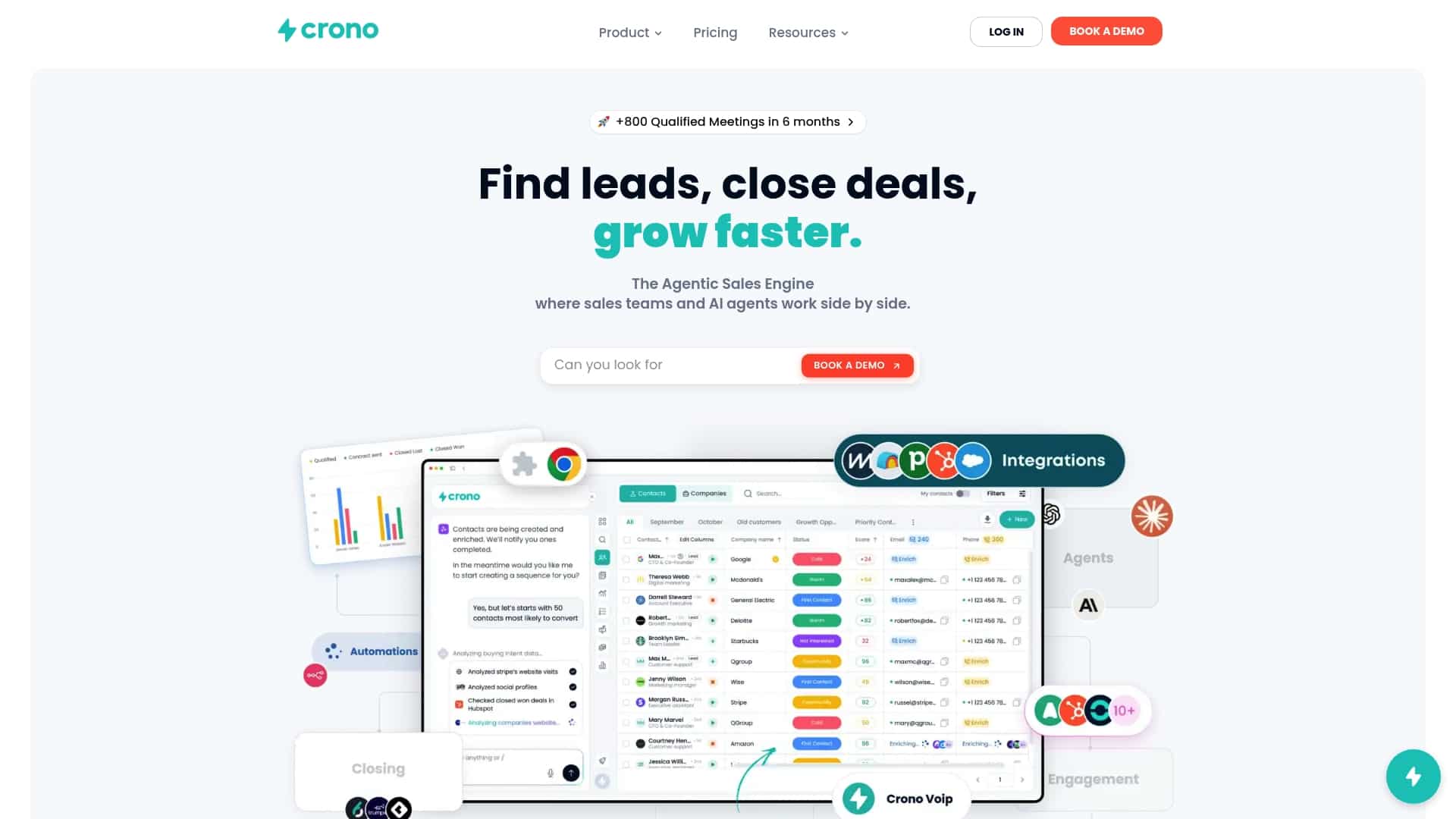
Crono combines buying signals, contact enrichment, multichannel outreach across LinkedIn, email, and calls, and agentic workflow automation into one platform, so the lifecycle described throughout this article, capture, enrich, score, route, sequence, and close happens inside a single system rather than across five logins. If you’re evaluating vendors in this category, validate these signals before you commit:
- API maturity and true bi-directional sync, not just one-way data pushes into your CRM.
- Security controls and clear data ownership, especially around what happens to enriched contact data.
- Agent controls, including approval gates and audit trails for anything an AI agent sends on your behalf.
- Onboarding speed, since a platform that takes a quarter to implement erodes the ROI case before you’ve measured anything.
You can see how the agentic execution layer works in practice or start a trial directly on the Crono platform to test it against your own pipeline data.
Frequently Asked Questions
What is automated sales in simple terms?
Automated sales is software executing repetitive selling tasks, lead capture, scoring, follow-up, reporting, based on data and rules instead of manual rep effort at every step.
How is sales automation different from marketing automation?
Marketing automation nurtures broad audiences with content and lead scoring; sales automation acts on qualified leads, sequencing outreach, updating deal stages, and routing accounts to reps.
Do I need a CRM before I can automate sales tasks?
Yes. Your CRM is the system of record every automation tool reads from and writes to, and messy CRM data will produce inaccurate automated decisions.
Will AI agents replace human sales reps?
No. Agentic AI handles research, drafting, and repetitive execution, but complex negotiations and relationship-building on high-value deals still require human judgment.
How long does an automated sales pilot typically take?
Six to eight weeks is usually enough to prove or disprove value on a narrowly scoped automation before deciding whether to scale it further.
Sources
- Sales automation: The key to boosting revenue and reducing costs (McKinsey PDF)
- What is Sales Automation & Why Your Business Needs It | Cincom
