

Send your first-touch outreach Tuesday through Thursday, 8 to 11 AM in the recipient’s local time, with a 9 AM local control. Use 1 to 3 PM local as a secondary window for follow-ups. That said, timing is a multiplier, not a fix: it nudges reply rates by single digits, while list quality and message relevance still decide most of your outcome. Test before you scale any single window.
TL;DR:
- Sending emails Tuesday through Thursday between 8 and 11 AM local time yields the highest reply rates, with 9 AM as the ideal baseline.
- Reply rate is a more accurate metric than open rate for timing optimization, as open data is unreliable due to privacy protections.
- Timing adjustments typically produce only 5 to 12% improvements in reply rates, emphasizing message relevance and list quality as more critical factors.
- Using per-recipient local time zone scheduling or regional buckets ensures emails land at the optimal moment and avoids misfires caused by time zone mismatches.
- Industry and role segmentation is essential, as executives and operational roles have different inbox habits, requiring tailored send windows for better engagement.
Table of Contents
- What Is the Best Time to Email B2B Prospects?
- Why Reply Rate Beats Open Rate for Timing Decisions
- How to Schedule Emails Across Time Zones
- Should Send Times Change by Seniority or Industry?
- How Do You Test and Measure Send-Time Performance?
- Which Tools Support Accurate Send-Time Scheduling?
- Do Subject Lines Affect When Prospects Open Email?
- Does Mobile vs Desktop Change Optimal Send Timing?
- How Do Timing Benchmarks Differ Across Industries?
- How Does Email Frequency Affect Reply Rates Over Time?
- Why Do Prospects Respond Differently at Different Times?
- Crono’s Take: Timing Inside a Multichannel Strategy
- Automate Recipient-Local Scheduling With Crono
- Sources
- FAQ
What Is the Best Time to Email B2B Prospects?
The operational shortlist below works as a starting configuration for most B2B sequences, before you layer in your own reply-rate testing.
- Primary control: Tuesday through Thursday, 8 to 11 AM recipient local time, with 9 AM local as your baseline control window.
- Secondary window: 7 to 9 AM local for early-shift industries like healthcare, logistics, and manufacturing, where inboxes get triaged before the workday officially starts.
- Follow-up window: 1 to 3 PM local, which tends to catch prospects after lunch and before the afternoon meeting crunch.
- Day weighting: lean toward Wednesday for general B2B outreach, and Tuesday when you need volume. A practical operational baseline for cold B2B outreach backs Tuesday through Thursday as the safest default across industries.
- Days to avoid for first touches: Friday afternoon and weekends. Replies on Sunday sit at roughly 0.9% in a large reply-rate analysis, consistently the weakest day measured.
None of this is a rigid formula. It’s a control group. Once your sequences run for a few weeks, your own reply data will tell you more than any published benchmark.
Why Reply Rate Beats Open Rate for Timing Decisions
Open-rate data has a trust problem. Apple’s Mail Privacy Protection pre-fetches images and pings tracking pixels automatically, which inflates open counts and disconnects them from actual human behavior. That’s why serious outbound teams have shifted to reply rate as the cleaner signal. It can’t be faked by a background process.
The scale of the data backing this shift matters too. A reply-rate analysis covering more than 850 million emails found day-of-week differences are narrow, largely debunking the idea of one magic “best day.” Separately, Omnisend’s analysis of roughly 26 billion emails shows opens, clicks, and conversions peak at different hours entirely. Opens cluster mid-morning, clicks run later in the day, and conversions skew earlier. If you optimize for opens, you may be aiming at the wrong bell curve.
Statistic Callout: Send-time optimization typically shifts reply rates by 5 to 12% relative to a control window, not the 40 to 50% swings some blog posts imply. Treat timing as one lever among several, not the lever.
How to Schedule Emails Across Time Zones
Getting the window right on paper means nothing if the send lands at 3 AM in the recipient’s inbox. Here’s how to operationalize it:
- Use per-recipient local-time scheduling if your platform supports it. This maps each contact’s time zone and sends automatically within your chosen window, no manual list splitting required.
- Bucket by time zone if your tool lacks that feature. Split your list into three or four regional groups (Eastern, Central, Mountain/Pacific, and international if relevant) and run separate campaign instances for each.
- Stagger sends inside the window. Randomize delivery across a 90-minute band, say 7:30 to 9:00 AM, rather than firing everything at one fixed minute. This reduces throttling risk and avoids dumping hundreds of emails into inboxes simultaneously.
- Cap daily sends per sender account to protect deliverability, and never schedule sends between 2 and 4 AM local, even accidentally through a misconfigured default time zone.
Pro Tip: Verify how your platform handles daylight saving time before you scale a campaign. A tool that doesn’t adjust automatically will drift an hour off target twice a year, quietly wrecking your control group without any obvious error message.
Removing the manual friction here tends to matter more than chasing one extra “perfect” hour. Automating per-recipient time-zone handling is the higher-leverage fix compared to fine-tuning a single global send time.
Should Send Times Change by Seniority or Industry?
A VP of Sales and an SDR-adjacent manager do not check email the same way, and treating them identically will cost you replies.
- Senior executives often triage inboxes before standard business hours or during commute windows on mobile. Test earlier sends, around 6:30 to 7:30 AM local, plus small, targeted evening tests, since many executives review email on their phones after dinner.
- Managers and individual contributors tend to spread email checks more evenly across the day. Their replies distribute broadly across 8 AM to 5 PM local, so a strict early-morning focus is less critical here.
- Healthcare and operations roles often skew earlier, matching shift schedules that start before 8 AM.
- Retail and marketing roles tend to tolerate later mid-morning windows better, since their calendars rarely lock up before 10 AM the way operations roles do.
Run these as segments, not assumptions; see our detailed Marketing Automation Checklist: Step-by-Step Guide for SMBs to set up effective automation and scheduling. A single “best hour” applied uniformly across a mixed list of VPs and ICs will underperform a segmented approach almost every time.
How Do You Test and Measure Send-Time Performance?
A/B testing send times only works if you pick the right primary metric and give each variant enough volume to mean something.
- Set your primary KPI as reply rate. Track meeting rate and conversion as secondary metrics. Use open rate only as a rough diagnostic, never as your decision metric, given the Apple Mail Privacy Protection distortion discussed earlier.
- Choose a control and one or two variants. A common setup: 9 AM local as control, 7:45 AM and 1 PM as variants. Keep everything else (subject line, message, list segment) identical across the test.
- Run for a minimum sample size or fixed period, long enough to gather statistically usable reply volume rather than judging results after a few dozen sends.
- Interpret results conservatively. A consistent 5 to 12% relative lift in reply rate across multiple sequences is meaningful. A one-time 20% jump from a small sample is probably noise.
- Re-run with segmentation once you have a winning window, since seniority and industry differences (covered above) often hide inside an aggregated test result.
Which Tools Support Accurate Send-Time Scheduling?
Choosing a platform for this comes down to a short checklist rather than a long feature comparison.
- Native per-recipient time-zone fields that schedule automatically based on each contact’s location, rather than requiring manual list segmentation.
- Send throttling controls so volume stays within safe per-inbox and per-domain limits.
- API-level scheduling for teams building custom logic around business hours, holidays, or regional exceptions.
- Sequence pause and resume triggered by replies, so a prospect who responds off-schedule doesn’t keep receiving a queued follow-up at the wrong hour.
- Signal-driven prioritization, where a buying signal like a job change or funding announcement can justify sending outside your normal window because urgency outweighs timing optimization for that one contact.
If your current stack forces manual timezone bucketing for every campaign, that’s a sign you’re spending RevOps hours on a problem modern platforms handle natively.
Do Subject Lines Affect When Prospects Open Email?
Subject lines don’t change what time an email arrives, but they heavily influence whether it gets opened at all inside a crowded window like 8 to 11 AM. A generic subject line competing against fifteen other Tuesday-morning emails loses regardless of how perfectly you timed the send.
Preview text compounds this effect. Most inboxes display 40 to 100 characters of preview alongside the subject line, and that snippet often decides the open more than the subject itself, especially on mobile where screen space is limited. A subject line that promises value but a preview that reads as generic boilerplate (“Hi, I wanted to reach out…”) undercuts the timing advantage you worked to build.
Short, specific subject lines tend to outperform vague ones in B2B cold outreach, particularly when they reference something concrete: a role, a recent company event, or a specific pain point. Pairing your optimized send window with a tested subject-line format does more for your open and reply rates than shifting your send time by another 30 minutes ever will.
Preview text should extend the subject line’s thought rather than repeat it. If your subject asks a question, your preview shouldn’t restate the question; it should hint at the answer or add a second, related detail that makes the whole line worth clicking.
Does Mobile vs Desktop Change Optimal Send Timing?
Device matters more than most teams account for when picking send windows. Early-morning opens, especially before 8 AM, happen overwhelmingly on mobile, as recipients scan inboxes from bed or during a commute before sitting down at a desk. Midday and early-afternoon opens shift more toward desktop, when prospects are actively working through their inbox at a computer.
This split has practical consequences for formatting. A mobile open at 7:15 AM means your email needs to read cleanly on a small screen with minimal scrolling. If your message is dense with formatting that only renders correctly on desktop, an early-morning send window works against you rather than for you.
It also affects reply behavior. Replies typed on mobile tend to be shorter and sent faster, sometimes within minutes, while desktop replies often come after more deliberation and later in the day. If your goal is a quick “sounds good, let’s talk” response, an early mobile-heavy window can actually produce faster replies than a midday desktop-heavy one, even if the total reply count looks similar.
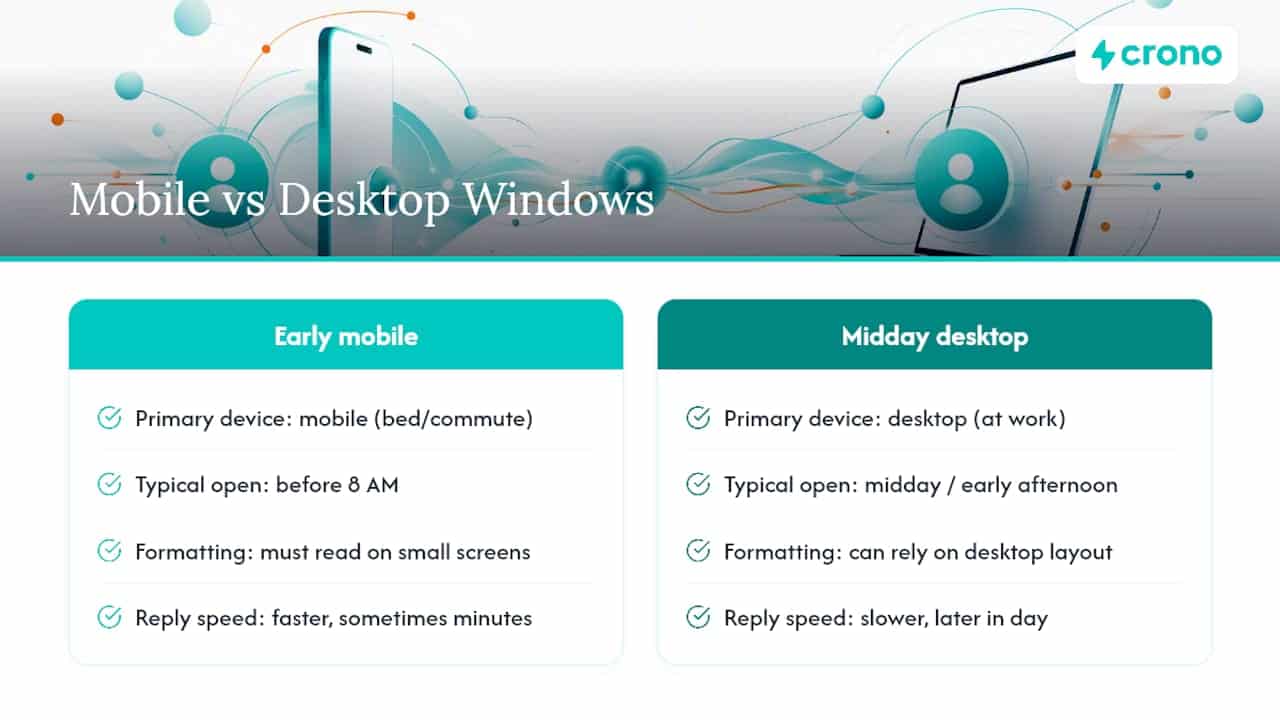
Test your send windows with device behavior in mind, not just clock time. A 7:45 AM send and a 1 PM send might generate similar reply rates overall, but the tone, length, and speed of those replies can differ enough to change how your sales team should follow up.
How Do Timing Benchmarks Differ Across Industries?
Benchmark data makes clear that no single window works uniformly across every vertical, and applying a generic “best time” across a mixed-industry list will underperform a segmented approach.
Industries running early operational shifts, healthcare, manufacturing, logistics, tend to see inbox activity cluster before 9 AM local, since decision-makers in these fields are often managing physical operations that start early. Waiting until 11 AM to send in these verticals means arriving well after the morning inbox triage is already done.
Technology, marketing, and professional services show more activity spread across the late morning and into early afternoon, reflecting more flexible, meeting-driven schedules. A platform analysis of cold email response rates found that morning sends between 8 AM and noon now consistently outperform late-evening sends across most verticals studied, but the specific peak hour inside that window still varies by industry.
Retail and consumer-facing industries tend to tolerate slightly later windows better than B2B-heavy sectors, since their operational rhythms don’t follow the same early-morning cadence. The practical takeaway: treat published benchmarks as a starting range for your vertical, then narrow it with your own reply data once you have a few hundred sends logged for that specific industry segment.
How Does Email Frequency Affect Reply Rates Over Time?
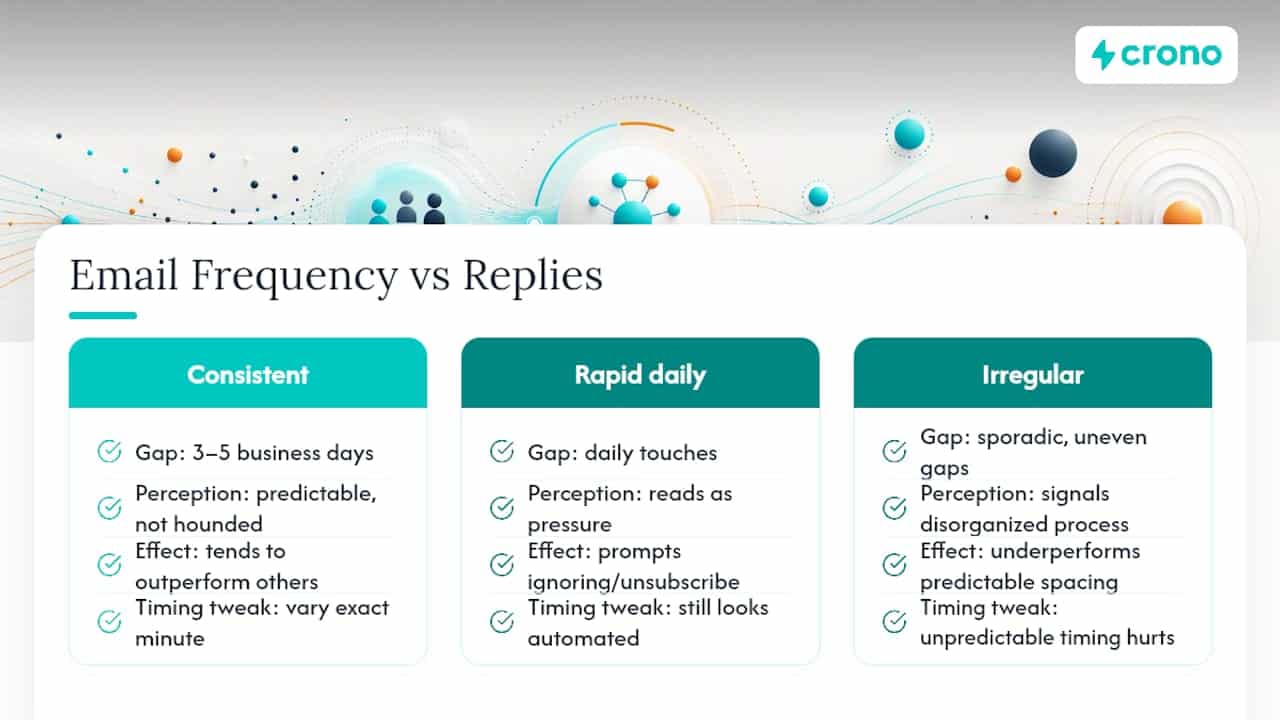
Send timing and send frequency work together, and getting one right while ignoring the other still produces mediocre results. A perfectly timed email that’s the fifth touch in nine days reads as pressure, not outreach, and prospects respond to that pressure by ignoring the message entirely or unsubscribing.
Consistent, predictable spacing between touches, typically three to five business days between follow-ups in a cold sequence, tends to outperform either rapid-fire daily contact or sporadic, irregular gaps. Irregular spacing signals a disorganized process to the recipient, even if they never consciously register why the email felt off. Predictable spacing, on the other hand, lets a prospect who’s genuinely interested but currently busy know another touch is coming without feeling hounded.
Frequency also interacts with the time-of-day question directly. If every touch in a sequence lands at the identical minute, prospects start pattern-matching your emails as automated, which can quietly reduce open rates over the course of a sequence even if the individual timing choice was sound. Slight variation, sending touch two at 8:45 AM instead of touch one’s 9:00 AM, keeps the sequence from feeling mechanically identical each time.
The practical rule: lock in a consistent cadence for your sequence length and gap between touches, then vary the exact minute within your chosen window touch to touch. Consistency in structure, variation in execution, tends to produce the best long-run engagement.
Why Do Prospects Respond Differently at Different Times?
The psychology behind send timing explains why the data shows such modest, single-digit effects rather than dramatic swings. Prospects aren’t rational actors carefully triaging every email the moment it lands; they’re managing decision fatigue and inbox overload just like everyone else.
Early morning, before the day’s meetings and fires start, tends to catch people with more cognitive bandwidth available. That’s part of why 8 to 11 AM windows consistently show up across reply-rate benchmarks: it’s not that the email is inherently more persuasive at that hour, it’s that the recipient has more capacity to engage with a new request. By mid-afternoon, decision fatigue accumulates from a day of meetings and smaller choices, and a cold email competing for attention has a harder time breaking through.
Inbox overload compounds this. A prospect who opens their inbox to 40 unread messages at 9 AM is scanning, not reading, which is why concise subject lines and preview text matter as much as timing itself. The same email arriving at 1 PM, after that prospect has already cleared their morning backlog, might get a more careful read simply because the inbox pressure has eased.
None of this means you can predict an individual prospect’s mental state on a given Tuesday. It does mean that aggregate patterns in reply-rate data reflect real, if modest, shifts in attention and willingness to engage, not just arbitrary preferences for one hour over another.
Crono’s Take: Timing Inside a Multichannel Strategy
Getting the hour right is table stakes. What actually moves pipeline is marrying that timing to a buying signal, a job change, a funding round, a tech-stack shift, so the highest-opportunity leads get contacted at the moment they’re most likely to care, not just the moment your spreadsheet says to send. That’s the piece most timing guides skip entirely.
We go deeper on combining signals with scheduling in The Power of Timing in Multichannel Strategies, alongside follow-up templates built for exactly this kind of layered approach.
Automate Recipient-Local Scheduling With Crono
Crono orchestrates your CRM, enrichment data, and outreach channels into one execution layer, so per-recipient local-time scheduling isn’t a manual bucketing exercise, it’s a workflow that runs itself. Buying signals and enrichment data feed directly into send prioritization, meaning a prospect who just changed jobs can jump the queue even outside your standard window, while everyone else still lands inside their optimal local hour.
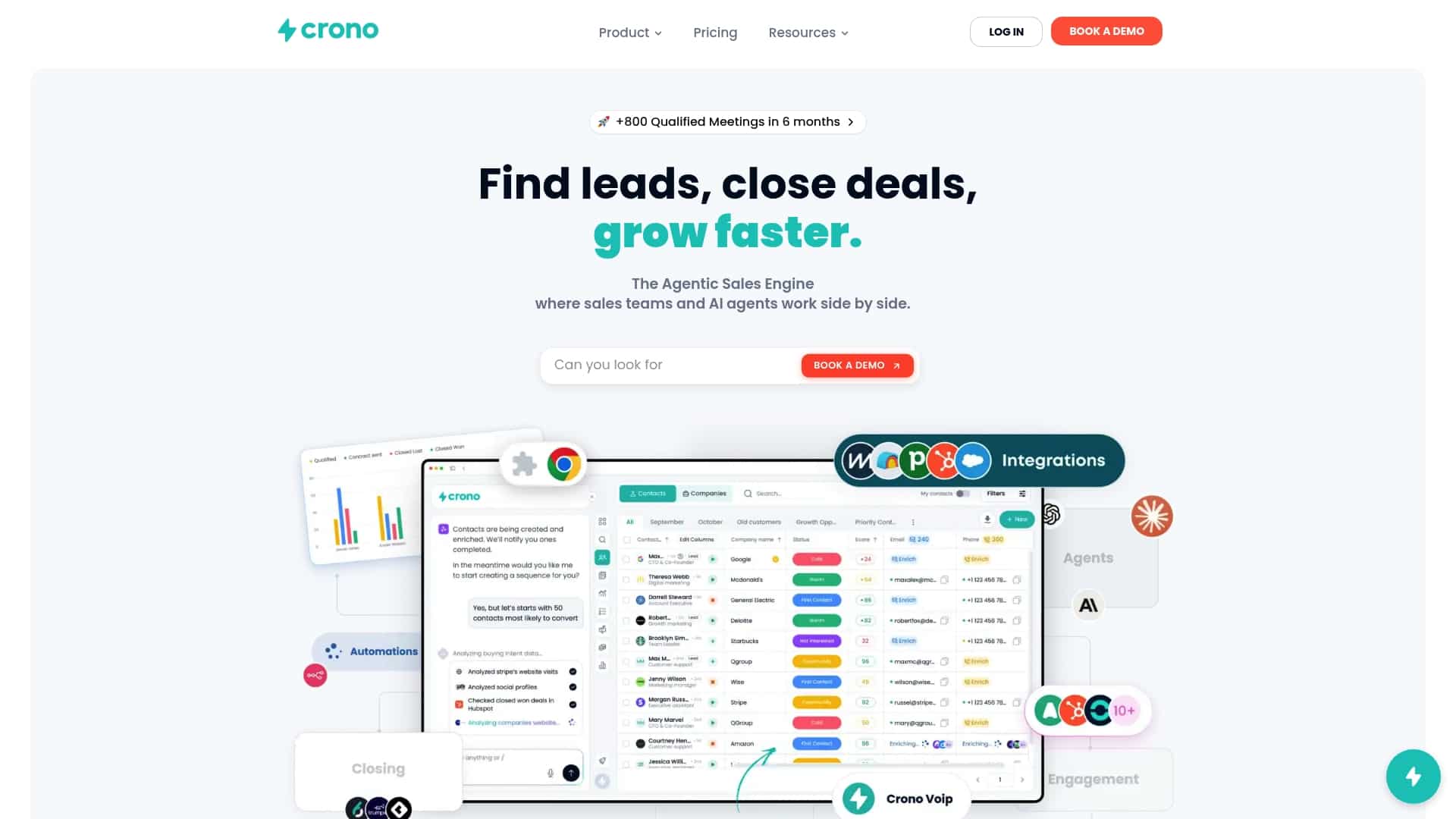
If you’re running multichannel sequences across LinkedIn, email, and calls, Crono’s workflow automation keeps timing, signal-based prioritization, and follow-up logic working together instead of living in three disconnected tools. Teams that want the agentic execution layer handling enrichment and sequencing at scale can start with the Agentic Sales Engine, while teams that want the full platform can compare plans on the Crono pricing page starting from €79 per seat per month on the Pro plan. Book a demo to see per-recipient scheduling and signal-driven prioritization running against your own list.
Sources
- Best Time to Send Cold Emails in 2026 (Data, Not Folklore)
- Best time to send email
- When to send cold email: timing, day-of-week, and time zone guidance | Quarvio
- Cold email response rates
- Best Time to Send Cold Emails in 2026 (Data-Backed Answer)
FAQ
What Is the Best Time to Send Cold Emails?
The strongest starting point is Tuesday through Thursday, 8 to 11 AM in the recipient’s local time zone, with a 9 AM local control for testing. Secondary windows of 7 to 9 AM and 1 to 3 PM local work well for early-shift industries and follow-ups, based on operational B2B benchmarks.
Should I Use Open Rate or Reply Rate to Judge Timing?
Reply rate is the more reliable metric for cold outbound, since Apple’s Mail Privacy Protection inflates open counts through automatic pixel pings. A large reply-rate analysis found day-of-week differences are narrow when measured this way, which is why reply rate should drive your testing decisions.
How Much Can Send Timing Actually Improve Reply Rates?
Expect single-digit gains, typically a 5 to 12% relative lift over a control window, not a dramatic swing. Targeting and message quality generally move reply rates far more than timing alone.
Does Crono Support Per-Recipient Time Zone Scheduling?
Crono’s platform combines enrichment data, buying signals, and workflow automation to help teams schedule outreach around recipient time zones and prioritize high-signal leads automatically. Pricing details and plan options are available on the Crono pricing page.
How Do I Test Different Send Times Without Guessing?
Pick a control window (commonly 9 AM local), one or two variants like 7:45 AM or 1 PM, and hold your subject line and message constant across the test. Track reply rate as your primary metric and look for a consistent 5 to 12% lift before declaring a winner.
