

Domain warmup means gradually increasing your sending volume so mailbox providers can learn to trust your domain before you rely on it for real campaigns. Before any warmup email goes out, authenticate your domain with SPF, DKIM, and DMARC, then start with your most engaged contacts and let bounce and complaint rates decide when you scale up. For a brand-new domain, expect the process to take 4 to 8 weeks, though migrated or dormant domains follow their own timelines.
TL;DR:
- New domains require a very slow ramp with strict volume and engagement thresholds, often taking at least four weeks to build trust.
- Authenticating your domain with SPF, DKIM, and DMARC is mandatory before sending, with DMARC alignment critical for reputation.
- Engagement signals like replies and clicks are more valuable than open rates, especially after Apple’s Mail Privacy Protection reduces open accuracy.
- Bounce rates must stay below 2%, and complaint rates under 0.1% during warmup to avoid filtering or reputation damage.
- Manual or automated warmup tools should focus on engaged contacts, and recovery from mistakes requires cautious reincreases rather than rushing back to previous volumes.
Table of Contents
- What domain warmup is and why mailbox providers care
- Technical prerequisites: authentication before anything else
- Choosing the right ramp for new, migrated, or dormant domains
- Week-by-week warmup schedule with metric gates
- Writing messages that actually earn replies
- Monitoring metrics and knowing when to pull back
- Manual warmup vs automated warmup tools
- Common warmup mistakes and how to recover from them
- How Crono’s templates and orchestration support a safer ramp
- What teams consistently underestimate about warmup
- Where Crono fits once your domain is ready to scale
- Where these warmup guidelines come from
- Sources
- FAQ
What domain warmup is and why mailbox providers care
Mailbox providers do not judge a single email. They judge a pattern built from your domain’s history, your sending IP, your authentication setup, and how recipients treat your messages over time. According to Microsoft’s warmup guidance, reputation forms from domain and IP signals combined with list quality, complaint rates, and genuine engagement, not just message content.
A brand-new domain has no history at all, which is exactly the problem. When that domain suddenly sends thousands of messages, providers see a pattern that matches spam operations: high volume, no track record, unpredictable recipient behavior. Warmup exists to avoid that pattern by ramping volume slowly enough that engagement data builds alongside sending volume, giving providers a reason to trust you.
Not every engagement signal carries equal weight. Since Apple’s Mail Privacy Protection began pre-loading tracking pixels, open rates no longer reliably reflect whether a human actually read a message. Replies and clicks are the stronger signals during warmup because they require an actual person to take action.
- Domain and IP reputation combine to form the baseline trust score providers assign to your mail.
- List quality matters as much as volume: sending to stale or purchased addresses damages reputation faster than sending too much too soon.
- Replies and clicks outweigh opens as proof of engagement in a Mail Privacy Protection world.
- Complaint rates are tracked per domain and can trigger filtering even when bounce rates look fine.
Bulk senders face additional scrutiny. Google enforces accelerated rules for anyone sending 5,000 or more messages a day to Gmail addresses, which makes a careful ramp even more important if you expect to reach that volume eventually.
Technical prerequisites: authentication before anything else
No warmup schedule matters if your domain fails basic authentication. Providers use SPF, DKIM, and DMARC to confirm a message actually comes from who it claims to come from, and skipping this step guarantees filtering regardless of how carefully you ramp volume. Gmail’s sender requirements treat SPF and DKIM as mandatory and recommend DMARC on top of them, so this is not optional groundwork, it is the foundation warmup builds on.
Work through these items before your first warmup send:
- Publish SPF and include every service that sends mail on your behalf, since a missing entry causes authentication failures that look identical to spoofing.
- Enable DKIM signing for your sending domain, using 2048-bit keys where your provider supports them for stronger cryptographic signing.
- Publish a DMARC record starting at
p=nonewithruareporting enabled, so you can watch alignment results before enforcing rejection policies. - Add List-Unsubscribe headers that follow RFC 8058, giving recipients a genuine one-click unsubscribe rather than a link buried in a footer.
- Confirm forward and reverse DNS (PTR records) match, and verify TLS is enabled for your SMTP connections.
- Segregate transactional and promotional streams by IP or DKIM domain, since provider best practices treat these as separate reputational pools.
DMARC alignment deserves a closer look because it trips up more teams than SPF or DKIM alone. Alignment means the domain in your “From” address matches the domain authenticated by SPF or DKIM, not just that both records exist somewhere in your DNS. Starting at p=none lets you collect reporting data without risking legitimate mail getting rejected, and only after you’ve reviewed a few weeks of reports should you consider moving toward p=quarantine or p=reject. For a full walkthrough of setting up records and timelines, see this guide to SPF, DKIM, and DMARC.
RFC 8058 compliance is worth treating as non-negotiable rather than a nice-to-have. Gmail now requires it for bulk senders, and providing a genuine one-click unsubscribe reduces the spam complaints that damage reputation faster than almost anything else you’ll encounter during warmup.
Choosing the right ramp for new, migrated, or dormant domains
Not every domain starts from the same place, and treating them identically wastes time or invites risk. A new domain has zero sending history, so it needs the slowest ramp and the most conservative gate thresholds, since providers have nothing to draw on besides what you send during warmup itself.
A migrated domain, meaning one that already sent mail successfully elsewhere and is moving to a new ESP or infrastructure, can often start at a higher volume if its prior history was clean. Even so, verify metrics closely during the first week rather than assuming past performance guarantees a fast track, since providers reassess reputation when sending infrastructure changes.
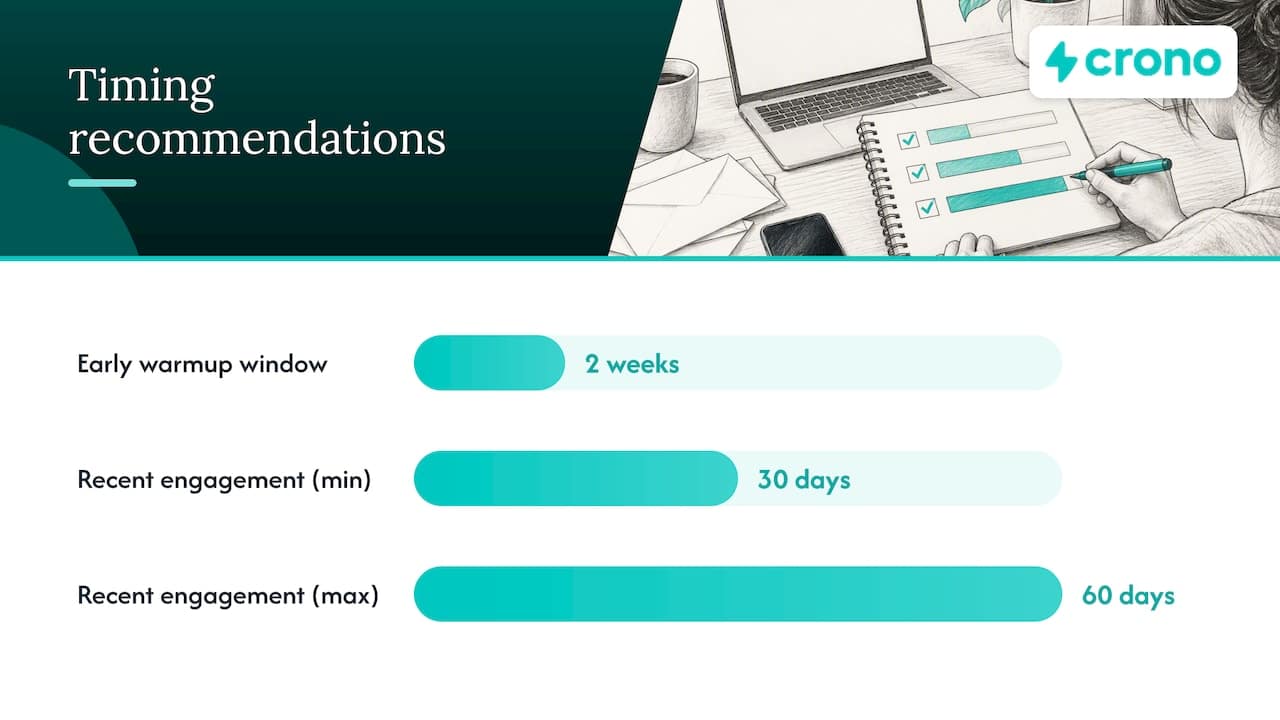
A dormant domain, one that has gone quiet for an extended period, should be treated as functionally new once inactivity crosses roughly 30 to 60 days. Providers don’t retain indefinite trust for a domain that stopped sending, and jumping back in at previous volumes risks the same filtering a brand-new domain would face.
- New domains need the full conservative ramp with the tightest gate thresholds at every step.
- Migrated domains can start higher but still require a verification week before accelerating.
- Dormant domains inactive for 30 to 60 days or more should restart at new-domain volumes.
- Subdomains are worth warming separately from your primary domain when you’re testing a new sending purpose, since this isolates any reputation risk from your main brand domain.
Week-by-week warmup schedule with metric gates
The schedule below is built around gates, not a calendar. You move to the next stage only when your metrics clear the thresholds, and you hold or roll back when they don’t. This engagement-first approach reflects the guidance from SiteGround’s warmup walkthrough: start small with known contacts, then expand only as the numbers support it.
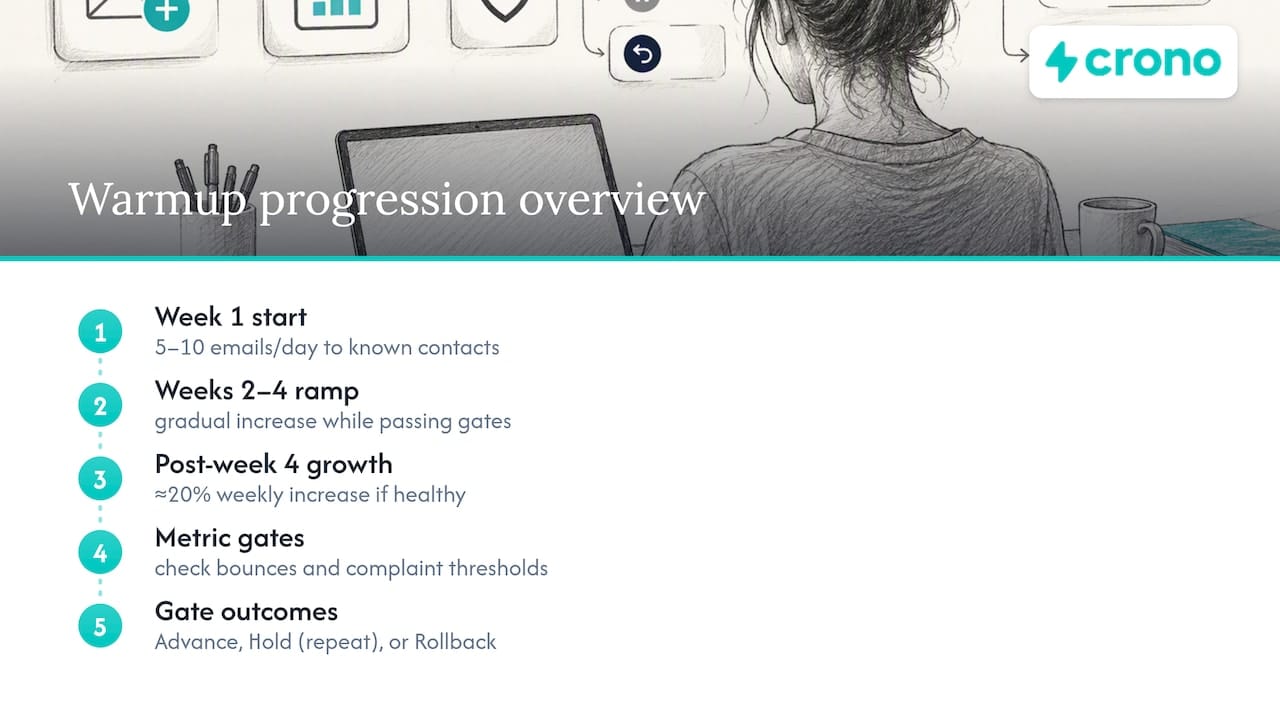
For a new domain, a practical starting point looks like 5 to 10 emails per day in week one, sent exclusively to contacts who know you and are likely to open, click, or reply. If either threshold is crossed, you hold at the current volume for another cycle rather than pushing ahead.
Those figures come from SiteGround’s day-by-day example, which recommends roughly 20% weekly growth once metrics remain healthy through week four. Migrated domains with genuinely clean history can start at a higher tier, but the same bounce and complaint thresholds apply, since a clean history doesn’t exempt you from ongoing scrutiny.
The math behind the weekly increase is straightforward. The percentage you choose should reflect how comfortably you cleared the previous week’s gates, not a fixed preference.
When a gate trips, you have three responses available, and the right one depends on severity. A serious event, like a blacklist listing or a wave of hard bounces, means rolling back further and treating the domain as if it needs to restart its ramp from an earlier stage.
The gates matter more than the calendar dates attached to them. A domain that clears every threshold in three weeks doesn’t need to wait out a fourth just because a generic schedule says so, and a domain still tripping complaint thresholds in week six shouldn’t advance just because time has passed. Metrics, not the calendar, decide the pace.
Writing messages that actually earn replies
The content of your warmup emails matters as much as the schedule, because providers are watching for the same replies and clicks that prove human engagement. Sending generic newsletter content to a cold list during warmup wastes the ramp, since nobody has a reason to respond.
- Start with two-way, personal messages to contacts who already know you, since these are the most likely to generate genuine replies.
- Use a real sender name and a specific subject line rather than a generic company name and a vague promotional subject, since recognizable senders earn higher open and reply rates.
- Sequence your early sends deliberately: an account verification or check-in message first, followed by a short question that invites a reply, then a brief note offering something useful, ending with a direct ask for a response.
- Avoid heavy external links in your first two weeks, since link-dense messages resemble bulk promotional mail and can suppress the reply behavior you’re trying to build.
- Keep the call to action singular and direct, asking for a reply rather than a click, since replies carry more reputational weight during the early ramp.
For sales teams warming a domain ahead of an outbound push, adapting existing follow-up templates that already earn replies gives you a head start, since you’re reusing language that’s proven to prompt a response rather than guessing at what will land.
Pro Tip: Send your first warmup week’s messages only to contacts who opened or clicked something from you in the past 30 to 60 days, since engagement history predicts warmup engagement better than list size ever will.
Monitoring metrics and knowing when to pull back
Warmup lives or dies on the numbers you track daily, not weekly. Bounce rate should stay under 2%, and complaint rates ideally stay under 0.1%, with 0.3% as an absolute ceiling before Gmail’s bulk-sender enforcement treats your domain as a risk regardless of volume.
- Check bounce rate daily during the first four weeks, since hard bounces signal list quality problems that compound quickly.
- Watch complaint rate closely, since even a small percentage of recipients marking mail as spam can outweigh a much larger group of engaged recipients.
- Run inbox placement checks using seed test accounts across major providers to confirm mail lands in the primary inbox rather than spam or promotions.
- Monitor SMTP error codes: a 421 or 451 response is temporary and often resolves on its own, while a 554 response is permanent and demands immediate investigation.
- Check Postmaster or provider dashboards weekly for domain reputation status, since these tools flag issues before they show up in your own bounce data.
A complaint rate above 0.3% is the threshold at which Gmail’s bulk-sender enforcement treats a domain as high risk, which makes daily complaint tracking during warmup worth the extra effort even for smaller sending volumes.
Manual warmup vs automated warmup tools
Manual warmup works well for a single domain and a team with time to track metrics daily. It requires nothing more exotic than a spreadsheet, a segmented list of engaged contacts, and the discipline to check bounce and complaint data every day rather than every week. For most small and mid-sized senders running one domain, manual warmup is sufficient, and a paid tool adds cost without adding much value.
Automated warmup services earn their keep once you’re managing several domains at once or need to repeat the same ramp process on a recurring basis. They handle the repetitive sending and reply-simulation work that would otherwise consume a person’s time, but they do not replace authentication setup or list hygiene, both of which remain your responsibility regardless of what tool you use.
- Choose manual warmup when you’re managing one or two domains and have someone who can check metrics daily.
- Choose automated tools when you’re warming several domains simultaneously or repeating the process often enough that manual tracking becomes a bottleneck.
- Neither approach substitutes for SPF, DKIM, and DMARC, since automation only accelerates the ramp, it doesn’t fix a broken authentication setup.
- Combine automation with CRM-driven targeting by routing your most engaged contacts into warmup sequences first, regardless of which tool handles the sending mechanics.
The decision often comes down to domain count and team bandwidth more than budget. A RevOps team managing a dozen sending domains across multiple sales pods has a very different calculus than a solo marketer running one domain for a single newsletter.
Common warmup mistakes and how to recover from them
Most warmup failures trace back to a handful of repeated errors, and recognizing them early saves weeks of rebuilding trust.
- Rushing volume before engagement metrics justify it is the single most common mistake, since providers respond to velocity, not just totals.
- Ignoring list hygiene by including unengaged or purchased contacts inflates bounce and complaint rates precisely when you can least afford it.
- Skipping authentication setup and assuming warmup alone will fix deliverability issues that actually stem from missing SPF or DKIM records.
- Stopping abruptly after warmup completes, then resuming weeks later at full volume, which effectively restarts the reputational clock.
If metrics degrade mid-ramp, pause sending immediately rather than pushing through and hoping the numbers recover on their own. Prune any recently added contacts who haven’t engaged, and investigate whether specific bounces trace back to invalid addresses or spam-trap hits. For serious degradation, such as a blacklist listing, check your domain’s status through Postmaster tools or open a support case directly with the affected mailbox provider rather than guessing at the cause.
Recovery follows the same gated logic as the original ramp: restart at a reduced volume, confirm metrics hold for several consecutive days, and increase incrementally rather than jumping back to where you left off. A domain that earned trust once can earn it again, but only through the same patient process that built it the first time.
How Crono’s templates and orchestration support a safer ramp
Crono maintains cold email templates and orchestration patterns built around producing replies rather than passive opens, which matters directly during warmup since two-way engagement is what mailbox providers reward. These templates are designed for the same short, personal, reply-focused structure that warmup sequences need in their earliest weeks.
The orchestration pattern behind this works by identifying CRM-flagged engaged contacts, the people who’ve already opened, clicked, or replied recently, and routing them into early sequences ahead of colder prospects. That prioritization mirrors exactly what a metric-gated warmup schedule calls for: engaged recipients first, broader lists only once the gates clear.
For a sales team warming a domain ahead of an outbound campaign, the practical combination looks like this: pull your most engaged CRM contacts, sequence them through reply-oriented templates, and layer that sequence on top of the volume schedule and gate thresholds already in place. The templates supply the content, the orchestration supplies the targeting logic, and the warmup schedule still governs the pace.
What teams consistently underestimate about warmup
Most teams treat warmup as a fixed countdown: four weeks, done, move on. That assumption causes more failed ramps than any technical misstep, because providers don’t care how many days have passed. They care whether your engagement metrics justify the volume you’re sending, and a domain that hits strong reply rates in week three has earned the right to accelerate, while one still struggling with complaints in week six hasn’t earned anything by simply waiting it out.
The real trade-off is speed against safety, and the honest answer is that acceleration is only acceptable when your gates are clearing comfortably, not just barely. Before every weekly volume increase, run through a short checklist: confirm bounce and complaint rates from the past 48 hours, verify your authentication records haven’t broken anything upstream, and run a quick seed test to confirm inbox placement. Skipping that check to hit an arbitrary weekly milestone is how a clean ramp turns into a rollback.
Where Crono fits once your domain is ready to scale
Warmup gets your domain trusted. What you do with that trust, at scale, across a full sales team, is a separate problem, and it’s the one Crono is built to solve. Rather than replacing your CRM or your existing sending setup, Crono connects them into a single execution layer where buying signals, contact data, and sequencing logic work together instead of living in five different tabs.
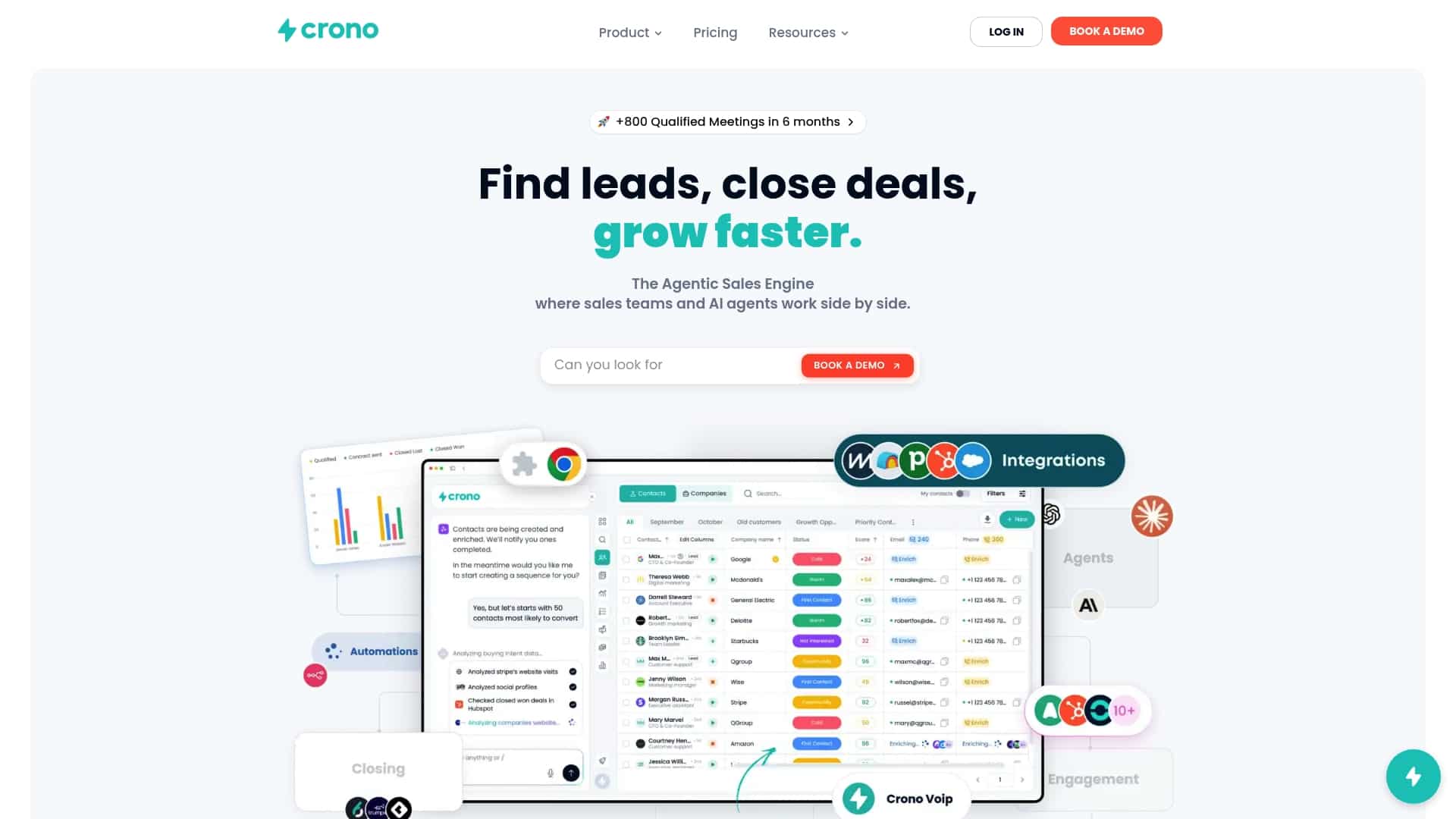
For sales and RevOps teams running outbound campaigns on a freshly warmed domain, that means your CRM’s most engaged contacts get prioritized automatically into the same kind of reply-focused sequences that built your domain’s reputation in the first place, without someone manually pulling lists every morning.
- Teams managing multiple sending domains benefit most from orchestration that applies consistent targeting logic across all of them.
- Sales leaders who need pipeline visibility get a single view of engagement instead of piecing it together from separate tools.
- RevOps managers scaling outbound can layer automated sequencing on top of a domain that’s already earned trust.
If you’re ready to put a warmed domain to work, explore Crono’s pricing to see which plan fits your team’s outbound volume.
Where these warmup guidelines come from
This guide draws on published provider policy and technical standards rather than generic advice. Microsoft’s warmup process documentation supplies the reputation mechanics and typical timelines, while Gmail’s sender requirements define the authentication and bulk-sender rules that shape every schedule here. RFC 8058 governs the List-Unsubscribe standard, SiteGround’s day-by-day schedule supplies the practical weekly volumes, and Yahoo’s sender best practices inform the stream-segregation guidance. For list-building tactics that feed engaged contacts into warmup, see this guide to growing an email list.
Sources
- Warmup process for email marketing — Microsoft Learn
- Email sender requirements — Gmail Help
- Email Warmup: A Day-by-Day Schedule, No Paid Tool Needed — SiteGround Academy
- Sender best practices — Yahoo Sender Hub
FAQ
How do I warm up a domain for email sending?
Authenticate your domain with SPF, DKIM, and DMARC first, then send small daily volumes to your most engaged contacts and increase gradually based on bounce and complaint metrics rather than a fixed calendar. Most new domains take 4 to 8 weeks to reach full sending readiness, though migrated domains with clean history can often move faster.
What is the most hacked email provider?
There’s no publicly tracked, authoritative ranking of which email provider suffers the most account compromises, since breach data varies by year, attack type, and how each provider reports incidents. Rather than focusing on a specific provider, the more useful practice is authenticating your own domain properly and monitoring for suspicious sending activity regardless of which service you use.
How do I know if an email domain is legitimate?
Check whether the domain publishes valid SPF, DKIM, and DMARC records, since legitimate senders authenticate their mail while spoofed or malicious domains often skip this step. You can also look up the domain’s registration age and reputation status through Postmaster tools or a DNS lookup service, since a domain with no history or a recent registration date warrants more scrutiny.
Is using a temporary email address illegal?
Using a temporary or disposable email address is not illegal in itself, though it may violate the terms of service of specific platforms that require a permanent, verifiable address. The legality issue only arises if the temporary address is used to commit fraud or evade a legal obligation, not from the act of using a disposable inbox on its own.
How long does domain warmup typically take?
Warmup for a new domain typically takes 4 to 8 weeks, though the exact timeline depends on your domain’s sending history and how consistently your metrics clear each gate. A migrated domain with a clean sending history may progress faster, while a dormant domain inactive for 30 to 60 days or more should expect a timeline similar to a brand-new domain.
