

B2B email deliverability is the share of your sales emails that land in the recipient’s inbox after the receiving server accepts them. It is not the same as delivery. You protect it with four habits: authenticate your domain, warm and pace your mailboxes, send only to verified contacts, and watch bounce and spam complaint rates. This guide walks through each one for US sales teams, including the current Gmail, Yahoo and Outlook rules.
TL;DR
- Delivery means the server accepted your message. Deliverability means it reached the inbox instead of spam or a filtered folder.
- SPF, DKIM and DMARC are now baseline requirements for high-volume senders at Gmail, Yahoo and Outlook.
- Keep spam complaints under 0.3% (Gmail’s hard line) and bounces low by verifying every contact before you send.
- Use a dedicated sending domain, warm mailboxes over several weeks, and add mailboxes before you add volume per mailbox.
- B2B cold email is legal under CAN-SPAM, but it must still carry an honest sender, a postal address and a working opt-out.
Table of Contents
- Deliverability, delivery and inbox placement are three different numbers
- What decides whether a B2B email reaches the inbox
- Authentication: SPF, DKIM and DMARC for US senders
- Domains, mailboxes and warm-up
- Clean lists are the cheapest deliverability fix
- The metrics worth watching
- Is B2B cold email legal in the US?
- Diagnosing and recovering from a deliverability drop
- Put these rules into your workflow with Crono
- FAQ
- Sources
Deliverability, delivery and inbox placement are three different numbers
Most dashboards report a delivery rate, and that number flatters you. Delivery rate measures whether the receiving server accepted the message, which can stay high even when many messages are filtered into spam. Deliverability is what happens next: where the email lands once the server has accepted it, such as the inbox, spam or a Promotions tab.
It helps to split the outcome into three layers:
| Layer | Question it answers | What a problem looks like |
|---|---|---|
| Delivery | Did the server accept the message? | Bounces, rejections, deferrals |
| Inbox placement | Primary inbox or spam folder? | Replies fall while delivery stays near 100% |
| Tab placement | Which tab inside the inbox? | Messages arrive but sit in Promotions |
Salesforce draws the same distinction between delivery, inbox placement and tab placement. The practical lesson: respond differently to each. A message that reaches the inbox and gets ignored is a relevance problem. A message that lands in spam is a reputation or authentication problem. Treating the first as the second wastes weeks.
What decides whether a B2B email reaches the inbox
Mailbox providers weigh a handful of signals. Authentication, sender reputation and engagement are the three headline drivers, and list quality, sending behavior, content, spam complaints and bounce rates sit behind them. Spam complaints and bounce rates carry the most weight as negative signals.
Think of reputation as a credit score. It improves with consistent good behavior and drops quickly with bounces and complaints. That asymmetry shapes everything below: you build slowly, and one careless send from a bad list can undo weeks of work.
Two behaviors deserve special attention in outbound:
- Dormant contacts. Repeatedly sending to people who never engage lowers sender reputation and pushes more of your mail into spam.
- Volume spikes. Jumping from a handful of sends to hundreds in a day looks like a compromised account or a spam run.
Authentication: SPF, DKIM and DMARC for US senders
Authentication proves that your domain really sent the message. Since early 2024, the largest mailbox providers have turned it from best practice into a requirement.
| Provider | What it requires | Applies to |
|---|---|---|
| Gmail | SPF or DKIM for everyone; SPF, DKIM and DMARC (p=none minimum) above 5,000 messages per day to Gmail; spam rate under 0.3%; one-click unsubscribe for marketing mail | Requirements from February 1, 2024 |
| Yahoo | SPF or DKIM for all senders; bulk senders need both plus DMARC (p=none minimum), List-Unsubscribe, and unsubscribes honored within 2 days | Requirements from February 2024 |
| Outlook.com | Full SPF, DKIM and DMARC compliance above 5,000 emails per day; non-compliant mail goes to junk and may be rejected with error 550 5.7.515 | Effective May 5, 2025 |
A few details from Google’s guidance matter for sales teams. The From domain must align with the SPF or DKIM domain. Sending to personal Gmail accounts requires a DKIM key of at least 1024 bits, and Google recommends 2048 bits. Google also recommends setting up DMARC reports so you can see who is sending as your domain. All of this is in the Gmail sender guidelines.
Do not read the 5,000-per-day thresholds as permission to skip setup below them. All the major providers require SPF and DKIM at any volume. A team sending 300 emails a day from several mailboxes still needs all three records, because DMARC alignment is also how you protect your brand from spoofing.
If you want a staged rollout, our 60 to 90 day path to p=reject covers moving from monitoring to enforcement without breaking legitimate mail.
Domains, mailboxes and warm-up
Outbound prospecting carries more reputation risk than newsletters to opted-in subscribers, so the standard advice is to isolate it. Use a dedicated sending domain or subdomain, warm new mailboxes gradually over several weeks, send only to verified contacts, keep daily volume per mailbox modest, and remove hard bounces immediately. A separate domain keeps a problem in outbound from touching the domain your invoices and customer replies depend on.
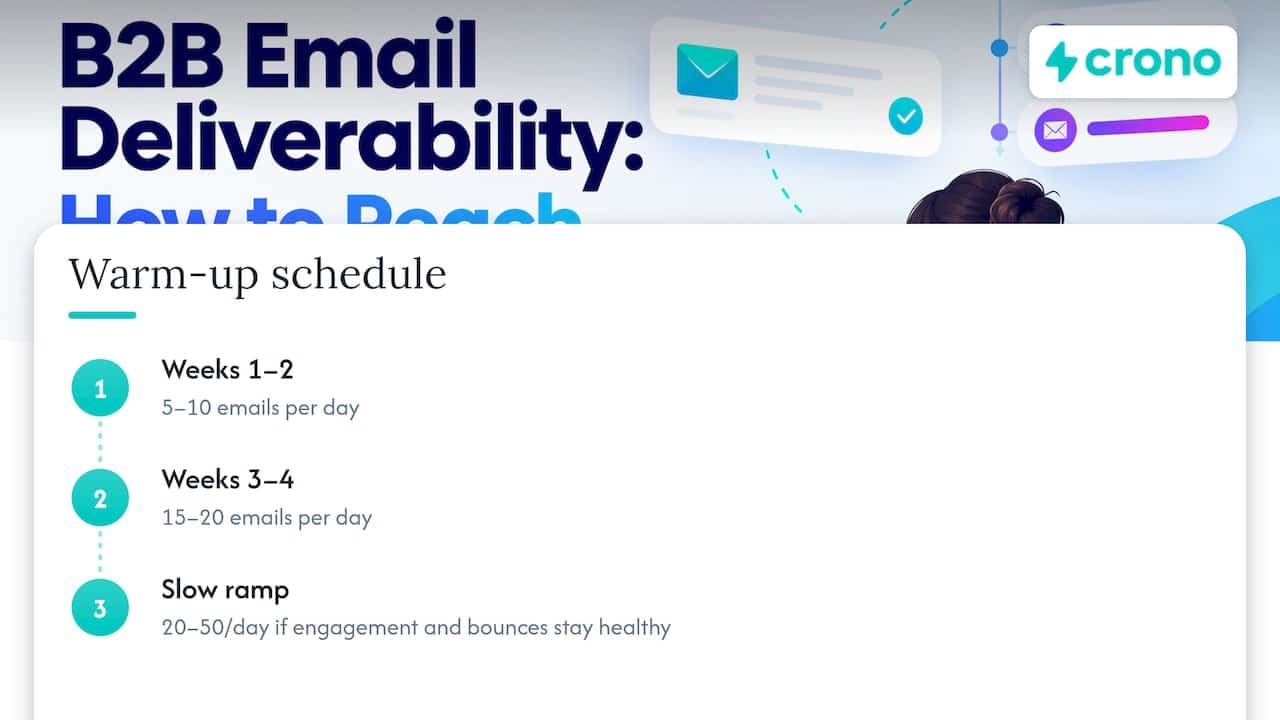
A conservative warm-up schedule
One published schedule gives a sensible starting point. Per new inbox, send 5 to 10 emails a day in weeks 1 and 2, then 15 to 20 in weeks 3 and 4, and ramp slowly toward 20 to 50 only if engagement and bounces stay healthy. Treat these as cautious guidelines rather than provider-mandated limits. Your own bounce and complaint data is the real governor.
How many domains and mailboxes you need
Scale by adding mailboxes, not by pushing each one harder. A simple planning formula: total daily volume divided by 40 sends per mailbox, divided by 3 mailboxes per domain. For 500 cold emails a day, that works out to roughly four domains with three mailboxes each. The 40-send ceiling is a conservative planning figure, not a rule.
A few operating rules keep the setup stable:
- Give each rep a named mailbox on the sending domain, so replies and complaints trace back to one sender.
- Hold volume flat for a week after each change, whether new copy, a new list or a new mailbox.
- Keep first messages plain: short, specific to the recipient, few links, no attachments.
- Add an easy opt-out in every message, and honor it fast.
Our cold email deliverability playbook for RevOps turns this into a six-step operating routine.
Clean lists are the cheapest deliverability fix
B2B data decays fast. Lists lose roughly 22 to 28% of their addresses per year as people change roles and companies, and a bounce rate above about 2% is a major negative signal for mailbox providers. A list that was fine in spring can be a reputation risk by autumn.
Build a routine around that decay:
- Verify before every campaign, not once at import. Treat any address you have not verified recently as suspect.
- Suppress hard bounces immediately and never retry them.
- Retire non-responders. After a defined number of touches with no engagement, stop sending, since dormant contacts drag reputation down.
- Prefer fewer, better-matched prospects. Targeting people who plausibly care about your offer produces replies, and replies are the engagement signal providers reward.
The same logic applies to any audience you build: keeping an email list healthy and engaged is what lets inbox placement hold up over time.
The metrics worth watching
Open rates are a weak guide. They can be distorted and should not be used alone to judge inbox placement or interest. A better dashboard for outbound tracks accepted versus rejected messages, hard bounces, temporary deferrals, spam complaints, unsubscribes and negative replies, and positive replies and meetings.
For thresholds, use these reference points:
| Metric | Reference point | Source |
|---|---|---|
| Bounce rate | Healthy below 1%; above 2% needs attention | Email deliverability monitoring guidance |
| Unsubscribe rate | Aim below 0.3% | Same guidance |
| Spam complaint rate | Below 0.01% per provider; above 0.05% needs attention | Same guidance |
| Spam rate at Gmail | Keep under 0.3% | Gmail sender guidelines |
The monitoring guidance also notes that Gmail advises keeping spam rates below 0.1% and avoiding 0.3% or higher. Those benchmarks come from email marketing contexts, so apply them as early-warning levels for outbound rather than guarantees. Use Google Postmaster Tools and your DMARC reports alongside your sending platform’s numbers, because only the providers see their own spam-rate data.
Is B2B cold email legal in the US?
Yes, with conditions. The FTC states that CAN-SPAM makes no exception for business-to-business email, so a prospecting message counts as a commercial message and must comply. The law does not require prior consent, but it does require:
- Accurate From, To, Reply-To and routing information that identifies the sender
- Subject lines that reflect the content
- A clear disclosure that the message is an ad, where it is one
- A valid physical postal address
- A clear opt-out that works, honored promptly and without charging a fee
The FTC guide also covers responsibility when another company sends on your behalf, and the current penalty amounts. Read the full CAN-SPAM compliance guide and confirm details with your counsel. Note that Gmail and Yahoo’s one-click unsubscribe rules are separate from, and in some respects stricter than, the law.
Diagnosing and recovering from a deliverability drop
When replies fall, resist the urge to rewrite copy first. Work through the layers in order.
- Confirm delivery. Check for rising bounces, rejections or deferrals. A spike points to list quality or a blocked sending IP or domain.
- Check authentication. Verify SPF, DKIM and DMARC still pass and still align on every sending mailbox. A new tool or a DNS change often breaks it silently.
- Test placement. Send from the affected mailbox to your own test addresses at Gmail, Outlook and Yahoo and see where the messages land. Compare it with an unaffected mailbox.
- Read the complaint and bounce data. Identify which list, campaign or rep drove the change.
- Pause and isolate. Stop the affected mailbox rather than pushing volume through it. Protect the rest of the domain.
- Restart small. Return to warm-up volumes, send only to freshly verified contacts, and use plain, relevant copy. Increase only as bounces and complaints stay low.
Recovery takes time because reputation is built on sustained behavior. Moving fast with higher volume to make up lost pipeline usually extends the problem.
Our view: execution discipline is deliverability
We see deliverability failures as execution failures, not technical mysteries. Teams rarely get into trouble because they missed one DNS record. They get into trouble because list building, enrichment, sequencing and mailbox management live in different tools that nobody coordinates.
That is why we built Crono as a sales execution layer on top of your CRM and sales tools. When buying signals decide who gets contacted, enrichment feeds the list, and workflows control cadence across LinkedIn, email and calls, volume goes to the prospects most likely to engage. Fewer wasted sends is the best deliverability policy we know.
Our advice to RevOps and sales leaders: set the rules once (verified contacts only, capped volume per mailbox, automatic suppression) and let automation enforce them for every rep, every day.
Alex
Put these rules into your workflow with Crono
If you are running outbound across several reps and tools, the hard part is enforcing these habits consistently. Crono connects your CRM and sales tools in one execution platform, combining buying signals, data enrichment, workflow automation, AI agents and multichannel outreach, so your team can prioritize the right prospects and automate repetitive execution.
Plans are priced per seat: Pro starts at €79 per month per seat and Ultra at €119 per month per seat, with Enterprise available on request. If you want agent-driven prospecting with credits, the Agentic Sales Engine starts at €99 per month for 10,000 credits. For wider channel tactics, see our guide to B2B cold outreach strategies.
FAQ
What is a good deliverability rate for B2B email?
There is no single official figure. Instead of chasing one number, keep bounces below 1%, complaints well under Gmail’s 0.3% limit, and track positive replies. One monitoring guide treats bounces above 2% as a warning sign.
Do I need DMARC if I send fewer than 5,000 emails a day?
The formal DMARC requirement at Gmail and Outlook starts above 5,000 messages per day, but SPF and DKIM are required at any volume. We recommend publishing DMARC anyway, starting at p=none with reporting, so you can see who sends mail as your domain.
How long should I warm up a new mailbox?
Plan on several weeks. A commonly cited schedule starts at 5 to 10 emails a day per inbox for the first two weeks, then rises gradually while bounces and engagement stay healthy.
Are B2B cold emails legal?
Yes in the United States. CAN-SPAM applies to business email and does not require prior consent, but you must identify yourself honestly, include a postal address and honor opt-outs.
Sources
- Email Delivery Rate vs Deliverability
- Email Delivery vs. Email Deliverability
- Reaching the Inbox Is the Win
- How to Improve Cold Email Inbox Placement
- B2B Email Deliverability: How to Improve Inbox Placement
- Email deliverability, OneSignal documentation
- Troubleshooting why emails go to spam
- Email sender guidelines, Gmail Help
- Sender Best Practices, Yahoo Sender Hub
- Outlook.com Policies
- Inbox provider authentication requirements
- How to Set Up Email Deliverability for Cold Outreach in the US
- Email Domain Management: Keeping Your Outreach Legit
- Cold Email Deliverability: 2026 Setup and Recovery Playbook
- Getting started with email deliverability monitoring
- Cold Email Deliverability United States: Practical Guide
- CAN-SPAM Act: A Compliance Guide for Business
- How to grow an email list
